







Question: Sunrise: The goal of this Python programming assignment is to finish the code from the scroller assignment to create an animated movie that shows the
Sunrise:
The goal of this Python programming assignment is to finish the code from the scroller assignment to create an animated movie that shows the sun rising up from behind the horizon as night turns to dawn. There are several required parts, but you are encouraged to be creative. Have some fun with this one!
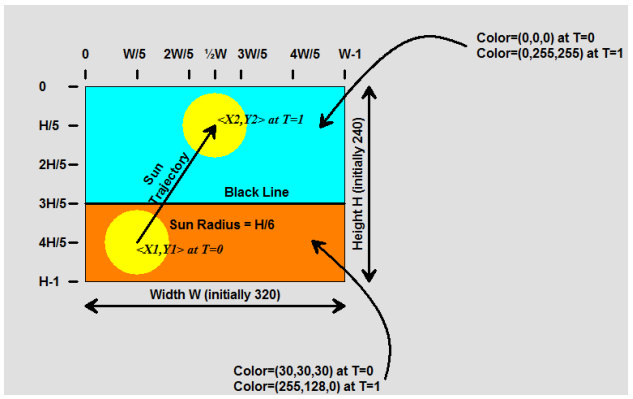
In the diagram shown above each frame is 320240 pixels, but in the Scroller assignment the size was set to 640480. Leave the canvas size at 640480, but I want to be able to change it and have the animation play the same way and create an identical movie at any arbitrary size. Do NOT hard-code numeric constants into your program; pay particular attention to the proportions listed in the diagram (2H/5, W, etc.). First Steps Make a copy of your Lab4.py program as Lab5.py in the same folder. Do not modify your old Lab4.py program. (You should keep it for backup purposes.) Change the name of the movie in the writeQuicktime function from Scroller.mov to Last_First_Sunrise.mov with your last name and first name (I would use Abdoul_Bamba_Sunrise.mov, for example). Main Task In the Run function left over from Scroller there is an empty function stub called Sunrise, which is called before the Scroller function. The parameters to Sunrise are the current canvas and the number of frames to generate for the movie, currently 100 frames. Depending on the complexity of your animation you are allowed to use more than 100 frames, but the number of frames must be passed in as a parameter and not hard-coded in the Sunrise function. (In other words, you are allowed to change the function call to Sunrise(Canvas,200) or Sunrise(Canvas,300), etc., but those numbers must not appear explicitly inside the function itself.) For each frame call the SaveFrame function. Finish the code in Sunrise to do the following REQUIRED things: (A) Cause the sun to come up from behind the ground and horizon line up into the sky. The horizon line is a black line at the common edge of the sky and the ground. (B) As the sun comes up, the sky must change from black to cyan and the ground from dark gray to orange (exact numbers in the diagram). (C) Create AT LEAST TWO additional objects that change color and position as the sun comes up. These can be a car that drives along the ground (getting brighter as the sun comes up), birds that move across the sky, fish swimming, clouds, etc. The objects must change in a logical way (i.e., the sun can't be in front of birds or clouds, clouds can't be bright white before the sun comes up, etc.). (D) You will be given EXTRA CREDIT for three or more objects, including multiple items following different paths, for example (for example, I suggest a function that paints a car, its wheels and windows, at a given location and color, or the FishLeft and FishRight functions from the Fish Tank assignment, a 3D house, or something of your own design). You will also acquire EXTRA CREDIT for use of parabolic, quadratic spline, or Bzier blending functions for trajectories and/or colors, polygon fill, and/or use of 3D projection to generate 3D objects in your scene. The code to do 3D orthographic projections, polygon fill, linear and parabolic blending, etc., is available on the class site or in the Companion you can use any code that you need from those examples. Use the Run function to start up the program. It should create a bunch of frames as individual .jpg files, some from the Sunrise function and some from the Scroller function (make certain that the frames generated here do not conflict with those generated from the previous assignment). Once the frames have been created, use the MakeMovie function to create a movie from your frames and save it out to the disk as either an Apple Quicktime movie (recommended) or as a Windows AVI movie
HI5 2HI5 3HI5 4HI5 H-1 WI5 2WJ5 W 3WI5 4WI5 W-1
Step by Step Solution
There are 3 Steps involved in it

Get step-by-step solutions from verified subject matter experts
 Study Help