







Question: Swift/XCode I need to implement the following functions: background(gray: 0.5) drawBorder(width: 100) moveBall() drawBall() in order for a ball to bounce inside a box. (The
Swift/XCode
I need to implement the following functions:
background(gray: 0.5) drawBorder(width: 100) moveBall() drawBall()
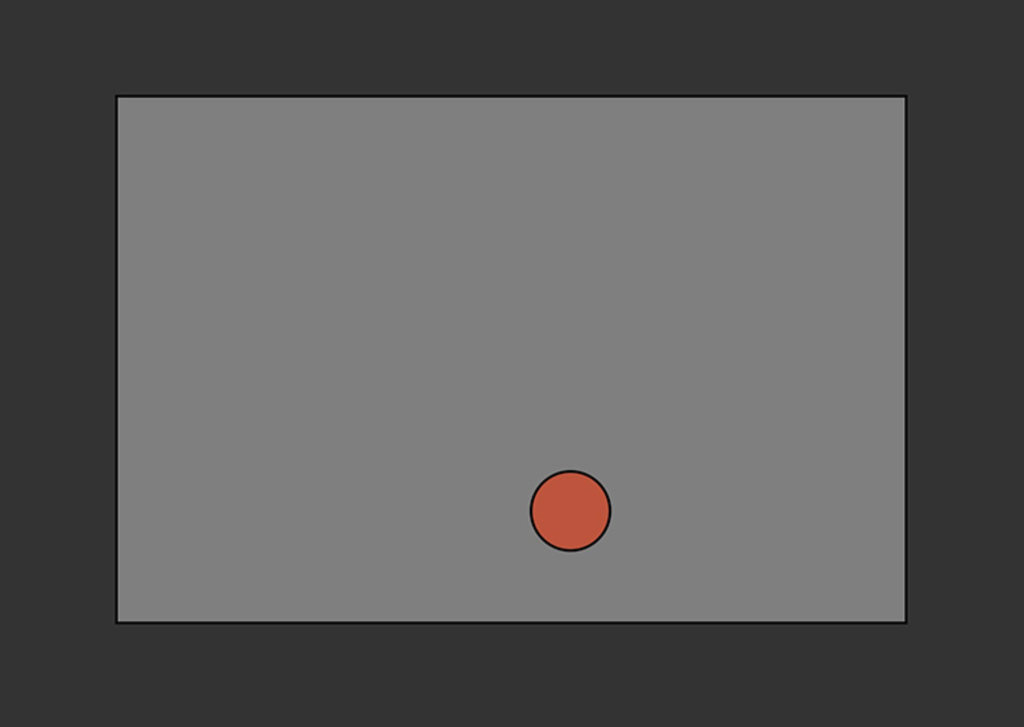
in order for a ball to bounce inside a box. (The output solution is at the bottom in a picture)
drawBall. This function is for the code that renders the ball. In the original Bounce1 project, this is just one line of code (ellipse...). You should add some additional code here, to set the stroke and fill color for the ball. This function will not have any parameters. moveBall. This function will contain all the code that causes the ball movement. (Cut and paste this code from the update function.) This function will not have any parameters. You will need to change this code, so that the ball will bounce inside the new border, instead of bouncing at the edge of the view. drawBorder. This function is for a new border 100 pixels wide, that you will add to the program. The function will have one parameter, with the name width. The function will have the drawing instructions to create the border. See the image below of the ball bouncing inside the 100 pixel wide border.
///////THIS IS THE CODE///////
import Cocoa
import Tin
class ViewController: TController {
//
// viewWillAppear will be called once, just before the view is placed on screen.
//
override func viewWillAppear() {
view.window?.title = "Bounce 1"
makeView(width: 800.0, height: 600.0)
let scene = Scene()
present(scene: scene)
scene.view?.showStats = false
}
}
class Scene: TScene {
var bX = 400.0
var bY = 300.0
var radius = 30.0
var velocityX = 4.5
var velocityY = -3.0
//
// The update function is called to draw the view automatically.
//
override func update() {
background(gray: 1.0)
// Move the position using velocity
bX = bX + velocityX
bY = bY + velocityY
// Check to see if the ball hit any edge
if bX + radius > tin.width {
// Hit the right edge
bX = tin.width - radius
velocityX = velocityX * -1
}
else if bX - radius
// Hit the left edge
bX = radius
velocityX = velocityX * -1
}
if bY + radius > tin.height {
// Hit the top edge
bY = tin.height - radius
velocityY = velocityY * -1
}
else if bY - radius
// Hit the bottom edge
bY = radius
velocityY = velocityY * -1
}
// Draw the ball
ellipse(centerX: bX, centerY: bY, width: radius * 2, height: radius * 2)
}
}
Black background with a gray rectangle inside where the ball will be bouncing inside>>> (Ball bouncing inside the gray box should be the solution) This is done in SWIFT coding.
Step by Step Solution
There are 3 Steps involved in it

Get step-by-step solutions from verified subject matter experts
 Study Help