Question: Systems Word Problems with RREF and Python We're going to prepare a meal using only five different foods. However, the meal needs to provide exact
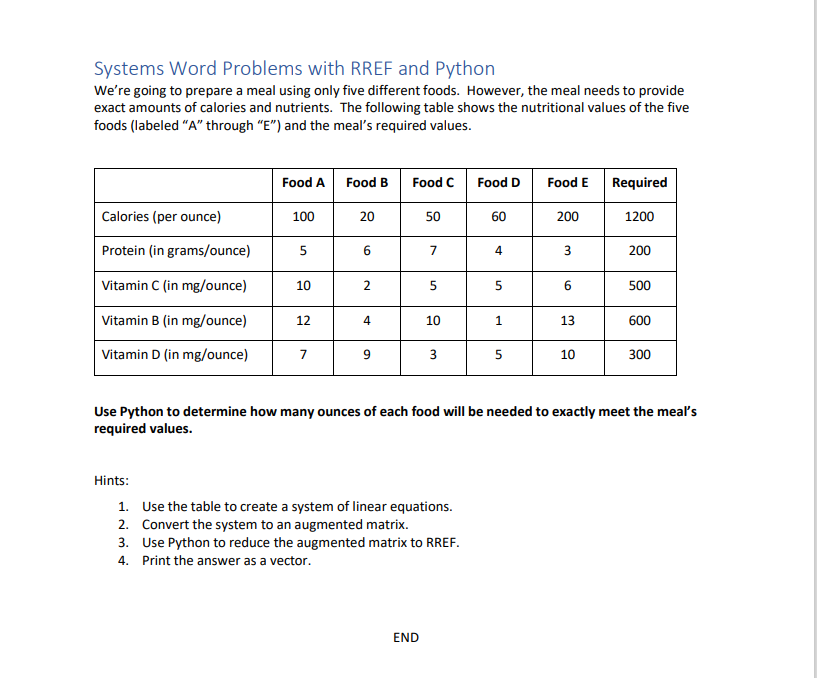
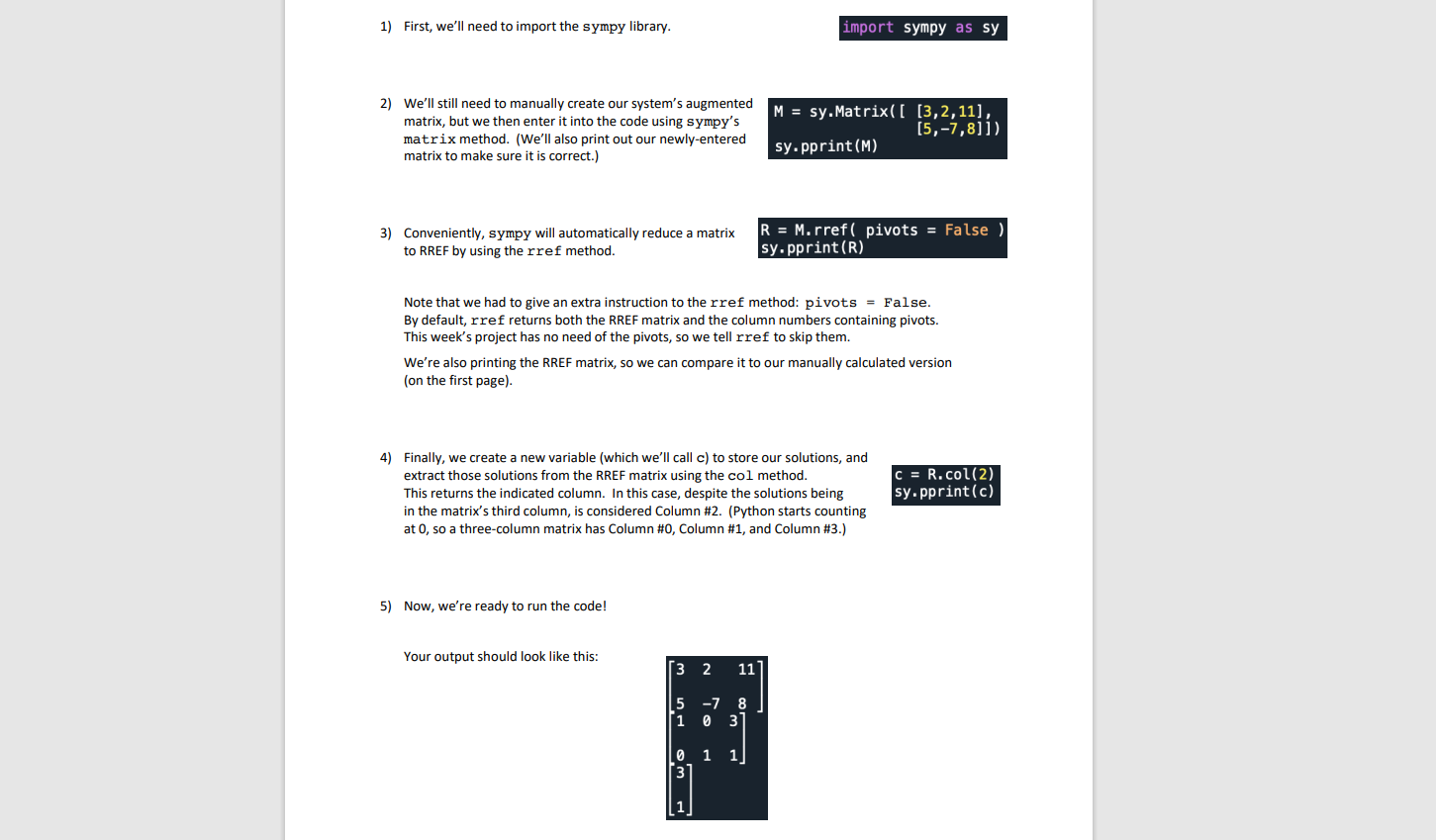
Systems Word Problems with RREF and Python We're going to prepare a meal using only five different foods. However, the meal needs to provide exact amounts of calories and nutrients. The following table shows the nutritional values of the five foods (labeled "A" through "E") and the meal's required values. Food A Food B Food C Food D Food E Required Calories (per ounce) 100 20 50 60 200 1200 Protein (in grams/ounce) 5 6 7 4 3 200 Vitamin C (in mg/ounce) 10 2 5 5 500 Vitamin B (in mg/ounce) 12 4 10 1 13 600 Vitamin D (in mg/ounce) 7 3 10 300 Use Python to determine how many ounces of each food will be needed to exactly meet the meal's required values. Hints: 1. Use the table to create a system of linear equations. 2. Convert the system to an augmented matrix. 3. Use Python to reduce the augmented matrix to RREF. 4. Print the answer as a vector. END1) First, we'll need to import the sympy library. import sympy as sy 2) We'll still need to manually create our system's augmented matrix, but we then enter it into the code using sympy's M = sy. Matrix( [ [3, 2, 11] [5, -7,8]]) matrix method. (We'll also print out our newly-entered sy . pprint (M) matrix to make sure it is correct.) 3) Conveniently, sympy will automatically reduce a matrix R = M. rref( pivots = False to RREF by using the rref method. sy . pprint (R) Note that we had to give an extra instruction to the rref method: pivots = False. By default, rref returns both the RREF matrix and the column numbers containing pivots. This week's project has no need of the pivots, so we tell rref to skip them. We're also printing the RREF matrix, so we can compare it to our manually calculated version (on the first page). 4) Finally, we create a new variable (which we'll call c) to store our solutions, and extract those solutions from the RREF matrix using the col method. C = R. col(2) This returns the indicated column. In this case, despite the solutions being sy . pprint (c) in the matrix's third column, is considered Column #2. (Python starts counting at 0, so a three-column matrix has Column #0, Column #1, and Column #3.) 5) Now, we're ready to run the code! Your output should look like this: 3 2 11 5 8 1 3 1 3
Step by Step Solution
There are 3 Steps involved in it
1 Expert Approved Answer
Step: 1 Unlock
Question Has Been Solved by an Expert!
Get step-by-step solutions from verified subject matter experts
Step: 2 Unlock
Step: 3 Unlock
Students Have Also Explored These Related Mathematics Questions!









 Study Help