







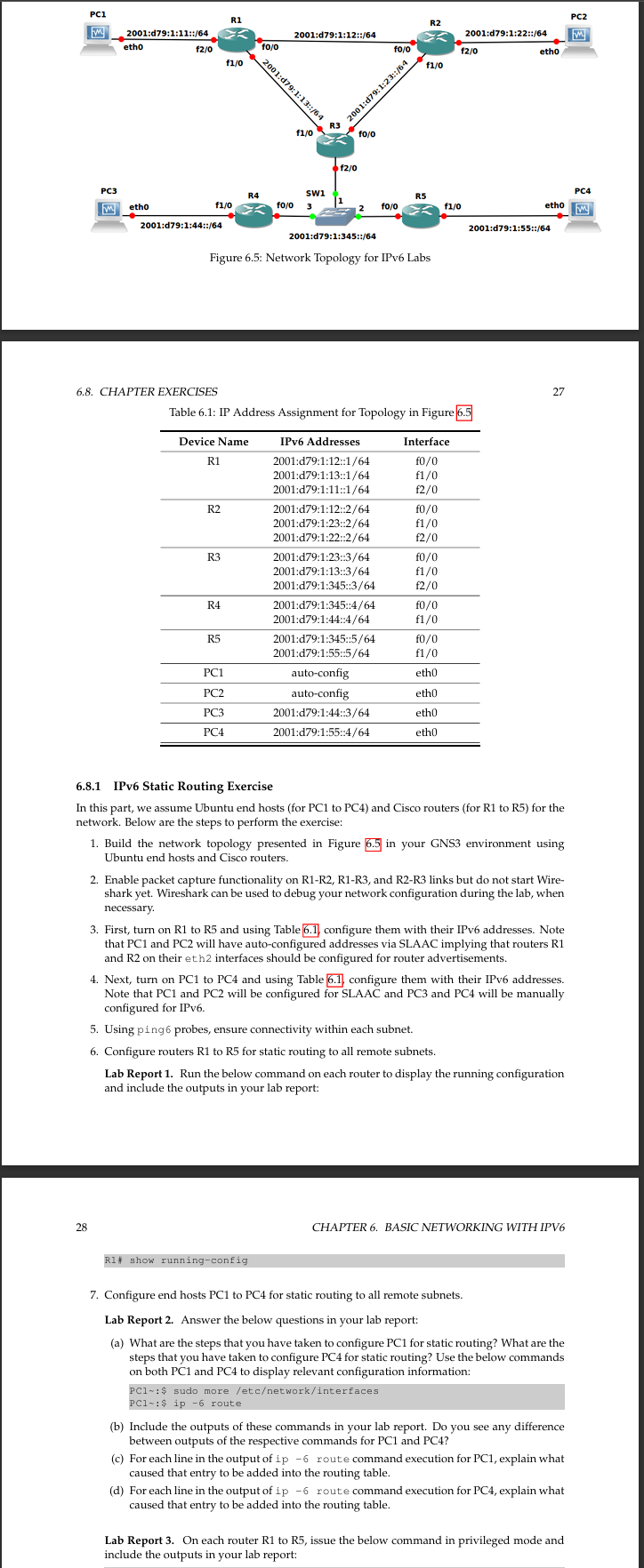
Question: Table 6 . 1 : IP Address Assignment for Topology in Figure 6 . 5 6 . 8 . 1 IPv 6 Static Routing Exercise
Table : IP Address Assignment for Topology in Figure
IPv Static Routing Exercise
In this part, we assume Ubuntu end hosts for PC to PC and Cisco routers for R to R for the
network. Below are the steps to perform the exercise:
Build the network topology presented in Figure in your GNS environment using
Ubuntu end hosts and Cisco routers.
Enable packet capture functionality on RR RR and RR links but do not start Wire
shark yet. Wireshark can be used to debug your network configuration during the lab, when
necessary.
First, turn on R to R and using Table configure them with their IPv addresses. Note
that PC and PC will have autoconfigured addresses via SLAAC implying that routers R
and R on their eth interfaces should be configured for router advertisements.
Next, turn on PC to PC and using Table configure them with their IPv addresses.
Note that PC and PC will be configured for SLAAC and PC and PC will be manually
configured for IPv
Using ping probes, ensure connectivity within each subnet.
Configure routers to for static routing to all remote subnets.
Lab Report Run the below command on each router to display the running configuration
and include the outputs in your lab report:
Configure end hosts PC to PC for static routing to all remote subnets.
Lab Report Answer the below questions in your lab report:
a What are the steps that you have taken to configure PC for static routing? What are the
steps that you have taken to configure PC for static routing? Use the below commands
on both PC and PC to display relevant configuration information:
PCI : $ sudo moreetcnetworkinterfaces
PCl : $ ip route
b Include the outputs of these commands in your lab report. Do you see any difference
between outputs of the respective commands for PC and PC
c For each line in the output of ip route command execution for PC explain what
caused that entry to be added into the routing table.
d For each line in the output of route command execution for PC explain what
caused that entry to be added into the routing table.
Lab Report On each router R to R issue the below command in privileged mode and
include the outputs in your lab report
I need help with step onwards to labreport I do not know how to configure ipv on ubuntu Linux for static routing. Preferably I would like to know how to do it via UBuntu GUI. Will give thumbs up
Step by Step Solution
There are 3 Steps involved in it
1 Expert Approved Answer
Step: 1 Unlock

Question Has Been Solved by an Expert!
Get step-by-step solutions from verified subject matter experts
Step: 2 Unlock
Step: 3 Unlock
 Study Help