







Question: ********Table Data:********** *******Question:********* ********** Cursor I made************ begin for implicit_cursor in (select * from oilprice) loop dbms_output.put_line( 'Date= ' || implicit_cursor.dateline || ' ' ||
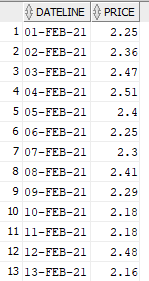
********Table Data:**********
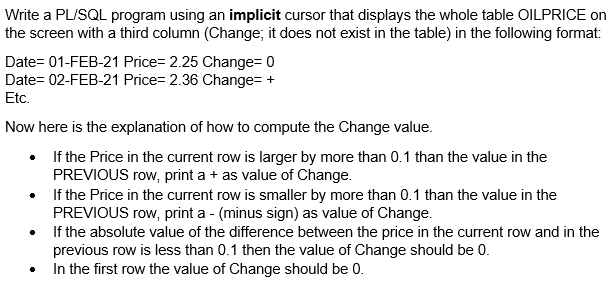
*******Question:*********
********** Cursor I made************
begin for implicit_cursor in (select * from oilprice) loop dbms_output.put_line( 'Date= ' || implicit_cursor.dateline || ' ' || 'Price= '|| implicit_cursor.price ); end loop; end;
****** You can add the third column in the above code or you can make your own.
Thank you!!!!!!
IMPORTANT: If you happen to be an Oracle Wizard who knows the Lag and Lead functions, do NOT use them. You need to write your own programs and store your own data.
DATELINE PRICE 1 01-FEB-21 2.25 2 02-FEB-21 2.36 3 03-FEB-21 2.47 2.51 4 04-FEB-21 5 05-FEB-21 2.4 6 06-FEB-21 2.25 7 07-FEB-21 2.3 8 08-FEB-21 2.41 9 09-FEB-21 2.29 2.18 10 10-FEB-21 11 11-FEB-21 12 12-FEB-21 2.18 2.48 13 13-FEB-21 2.16 Write a PL/SQL program using an implicit cursor that displays the whole table OILPRICE on the screen with a third column (Change; it does not exist in the table) in the following format: Date= 01-FEB-21 Price= 2.25 Change=0 Date= 02-FEB-21 Price=2.36 Changes + Etc. Now here is the explanation of how to compute the Change value. If the Price in the current row is larger by more than 0.1 than the value in the PREVIOUS row, print a + as value of Change. If the Price in the current row is smaller by more than 0.1 than the value in the PREVIOUS row, print a - (minus sign) as value of Change. If the absolute value of the difference between the price in the current row and in the previous row is less than 0.1 then the value of Change should be 0. In the first row the value of Change should be 0
Step by Step Solution
There are 3 Steps involved in it

Get step-by-step solutions from verified subject matter experts
 Study Help