







Question: Table of Contents Database User] Activity 5-5: Managing Database Permissions Enter Time Required: 60 minutes Objective: Manage database permissions using a variety of security objects
![Table of Contents Database User] Activity 5-5: Managing Database Permissions Enter](https://dsd5zvtm8ll6.cloudfront.net/si.experts.images/questions/2024/09/66f3ab2b7d34b_09866f3ab2ad9cb0.jpg)
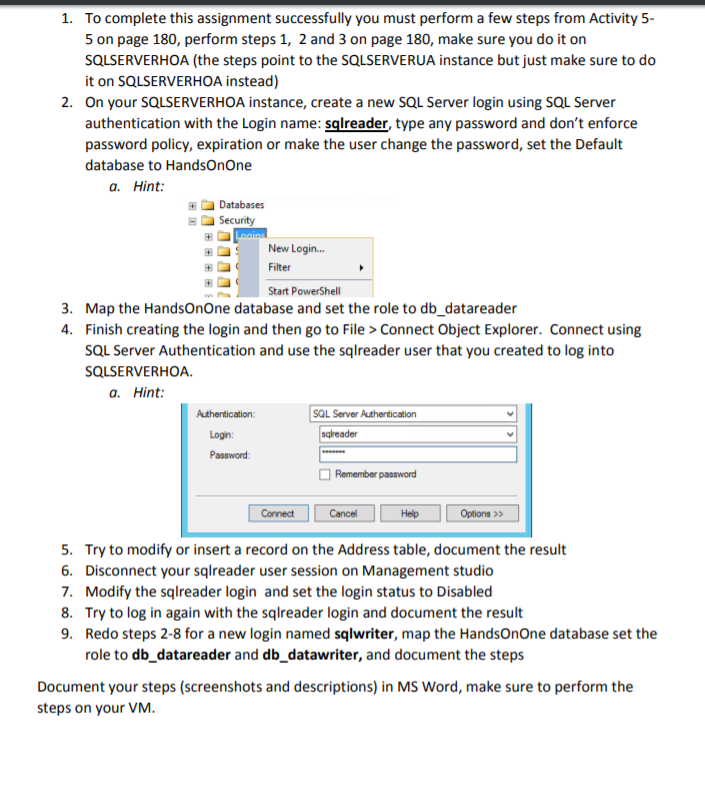
Table of Contents Database User] Activity 5-5: Managing Database Permissions Enter Time Required: 60 minutes Objective: Manage database permissions using a variety of security objects using the SQL programming language ACTIVITY Description: In this activity, you will use the DCL components of the SQL language to create new database logins and users, grant and revoke permissions to users and roles, and manage database schemas and role membership 1. To begin this activity, you need to ensure that the authentication mode in the database server properties is set to SQL Server and Windows Authentication mode In SQL Server Management Studio, right-click SQLSERVERUA in the left navigation pane of Object Explorer, and then click Properties. In the Server Properties window click Security in the left navigation pane. Click the SQL Server and Windows Authentication mode option button, and then click OK twice. See Figure 5-25 2. For the changes to take effect, you must restart the SQL Server database engine and agent services. Click the Start button, point to All Programs, and then click Microsoft SQL Server 2012. Click Configuration Tools, and then click SQL Server Configuration Manager. Click Yes if prompted by the User Account Control dialog box. In the SQL Server Configuration Manager, click SQL Server Services in the left navigation pane In the details pane, right-click SQL Server (SQLSERVERUA), and then click Restart See Figure 5-26. 3. Perform the same action on the row labeled SQL Server Agent (SQLSERVERUA) Close SQL Server Configuration Manager
Step by Step Solution
There are 3 Steps involved in it

Get step-by-step solutions from verified subject matter experts
 Study Help