







Question: Task 0 3 : Understanding the os Module ( 3 0 points ) Write a Python script that uses the os module to perform the
Task : Understanding the os Module points
Write a Python script that uses the os module to perform the following tasks:
Display the current working directory.
Create a new directory called "testdir" in the current working directory.
Change the current working directory to "testdir".
Verify the current working directory has been changed.
Create a new file named "testfile.txt in "testdir".
a You must write the following contents to testfile.txt:
This is a test file.
Verify that "testfile.txt was created by listing the contents of "testdir".
Display the file size and the last modification time of "testfile.txt
Change the name of "testfile.txt to "newtestfile.txt
Verify the name change by listing the contents of "testdir" again.
Finally, remove "newtestfile.txt and "testdir", verifying each deletion by listing the
contents of the parent directory.
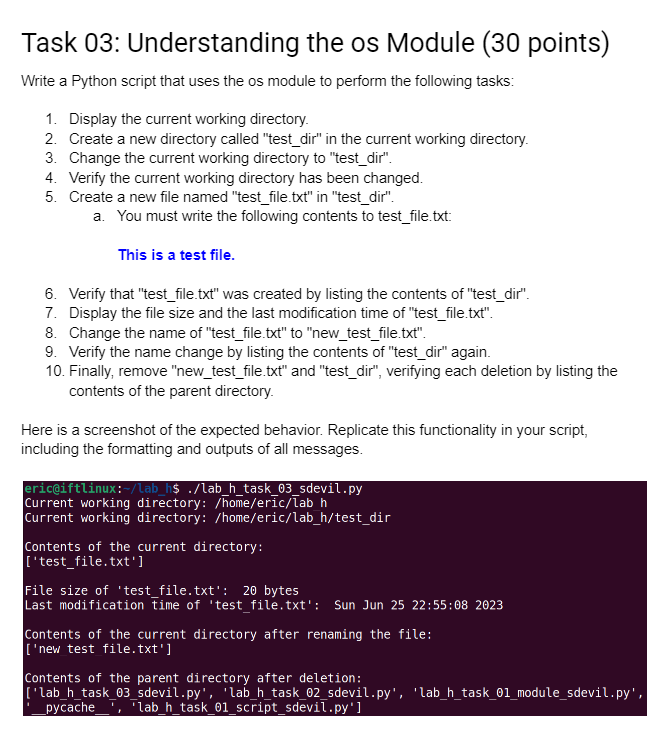
Here is a screenshot of the expected behavior. Replicate this functionality in your script,
including the formatting and outputs of all messages.Current working directory:homeericlab h
Current working directory: homeericlabhtestdir
Contents of the current directory:
testfile.txt
File size of 'testfile.txt: bytes
Last modification time of 'testfile.txt: Sun Jun ::
Contents of the current directory after renaming the file:
new test file.txt
Contents of the parent directory after deletion:
labhtasksdevil.py 'labhtasksdevil.py 'labhtaskmodulesdevil.py
Step by Step Solution
There are 3 Steps involved in it
1 Expert Approved Answer
Step: 1 Unlock

Question Has Been Solved by an Expert!
Get step-by-step solutions from verified subject matter experts
Step: 2 Unlock
Step: 3 Unlock
 Study Help