







Question: Task 1 D6:D12 contains various companies' Sales figures while E6:E12 contains those companies' Expense numbers. In F6:F12 write an IF statement that will report the
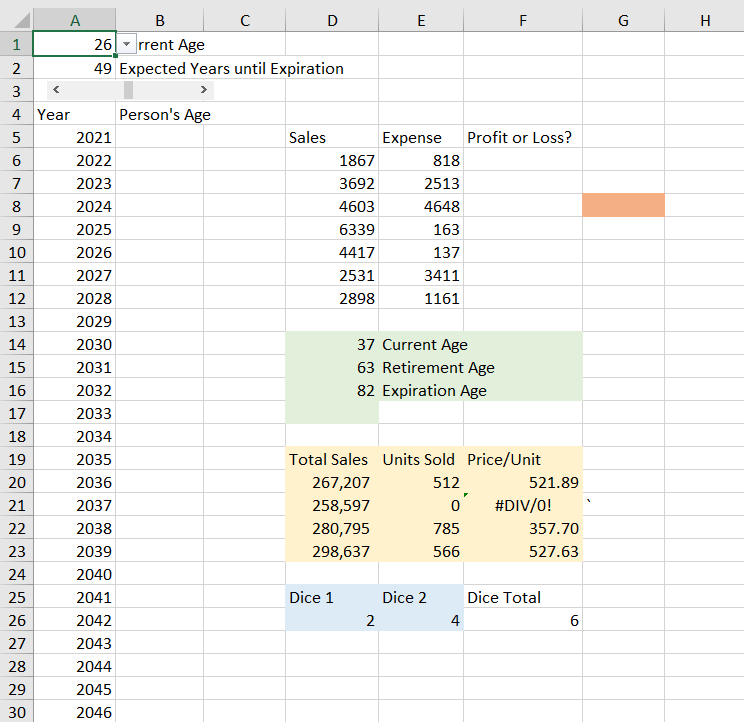
Task 1 D6:D12 contains various companies' Sales figures while E6:E12 contains those companies' Expense numbers. In F6:F12 write an IF statement that will report the word "Profit" if Sales > Expense or "Loss" otherwise.
Task 2 D14:F16 contains various ages. Write an IF statement (or perhaps some nested IF statements) in D17 that will return the answer of "Working," "Retired," or "Expired" depending on the person's Current Age relative to the Retirement/Expired ages. Make certain the formula is robust and will work for all ages entered into the D14:D16 range.
Task 3 D20:E23 contains some data while F20:F23 contains a formula that divides the Total Sales by Total Units. Note the #DIV/0 error in F21. Change the formulas in F20:F23 to report "Error in data" rather than a #DIV/0 error message if there is an error. If there is no error, the formula should still divide Total Sales by Unit Sales. This should be a robust formula.
Task 4 D26 and E26 contain dice values. In cell D27, write a formula that will report "You Lose!" if snake eyes (double 1s) are rolled or the dice total 7, "You Win!!!" if the dice total 12 or 4 and "Roll Again" if the dice total any other value. The die values are randomly generated. To have Excel randomly generate new die values, press F9.
Task 5 Cell A1 contains a dropdown box where you choose a person's current age. There is also a slider bar that controls how many more years the person is expected to live (the value appears in A2). In B5:B80, write an IF statement that will list the person's age if they are expected to still be alive in that year and blank if they are not.
Task 6 Replicate the previous task (place answers in column C rather than column B) but have the formula return an "official" #NA error (one that would be recognized by the ISNA function) rather than a blank cell if the person is no longer living.
Task 7 G8 contains a dropdown list of fruits and vegetables. In H8, write a formula that will report either "Fruit" or "Vegetable" based on what item is chosen from the dropdown box. The formula should be the most efficient way to accomplish this goal--NOT a bunch of nested IF statements.
F G H 2 A B D E 1 26rrent Age 2 49 Expected Years until Expiration 3 4 Year Person's Age 5 2021 Sales Expense Profit or Loss? 6 2022 1867 818 7 2023 3692 2513 8 2024 4603 4648 9 2025 6339 163 10 2026 4417 137 11 2027 2531 3411 12 2028 2898 1161 13 2029 14 2030 37 Current Age 15 2031 63 Retirement Age 16 2032 82 Expiration Age 17 2033 18 2034 19 2035 Total Sales Units Sold Price/Unit 20 2036 267,207 512 521.89 21 2037 258,597 0 #DIV/0! 2038 280,795 785 357.70 23 2039 298,637 566 527.63 24 2040 25 2041 Dice 1 Dice 2 Dice Total 26 2042 2. 4 6 27 2043 2044 29 2045 30 2046 22 28 F G H 2 A B D E 1 26rrent Age 2 49 Expected Years until Expiration 3 4 Year Person's Age 5 2021 Sales Expense Profit or Loss? 6 2022 1867 818 7 2023 3692 2513 8 2024 4603 4648 9 2025 6339 163 10 2026 4417 137 11 2027 2531 3411 12 2028 2898 1161 13 2029 14 2030 37 Current Age 15 2031 63 Retirement Age 16 2032 82 Expiration Age 17 2033 18 2034 19 2035 Total Sales Units Sold Price/Unit 20 2036 267,207 512 521.89 21 2037 258,597 0 #DIV/0! 2038 280,795 785 357.70 23 2039 298,637 566 527.63 24 2040 25 2041 Dice 1 Dice 2 Dice Total 26 2042 2. 4 6 27 2043 2044 29 2045 30 2046 22 28
Step by Step Solution
There are 3 Steps involved in it

Get step-by-step solutions from verified subject matter experts
 Study Help