







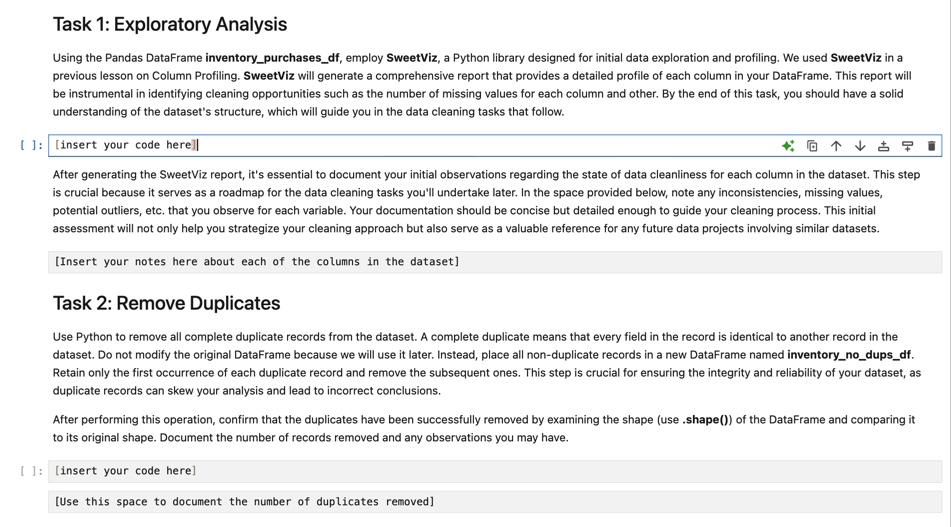
Question: Task 1 : Exploratory Analysis Using the Pandas DataFrame inventory _ purchases _ df , employ SweetViz, a Python library designed for initial data exploration
Task : Exploratory Analysis
Using the Pandas DataFrame inventorypurchasesdf employ SweetViz, a Python library designed for initial data exploration and profiling. We used SweetViz in a previous lesson on Column Profiling. SweetViz will generate a comprehensive report that provides a detailed profile of each column in your DataFrame. This report will be instrumental in identifying cleaning opportunities such as the number of missing values for each column and other. By the end of this task, you should have a solid understanding of the dataset's structure, which will guide you in the data cleaning tasks that follow.
: insert your code here
After generating the SweetViz report, it's essential to document your initial observations regarding the state of data cleanliness for each column in the dataset. This step is crucial because it serves as a roadmap for the data cleaning tasks you'll undertake later. In the space provided below, note any inconsistencies, missing values, potential outliers, etc. that you observe for each variable. Your documentation should be concise but detailed enough to guide your cleaning process. This initial assessment will not only help you strategize your cleaning approach but also serve as a valuable reference for any future data projects involving similar datasets.
Insert your notes here about each of the columns in the dataset
Task : Remove Duplicates
Use Python to remove all complete duplicate records from the dataset. A complete duplicate means that every field in the record is identical to another record in the dataset. Do not modify the original DataFrame because we will use it later. Instead, place all nonduplicate records in a new DataFrame named inventorynodupsdf Retain only the first occurrence of each duplicate record and remove the subsequent ones. This step is crucial for ensuring the integrity and reliability of your dataset, as duplicate records can skew your analysis and lead to incorrect conclusions.
After performing this operation, confirm that the duplicates have been successfully removed by examining the shape use shape of the DataFrame and comparing it to its original shape. Document the number of records removed and any observations you may have.
: insert your code here
Use this space to document the number of duplicates removed
Task : Address Outliers
In this task, you will focus on identifying and removing outliers from the 'Price' and 'Quantity' columns in the dataset. Outliers can significantly skew the results of your
data analysis, so it's crucial to handle them appropriately. Start by making a deep copy of the 'inventorycorrectformatdf DataFrame and name it
'inventorynooutliersdf
You will use Zscores' to identify outliers. A Zscore represents how many standard deviations an element is from the mean.
Calculate the mean and standard deviation for the Price and Quantity columns. Then, compute the Zscores for these columns. Once you have the Zscores, filter out the
records where the Zscore is outside the range of to for either Price or Quantity.
After you've performed these steps, print the shape of both 'inventorycorrectformatdf and 'inventorynooutliersdf Compare the number of records in these
two DataFrames to determine how many were removed due to outliers. Record your answer in the space provided below.
: insert your code here
Enter the number of records removed due to outliers
Task : Assess the Impact of Data Cleaning
Great, you've made it through the data cleaning process! Now it's time to revisit the initial analysis with the cleaned dataset. This will allow us to evaluate whether the
data cleaning has made a significant impact on our understanding of Rick's Brick & Cue's protein purchases over the last six months.
For this task, please copy the code from the initial analysis and paste it into the code block below. Make sure to change the DataFrame name to match the name of your
cleaned DataFrame, then rerun the analysis.
After running the code, take a moment to evaluate the results. Do the proteins now reach the $ mark in purchases over the last six months? Would it be
advantageous for Rick's Brick & Cue to enter into an exclusive contract with the supplier based on this new analysis? Write your response in the space provided below.
: insert your code here
write your response here
Congratulations on completing this assignment! You've not only honed your data cleaning skills but also made a significant impact on the decisionmaking process at
Rick's Brick & Cue. Your meticulous work in identifying and rectifying issues
Step by Step Solution
There are 3 Steps involved in it
1 Expert Approved Answer
Step: 1 Unlock

Question Has Been Solved by an Expert!
Get step-by-step solutions from verified subject matter experts
Step: 2 Unlock
Step: 3 Unlock
 Study Help