







Question: Task 1 : List the item ID , description, and price for all items. Task 2 : List all rows and columns for the complete
Task : List the item ID description, and price for all items.
Task : List all rows and columns for the complete INVOICES table.
Task : List the first name, last name, and credit limit of customers with credit limits of $ or more.
Task : List the invoice number for each order placed by customer number on
If you need help, use the discussion of the DATE data type in Figure in Module
Task : List the customer ID the first name, and the last name of each customer represented by sales rep or sales rep
Task : List the item ID and description of each item that is not in category HOR.
Task : List the item ID description, and number of units on hand for each item that has between and units on hand, including both and
Task : List the item ID description, and onhand value units on hand unit price of each item in category CAT. Onhand value is technically units on hand cost but there is no COST column in the ITEM table Assign the name ONHANDVALUE to the computed column.
Task : List the item ID description, and onhand value for each item where onhand value is at least $ Assign the name ONHANDVALUE to the computed column.
Task : Use the IN operator to list the item ID and description of each item in category FSH or BRD
Task : Find the ID first name, and last name of each customer whose first name begins with the letter S
Task : List all details about all items. Order the output by description.
Task : List all details about all items. Order the output by item ID within location. That is order the output by location and then by item ID
Task : How many customers have balances that are more than their credit limits
Task : Find the total of the balances for all customers represented by sales rep with balances that are less than their credit limits
Task : List the item ID description, and onhand value of each item whose number of units on hand is more than the average number of units on hand for all items.
Use a subquery.
Task : What is the price of the least expensive item in the database?
Task : What is the item ID description, and price of the least expensive item in the database?
Use a subquery.
Task : List the REPID and the corresponding sum of the balances, as BALANCE, of all customers for each sales rep. Order and group the results by sales rep ID
Task : List the sum of the balances of all customers for each sales rep but restrict the output to those sales reps for which the sum is more than $
The results should display the REPID and BALANCE column headers. Order the results by sales REPID
Task : List the item ID description, and category of all items that are in the DOG or CAT category and contain the word Small in the description
Task : KimTay Pet Supplies is considering discounting the price of all items by percent. List the item ID description, price, and discounted price for all items. Use DISCOUNTEDPRICE as the name for the computed column.
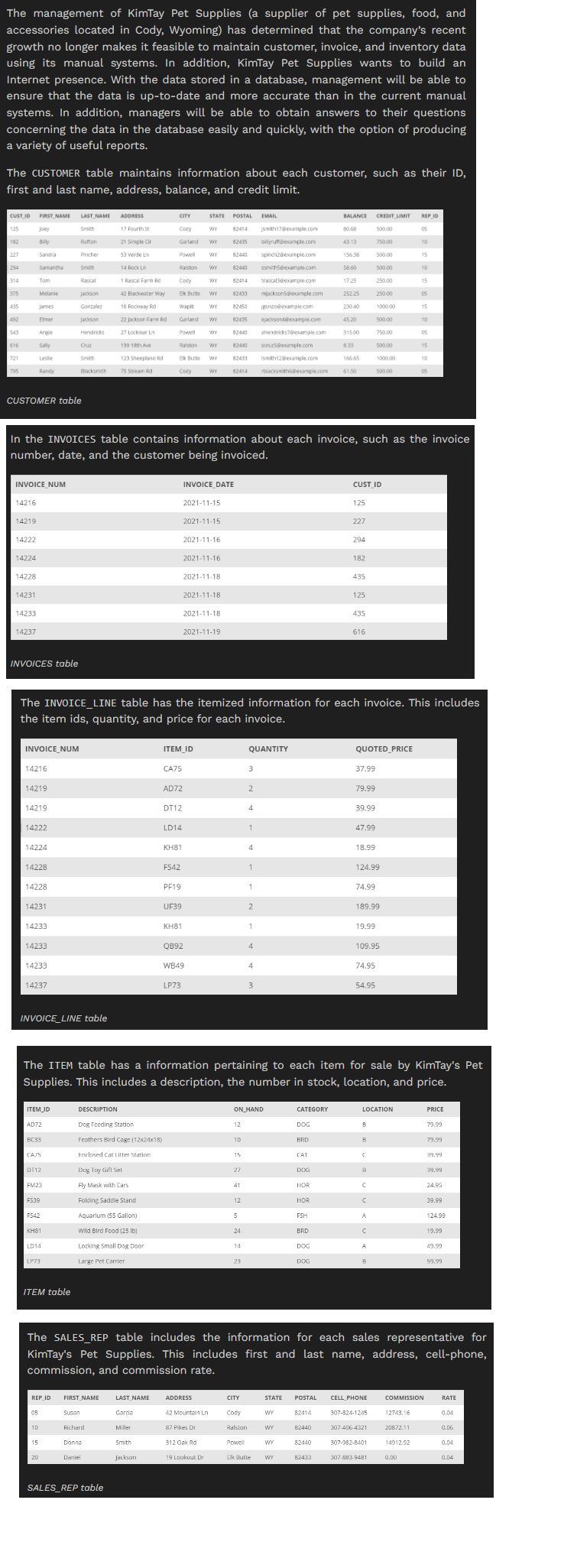
The management of KimTay Pet Supplies a supplier of pet supplies, food, and
accessories located in Cody, Wyoming has determined that the company's recent
growth no longer makes it feasible to maintain customer, invoice, and inventory data
using its manual systems. In addition, KimTay Pet Supplies wants to build an
Internet presence. With the data stored in a database, management will be able to
ensure that the data is uptodate and more accurate than in the current manual
systems. In addition, managers will be able to obtain answers to their questions
concerning the data in the database easily and quickly, with the option of producing
a variety of useful reports.
The CUSTOMER table maintains information about each customer, such as their ID
first and last name, address, balance, and credit limit
CUSTOMER table
Step by Step Solution
There are 3 Steps involved in it
1 Expert Approved Answer
Step: 1 Unlock

Question Has Been Solved by an Expert!
Get step-by-step solutions from verified subject matter experts
Step: 2 Unlock
Step: 3 Unlock
 Study Help