







Question: Task 1: Write a script file a6task1.py in which you export a function def runTask1O: This function is to create a figure that draws the
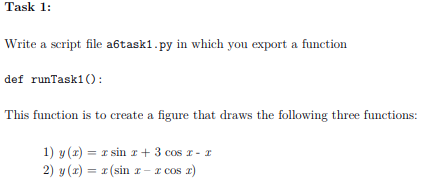
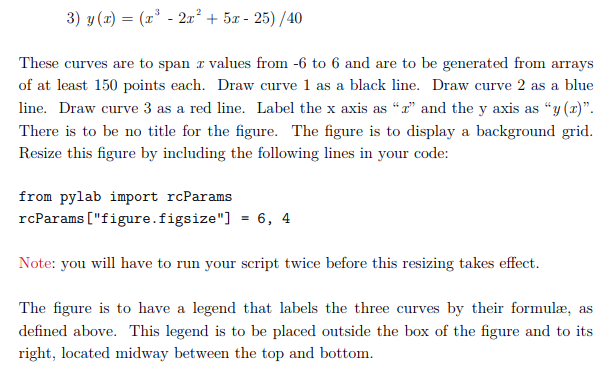
Task 1: Write a script file a6task1.py in which you export a function def runTask1O: This function is to create a figure that draws the following three functions 1) y(r)sin 3 cos r- 2) y (z) = r(sin 1-1 cos !) cos x-I 3) y(x)25- 25)/40 These curves are to span r values from -6 to 6 and are to be generated from arrays points eac line. Draw curve 3 as a red lne. Label the x axis as " and the y axis as "y(x) There is to be no title for the figure. The figure is to display a background grid. Resize this figure by including the following lines in your code: from pylab import rcParams rcParams ["figure.figsize"] -6, 4 Note: you will have to run your script twice before this resizing takes effect. The figure is to have a legend that labels the three curves by their formula, as defined above. This legend is to be placed outside the box of the figure and to its right, located midway between the top and bottom. Task 1: Write a script file a6task1.py in which you export a function def runTask1O: This function is to create a figure that draws the following three functions 1) y(r)sin 3 cos r- 2) y (z) = r(sin 1-1 cos !) cos x-I 3) y(x)25- 25)/40 These curves are to span r values from -6 to 6 and are to be generated from arrays points eac line. Draw curve 3 as a red lne. Label the x axis as " and the y axis as "y(x) There is to be no title for the figure. The figure is to display a background grid. Resize this figure by including the following lines in your code: from pylab import rcParams rcParams ["figure.figsize"] -6, 4 Note: you will have to run your script twice before this resizing takes effect. The figure is to have a legend that labels the three curves by their formula, as defined above. This legend is to be placed outside the box of the figure and to its right, located midway between the top and bottom
Step by Step Solution
There are 3 Steps involved in it

Get step-by-step solutions from verified subject matter experts
 Study Help