







Question: Task 2 ( 6 marks ) Querying and manipulating data in HBase table This assignment focuses on implementing HBase queries and data manipulations for a
Task marks
Querying and manipulating data in HBase table
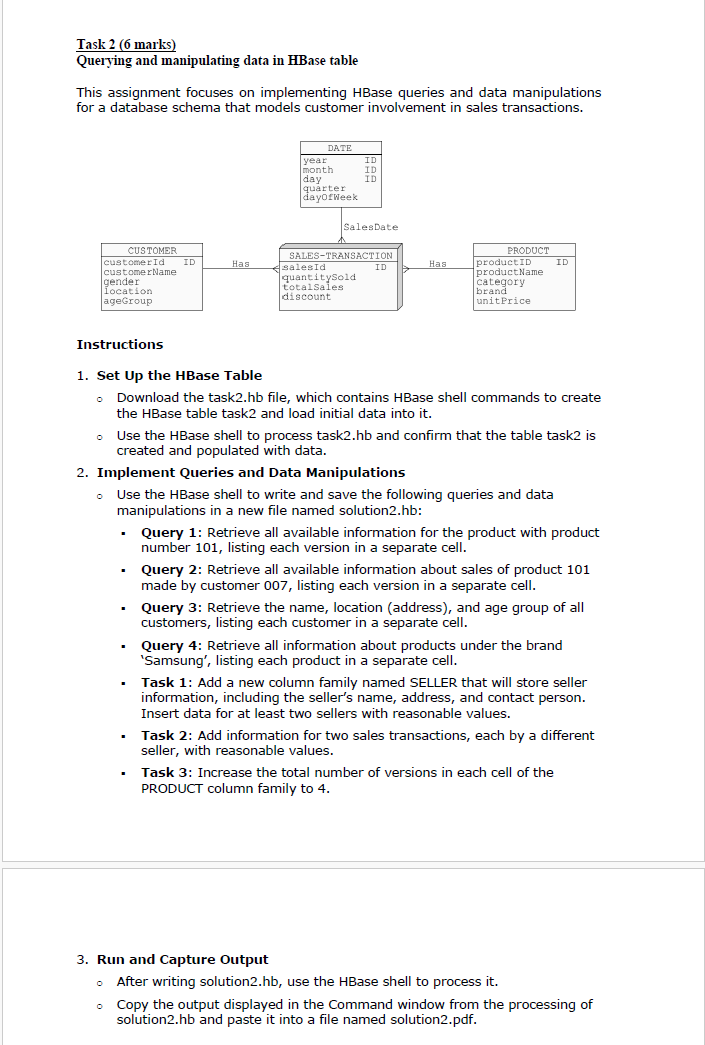
This assignment focuses on implementing HBase queries and data manipulations for a database schema that models customer involvement in sales transactions.
Instructions
Set Up the HBase Table
Download the taskhb file, which contains HBase shell commands to create the HBase table task and load initial data into it
Use the HBase shell to process taskhb and confirm that the table task is created and populated with data.
Implement Queries and Data Manipulations
Use the HBase shell to write and save the following queries and data manipulations in a new file named solutionhb:
Query : Retrieve all available information for the product with product number listing each version in a separate cell.
Query : Retrieve all available information about sales of product made by customer listing each version in a separate cell.
Query : Retrieve the name, location address and age group of all customers, listing each customer in a separate cell.
Query : Retrieve all information about products under the brand 'Samsung', listing each product in a separate cell.
Task : Add a new column family named SELLER that will store seller information, including the seller's name, address, and contact person. Insert data for at least two sellers with reasonable values.
Task : Add information for two sales transactions, each by a different seller, with reasonable values.
Task : Increase the total number of versions in each cell of the PRODUCT column family to
Run and Capture Output
After writing solutionhb use the HBase shell to process it
Copy the output displayed in the Command window from the processing of solutionhb and paste it into a file named solutionpdf
Step by Step Solution
There are 3 Steps involved in it
1 Expert Approved Answer
Step: 1 Unlock

Question Has Been Solved by an Expert!
Get step-by-step solutions from verified subject matter experts
Step: 2 Unlock
Step: 3 Unlock
 Study Help