





Question: Task 2 - Examine System Settings -Skip this Task In this step we look at one of the important settings in the system, the fiscal
Task 2 - Examine System Settings -Skip this Task
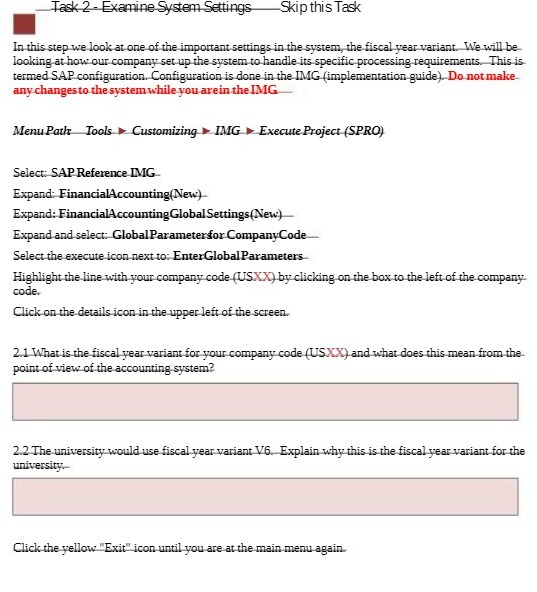
Task 2 - Examine System Settings -Skip this Task In this step we look at one of the important settings in the system, the fiscal year variant. We will be looking at how our company set up the system to handle its specific processing requirements. This is termed SAP configuration. Configuration is done in the IMG (implementation guide). Do not make any changes to the system while you are in the IMG Menu Path Tools Customizing > IMG > Execute Project (SPRO) Select: SAP Reference IMG Expand: FinancialAccounting(New) Expand: FinancialAccountingGlobal Settings(New) Expand and select: Global Parameterfor CompanyCode Select the execute icon next to: EnterGlobal Parameters- Highlight the line with your company code (USX X) by clicking on the box to the left of the company code. Click on the details icon in the upper left of the screen. 2.1 What is the fiscal year variant for your company code (USX X) and what does this mean from the point of view of the accounting system? 2.2 The university would use fiscal year variant V6. Explain why this is the fiscal year variant for the university. Click the yellow "Exit" icon until you are at the main menu again

Step by Step Solution

There are 3 Steps involved in it

1 Expert Approved Answer
Step: 1 Unlock blur-text-image

Question Has Been Solved by an Expert!

Get step-by-step solutions from verified subject matter experts

Step: 2 Unlock
Step: 3 Unlock

Students Have Also Explored These Related Accounting Questions!