







Question: Task 2 Write a program named bball.cpp that: Uses the inputVal() function to prompt the user for the scores of a basketball game for each
Task 2
Write a program named bball.cpp that:
Uses the inputVal() function to prompt the user for the scores of a basketball game for each quarter and each team
Stores the scores in parallel vectors If the score is tied at the end of the 4th quarter, increase the size of the vectors by 1 and get scores for the additional quarter (repeat as many times as necessary until the tie is broken)
When the game is over (one team has more points than the other at the end of the fourth or later quarter), print a well-formatted box score table of the game, including the 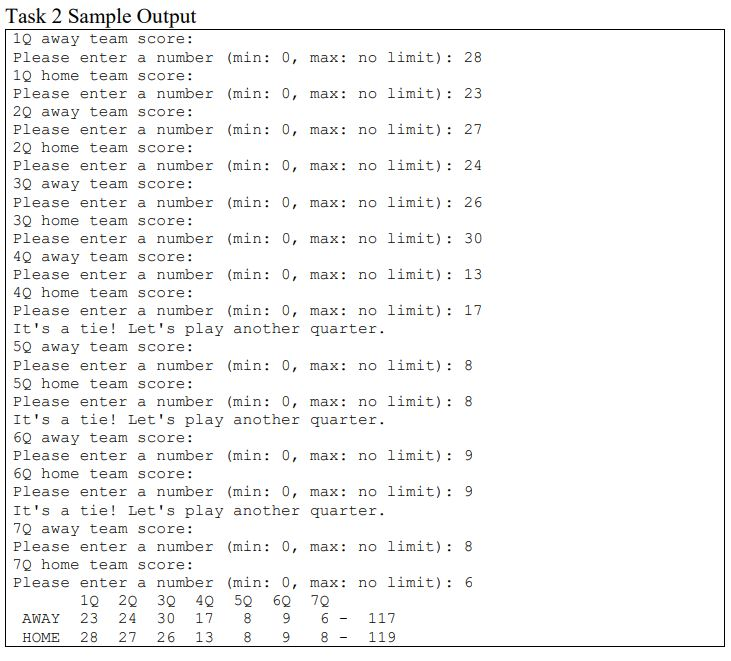 total score for each team
Task 2 Sample Output 1Q away team score: Please enter a number (min: 0, max: no limit): 28 1Q home team score: Please enter a number (min 0, max: no limit) 23 2Q away team score: Please enter a number (min: 0, max: no limit): 27 2Q home team score: Please enter a number (min 0, max: no limit) 24 3Q away team score: Please enter a number (min: 0, max: no limit): 26 3Q home team score: Please enter a number (min: 0, max: no limit) 30 4Q away team score: Please enter a number (min: 0, max: no limit) 13 4Q home team score: Please enter a number (min: 0, max: no limit): 17 It's a tie! Let's play another quarter. 5Q away team score: Please enter a number (min 0, max: no limit) 8 5Q home team score: Please enter a number (min: 0, max: no limit): 8 It's a tie! Let's play another quarter. 6Q away team score: Please enter a number (min 0, max: no limit) 9 6Q home team score: Please enter a number (min: 0, max: no limit): 9 It's a tie! Let's play another quarter. 7Q away team score: Please enter a number (min: 0, max: no limit) 8 7Q home team score: Please enter a number (min: 0, max: no limit): 6 1 2Q 3Q 4 5 6 7 AWAY 23 24 30 17 89 6 HOME 28 27 26 13 8 9 8
Step by Step Solution
There are 3 Steps involved in it

Get step-by-step solutions from verified subject matter experts
 Study Help