







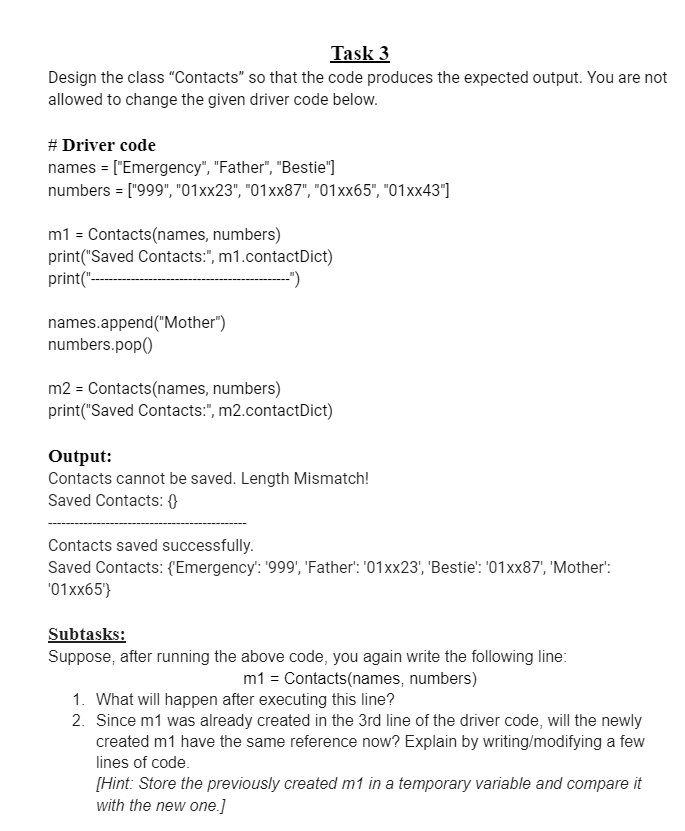
Question: Task 3 Design the class Contacts so that the code produces the expected output. You are not allowed to change the given driver code below.
Task
Design the class "Contacts" so that the code produces the expected output. You are not
allowed to change the given driver code below.
# Driver code
names Emergency "Father", "Bestie"
numbers xxxxxxxx
Contactsnames numbers
printSaved Contacts:", mcontactDict
print
names.appendMother
numbers.pop
m Contactsnames numbers
printSaved Contacts:", mcontactDict
Output:
Contacts cannot be saved. Length Mismatch!
Saved Contacts:
Contacts saved successfully.
Saved Contacts: Emergency: 'Father': xx 'Bestie': xx 'Mother':
xx
Subtasks:
Suppose, after running the above code, you again write the following line:
Contacts numbers
What will happen after executing this line?
Since was already created in the rd line of the driver code, will the newly
created have the same reference now? Explain by writingmodifying a few
lines of code.
Hint: Store the previously created in a temporary variable and compare it
with the new one.
Step by Step Solution
There are 3 Steps involved in it
1 Expert Approved Answer
Step: 1 Unlock

Question Has Been Solved by an Expert!
Get step-by-step solutions from verified subject matter experts
Step: 2 Unlock
Step: 3 Unlock
 Study Help