





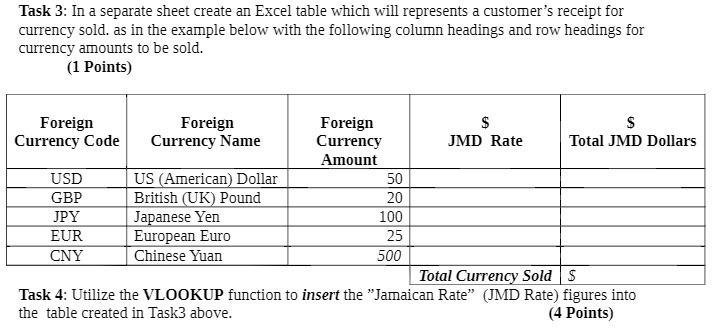
Question: Task 3: In a separate sheet create an Excel table which will represents a customer's receipt for currency sold. as in the example below with
Task 3: In a separate sheet create an Excel table
Task 3: In a separate sheet create an Excel table which will represents a customer's receipt for currency sold. as in the example below with the following column headings and row headings for currency amounts to be sold. (1 Points) Foreign Foreign Foreign $ Currency Code Currency Name Currency JMD Rate Total JMD Dollars Amount USD US (American) Dollar 50 GBP British (UK) Pound 20 JPY Japanese Yen 100 EUR European Euro 25 CNY Chinese Yuan 500 Total Currency Sold | $ Task 4: Utilize the VLOOKUP function to insert the "Jamaican Rate" (JMD Rate) figures into the table created in Task3 above. (4 Points)

Step by Step Solution

There are 3 Steps involved in it

1 Expert Approved Answer
Step: 1 Unlock blur-text-image

Question Has Been Solved by an Expert!

Get step-by-step solutions from verified subject matter experts

Step: 2 Unlock
Step: 3 Unlock

Students Have Also Explored These Related Mathematics Questions!