Question: Task 4: 4a: Write appropriate SAS procedure statements for sorting the data set Demographics_New as created in Task 2b by the variable Member_Id in ascending

Task 4: 4a: Write appropriate SAS procedure statements for sorting the data set Demographics_New as created in Task 2b by the variable Member_Id in ascending order. Replace the original Demographics_New with the sorted data set. 4b: The data set Demographics_New is supposed to contain all members information. However, However, not all members in Collapsed_Activities are also contained in Demographics_New or vice versa. Write one DATA step for creating three SAS data sets. The three data sets must have these characteristics: One data set contains only the observations of Collapsed_Activities with Member_Id that do not appear in Demographics_New. Name this data set Redundant_Activities and place it in the Work library of SAS Studio. Keep only the variables of Collapsed_Activities in Redundant_Activities. A second data contains the observations of Collapsed_Activities with Member_Id that also appear in Demographics_New. Name this data set Collapsed_Activities2 and place it in the Work library of SAS Studio. Keep only the variables of Collapsed_Activities in Collapsed_Activities2. A third data set contains the observations of Demographic_New with Members_ID that do not appear in Collapsed_Activities. Name this data set Inactive_Members and place it in the Work library of SAS Studio. Keep only the variables of Demographic_New in Inactive_Members.

You must accomplish Task 4b with one DATA step only.
Task 4: 4a: Write appropriate SAS procedureTask 4: 4a: Write appropriate SAS procedure

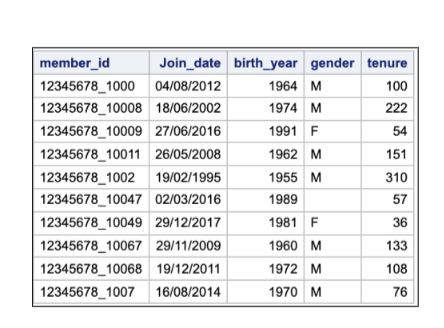
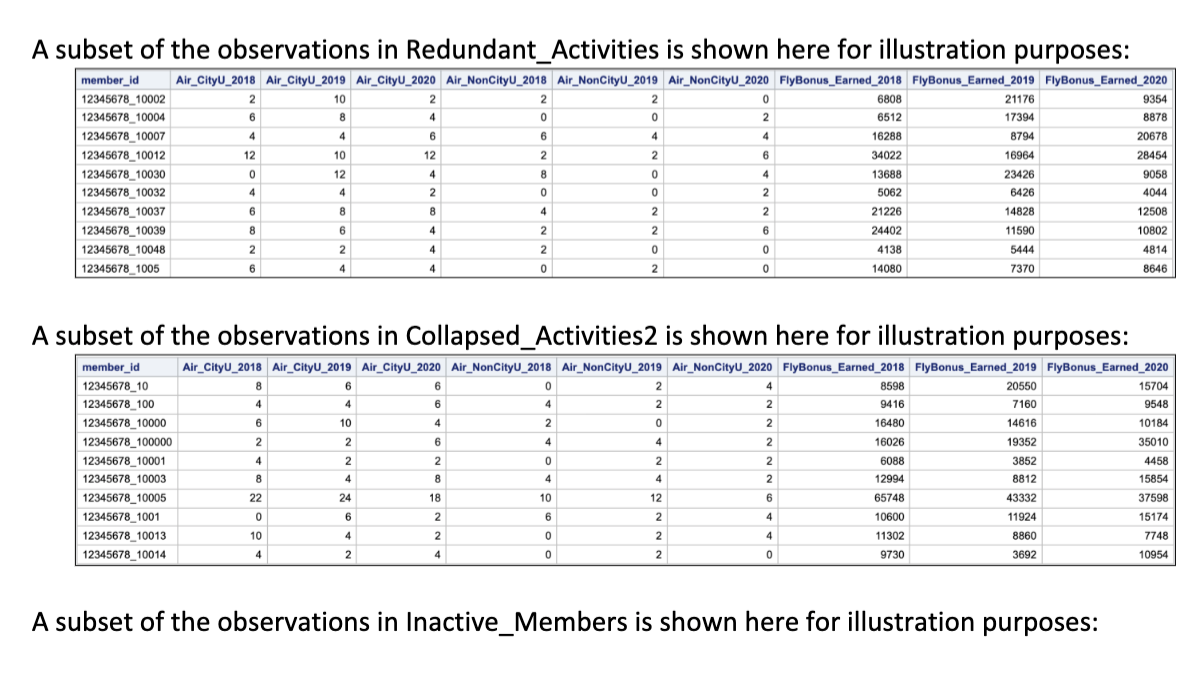
A subset of the observations in Redundant_Activities is shown here for illustration purposes: member_id 12345678_10002 12345678_10004 12345678_10007 12345678_10012 12345678_10030 12345678_10032 12345678_10037 12345678_10039 12345678_10048 12345678_1005 Air_CityU_2018 Air_CityU_2019 Air_CityU_2020 Air_NonCityU_2018 Air_NonCityU_2019 Air_NonCityU_2020 FlyBonus_Earned_2018 FlyBonus_Earned_2019 FlyBonus_Earned_2020 2 10 2 2 2 2 2 0 6808 21176 9354 6 8 8 4 0 0 0 0 2 6512 17394 8878 4 4 6 6 4 4 4 4 16288 8794 20678 12 10 12 2 2 6 34022 16964 28454 0 12 4 8 0 4 13688 23426 9058 4 4 2 0 0 2 5062 6426 4044 6 8 8 4 2 2 21226 14828 12508 8 6 4 2 2 6 24402 11590 10802 2 2 4 2 0 0 4138 5444 4814 6 4 4 4 0 2 0 14080 7370 8646 4 A subset of the observations in Collapsed_Activities 2 is shown here for illustration purposes: member_id 12345678_10 12345678_100 12345678_10000 12345678_100000 12345678_10001 12345678_10003 12345678_10005 12345678_1001 12345678_10013 12345678_10014 Air_CityU_2018 Air_CityU_2019 Air_CityU_2020 Air_NonCityU_2018 Air_NonCityU_2019 Air_NonCityU_2020 FlyBonus_Earned_2018 FlyBonus_Earned_2019 FlyBonus_Earned_2020 8 8 6 6 0 2 4 8598 20550 15704 4 4 6 4 2 2 2 9416 7160 9548 6 10 4 2 0 2 16480 14616 10184 2 2 6 4 4 4 2 16026 19352 35010 4 4 2 2 0 2 2 2 6088 3852 4458 8 4 8 4 4 2 12994 8812 15854 22 24 18 10 12 6 65748 43332 37598 0 6 2 6 2 4 10600 15174 10 4 2 0 2 4 11302 8860 7748 4 2 4 0 2 0 9730 3692 10954 11924 A subset of the observations in Inactive_Members is shown here for illustration purposes: member_id Join_date birth_year gender tenure 12345678_100004/08/2012 1964 M 100 12345678_10008 18/06/2002 1974 M 222 12345678_10009 27/06/2016 1991 F 54 12345678_10011 26/05/2008 1962 M 151 12345678_1002 19/02/1995 1955 M 310 12345678_10047 02/03/2016 1989 57 12345678_10049 29/12/2017 1981 F 36 12345678_10067 29/11/2009 1960 M 133 12345678_10068 19/12/2011 1972 M 108 12345678_1007 16/08/2014 1970 M 76 A subset of the observations in Redundant_Activities is shown here for illustration purposes: member_id 12345678_10002 12345678_10004 12345678_10007 12345678_10012 12345678_10030 12345678_10032 12345678_10037 12345678_10039 12345678_10048 12345678_1005 Air_CityU_2018 Air_CityU_2019 Air_CityU_2020 Air_NonCityU_2018 Air_NonCityU_2019 Air_NonCityU_2020 FlyBonus_Earned_2018 FlyBonus_Earned_2019 FlyBonus_Earned_2020 2 10 2 2 2 2 2 0 6808 21176 9354 6 8 8 4 0 0 0 0 2 6512 17394 8878 4 4 6 6 4 4 4 4 16288 8794 20678 12 10 12 2 2 6 34022 16964 28454 0 12 4 8 0 4 13688 23426 9058 4 4 2 0 0 2 5062 6426 4044 6 8 8 4 2 2 21226 14828 12508 8 6 4 2 2 6 24402 11590 10802 2 2 4 2 0 0 4138 5444 4814 6 4 4 4 0 2 0 14080 7370 8646 4 A subset of the observations in Collapsed_Activities 2 is shown here for illustration purposes: member_id 12345678_10 12345678_100 12345678_10000 12345678_100000 12345678_10001 12345678_10003 12345678_10005 12345678_1001 12345678_10013 12345678_10014 Air_CityU_2018 Air_CityU_2019 Air_CityU_2020 Air_NonCityU_2018 Air_NonCityU_2019 Air_NonCityU_2020 FlyBonus_Earned_2018 FlyBonus_Earned_2019 FlyBonus_Earned_2020 8 8 6 6 0 2 4 8598 20550 15704 4 4 6 4 2 2 2 9416 7160 9548 6 10 4 2 0 2 16480 14616 10184 2 2 6 4 4 4 2 16026 19352 35010 4 4 2 2 0 2 2 2 6088 3852 4458 8 4 8 4 4 2 12994 8812 15854 22 24 18 10 12 6 65748 43332 37598 0 6 2 6 2 4 10600 15174 10 4 2 0 2 4 11302 8860 7748 4 2 4 0 2 0 9730 3692 10954 11924 A subset of the observations in Inactive_Members is shown here for illustration purposes: member_id Join_date birth_year gender tenure 12345678_100004/08/2012 1964 M 100 12345678_10008 18/06/2002 1974 M 222 12345678_10009 27/06/2016 1991 F 54 12345678_10011 26/05/2008 1962 M 151 12345678_1002 19/02/1995 1955 M 310 12345678_10047 02/03/2016 1989 57 12345678_10049 29/12/2017 1981 F 36 12345678_10067 29/11/2009 1960 M 133 12345678_10068 19/12/2011 1972 M 108 12345678_1007 16/08/2014 1970 M 76

Step by Step Solution

There are 3 Steps involved in it

1 Expert Approved Answer
Step: 1 Unlock blur-text-image
Question Has Been Solved by an Expert!

Get step-by-step solutions from verified subject matter experts

Step: 2 Unlock
Step: 3 Unlock

Students Have Also Explored These Related General Management Questions!