







Question: Task 4: Edit the Yurts Page. Launch a text editor and open yurts.html. Modify the page in a similar manner as the Home page. Examine
Task 4: Edit the Yurts Page. Launch a text editor and open yurts.html. Modify the page in a similar manner as the Home page. Examine the wireframe in Figure 7.47 and notice that there are three sections with the main element. Remove the tags that configure the description list from the page. Notice the text content is a series of questions and answers. Configure each question within an h3 element. Configure each answer within a paragraph element. Code a section element to contain each question and answer pair. Save your file and test it in a browser. It should be similar to the page shown in Figure 7.48.
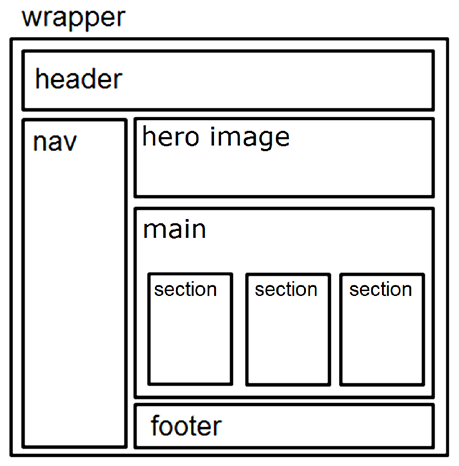
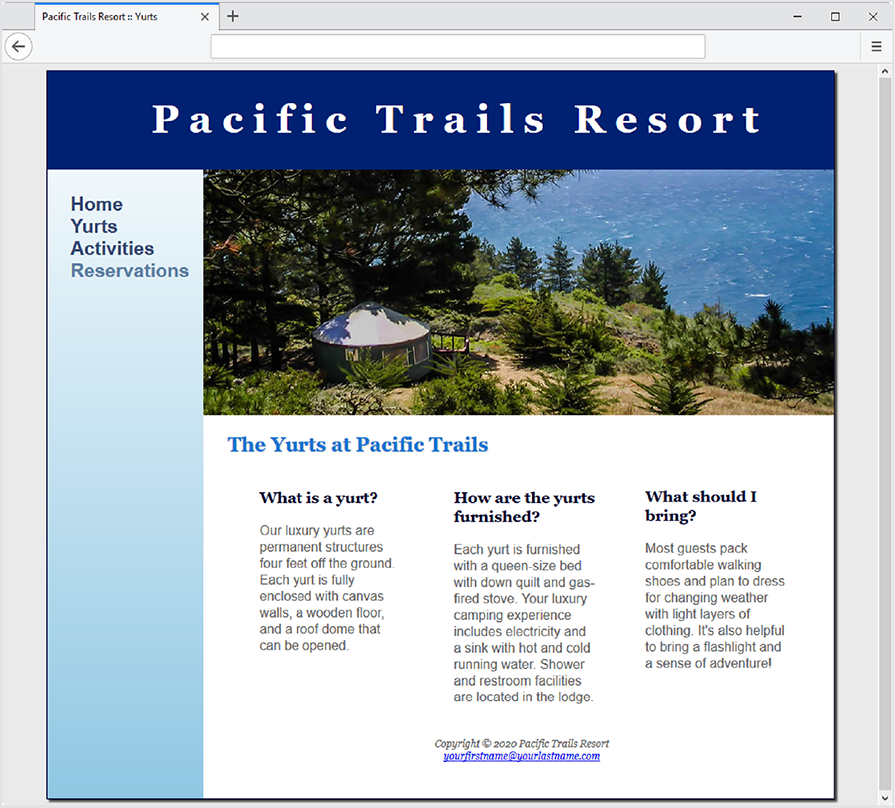
wrapper header \begin{tabular}{|l|l|} \hline nav & hero image \\ \hline main & \\ \hline section & \\ \hline footer \\ \hline \end{tabular} The Yurts at Pacific Trails Copyright @ 2020 Pacific Trails Resort yourfirstname@yourlastname.com
Step by Step Solution
There are 3 Steps involved in it

Get step-by-step solutions from verified subject matter experts
 Study Help