







Question: (*>* Task 4.3 *>*) let rec find (f: 'a -> bool) (l: 'a list) : 'a option = raise ImplementMe ;; (*>* Task 4.4 *>*)
(*>* Task 4.3 *>*)
let rec find (f: 'a -> bool) (l: 'a list) : 'a option = raise ImplementMe ;;
(*>* Task 4.4 *>*)
let parens (l: char list) : bool = raise ImplementMe ;;
(*>* Task 4.5 *>*)
let find2D (f: 'a -> bool) (lines: 'a list list) : (int * int) option = raise ImplementMe ;;
(* assert (find2D (fun _ -> true) [] = None);; assert (find2D (fun _ -> true) [[]; []] = None);; let file = [[1;2;3;4;5]; [5;4;3;2;1]; [10;9;8;7;6]; [2;4;6;8;10;12]] ;; assert (find2D ((=) 5) file = Some (0, 4));; assert (find2D ((
The language is Ocaml. Please don't use other languages, thanks!
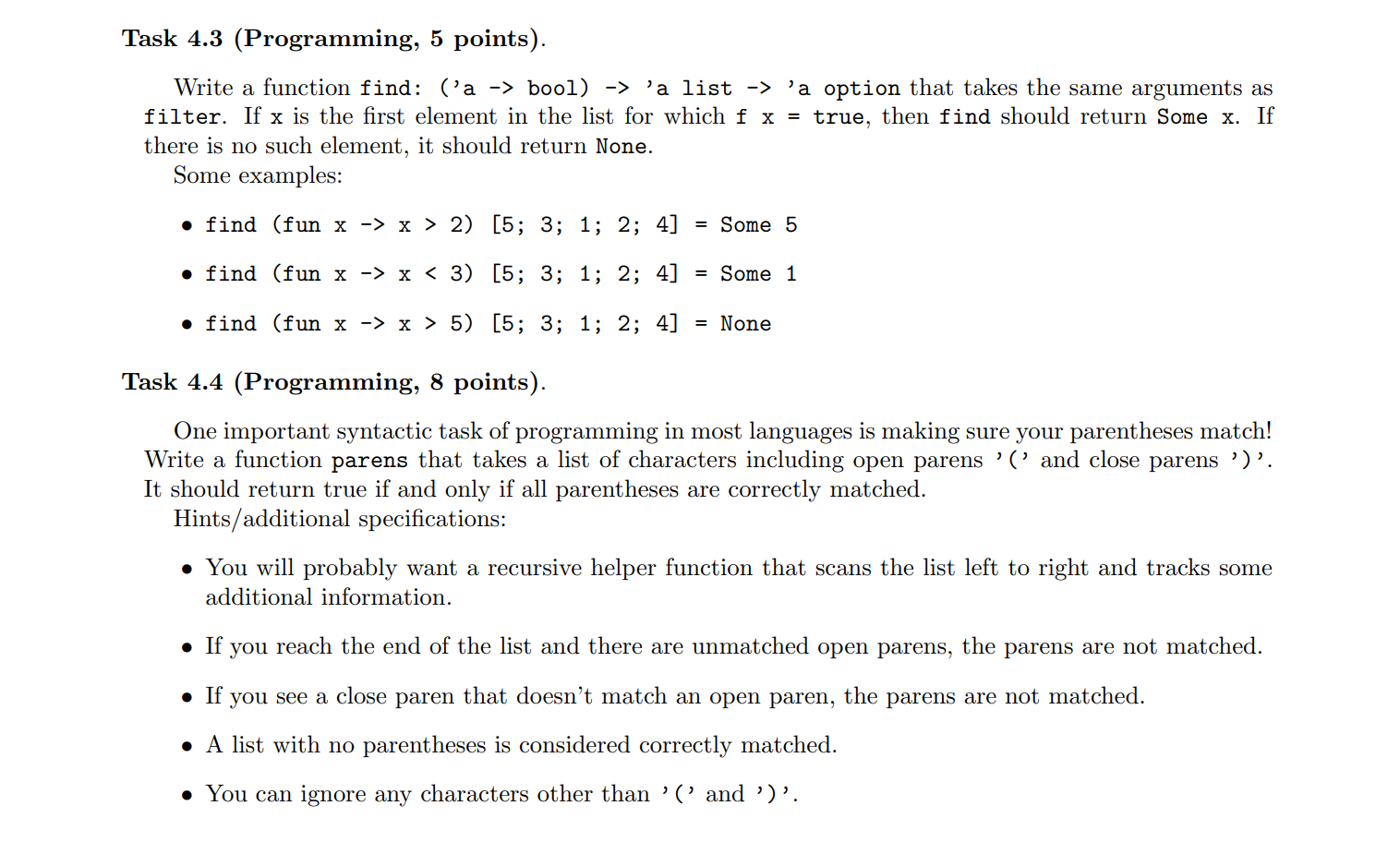
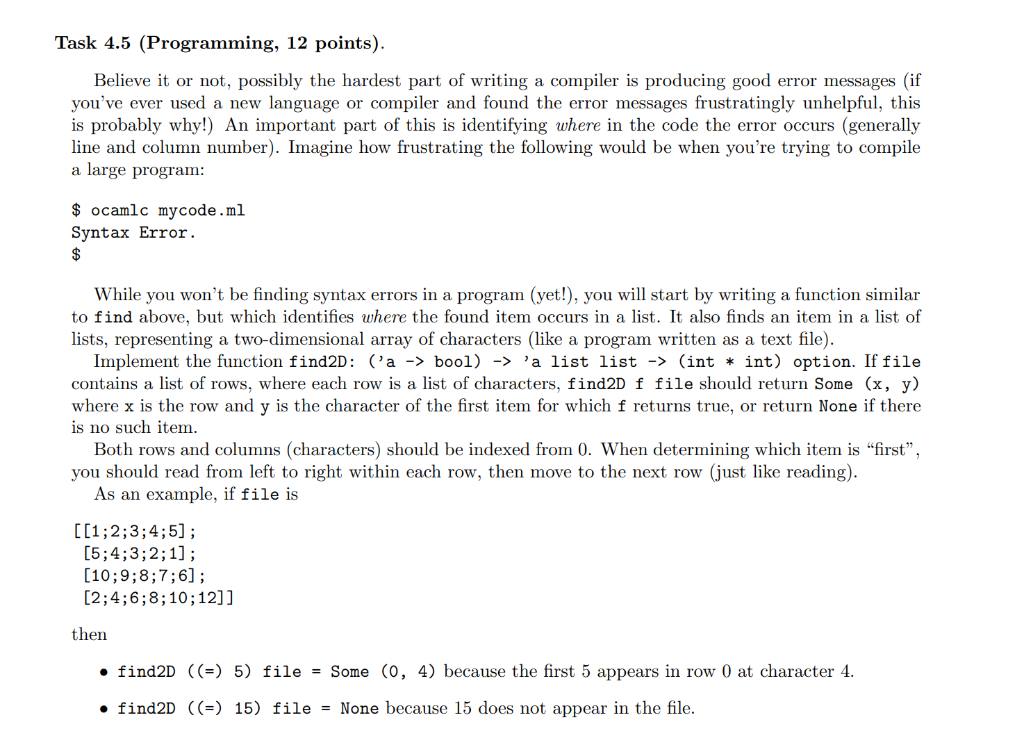
Task 4.3 (Programming, 5 points). Write a function find: la -> bool) -> 'a list -> 'a option that takes the same arguments as filter. If x is the first element in the list for which f x = true, then find should return Some x. If there is no such element, it should return None. Some examples: find (fun x -> x > 2) [5; 3; 1; 2; 4] = Some 5 find (fun x -> x x > 5) [5; 3; 1; 2; 4] = None Task 4.4 (Programming, 8 points). One important syntactic task of programming in most languages is making sure your parentheses match! Write a function parens that takes a list of characters including open parens 'l' and close parens ')'. It should return true if and only if all parentheses are correctly matched. Hints/additional specifications: You will probably want a recursive helper function that scans the list left to right and tracks some additional information. If you reach the end of the list and there are unmatched open parens, the parens are not matched. If you see a close paren that doesn't match an open paren, the parens are not matched. A list with no parentheses is considered correctly matched. You can ignore any characters other than '(' and ')'. Task 4.5 (Programming, 12 points). Believe it or not, possibly the hardest part of writing a compiler is producing good error messages (if you've ever used a new language or compiler and found the error messages frustratingly unhelpful, this is probably why!) An important part of this is identifying where in the code the error occurs (generally line and column number). Imagine how frustrating the following would be when you're trying to compile a large program: $ ocamlc mycode.ml Syntax Error $ While you won't be finding syntax errors in a program (yet!), you will start by writing a function similar to find above, but which identifies where the found item occurs in a list. It also finds an item in a list of lists, representing a two-dimensional array of characters (like a program written as a text file). Implement the function find2D: ('a -> bool) -> 'a list list -> (int * int) option. If file contains a list of rows, where each row is a list of characters, find2D f file should return Some (x, y) where x is the row and y is the character of the first item for which f returns true, or return None if there is no such item. Both rows and columns (characters) should be indexed from 0. When determining which item is "first", you should read from left to right within each row, then move to the next row (just like reading). As an example, if file is [[1;2;3;4;5); [5;4;3;2;1]; (10;9;8;7;6]; [2;4; 6; 8; 10; 12]] then find2D ((=) 5) file = Some (0, 4) because the first 5 appears in row 0 at character 4. find2D ((=) 15) file = None because 15 does not appear in the file. Task 4.3 (Programming, 5 points). Write a function find: la -> bool) -> 'a list -> 'a option that takes the same arguments as filter. If x is the first element in the list for which f x = true, then find should return Some x. If there is no such element, it should return None. Some examples: find (fun x -> x > 2) [5; 3; 1; 2; 4] = Some 5 find (fun x -> x x > 5) [5; 3; 1; 2; 4] = None Task 4.4 (Programming, 8 points). One important syntactic task of programming in most languages is making sure your parentheses match! Write a function parens that takes a list of characters including open parens 'l' and close parens ')'. It should return true if and only if all parentheses are correctly matched. Hints/additional specifications: You will probably want a recursive helper function that scans the list left to right and tracks some additional information. If you reach the end of the list and there are unmatched open parens, the parens are not matched. If you see a close paren that doesn't match an open paren, the parens are not matched. A list with no parentheses is considered correctly matched. You can ignore any characters other than '(' and ')'. Task 4.5 (Programming, 12 points). Believe it or not, possibly the hardest part of writing a compiler is producing good error messages (if you've ever used a new language or compiler and found the error messages frustratingly unhelpful, this is probably why!) An important part of this is identifying where in the code the error occurs (generally line and column number). Imagine how frustrating the following would be when you're trying to compile a large program: $ ocamlc mycode.ml Syntax Error $ While you won't be finding syntax errors in a program (yet!), you will start by writing a function similar to find above, but which identifies where the found item occurs in a list. It also finds an item in a list of lists, representing a two-dimensional array of characters (like a program written as a text file). Implement the function find2D: ('a -> bool) -> 'a list list -> (int * int) option. If file contains a list of rows, where each row is a list of characters, find2D f file should return Some (x, y) where x is the row and y is the character of the first item for which f returns true, or return None if there is no such item. Both rows and columns (characters) should be indexed from 0. When determining which item is "first", you should read from left to right within each row, then move to the next row (just like reading). As an example, if file is [[1;2;3;4;5); [5;4;3;2;1]; (10;9;8;7;6]; [2;4; 6; 8; 10; 12]] then find2D ((=) 5) file = Some (0, 4) because the first 5 appears in row 0 at character 4. find2D ((=) 15) file = None because 15 does not appear in the file
Step by Step Solution
There are 3 Steps involved in it

Get step-by-step solutions from verified subject matter experts
 Study Help