







Question: Task 55 Add a textbox with the upper left corner in A6. Task 56 Create a dropdown box in A2 that contains the values in
Task 55 Add a textbox with the upper left corner in A6.
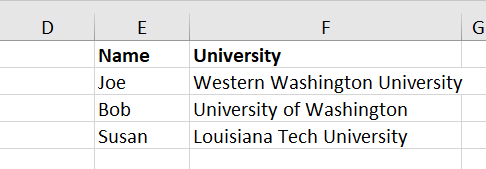
Task 56 Create a dropdown box in A2 that contains the values in E2:E4 as choices.
Task 57 In A4, create a formula that will generate the text "Hi [name], I noticed you recently graduated from [university]! Congratulations!" (without the quotes). The [name] should be the name chosen from the dropdown box you created in A2, and the [university] should be the University associated with that person. This should be a formula that automatically changes values for both the [name] and [university] when a different name is chosen from the dropdown box.
Task 58 Place the text in A4 in the textbox you created in the first task on this tab.
D G E Name Joe Bob Susan F University Western Washington University University of Washington Louisiana Tech University D G E Name Joe Bob Susan F University Western Washington University University of Washington Louisiana Tech University
Step by Step Solution
There are 3 Steps involved in it

Get step-by-step solutions from verified subject matter experts
 Study Help