







Question: Task Description: You are tasked with creating a grocery budget using either Excel or Google Sheets. Assume your budget is and should not exceed $
Task Description:
You are tasked with creating a grocery budget using either Excel or Google Sheets. Assume your budget is and should not exceed $ We expect the task should take no longer than minutes.
Task Instructions for you to complete:
Email Setup:
o Send an email to
hr@astca.net.
Subject: "Preliminary Interview Challenge Submission Your Full Name
Attach your completed spreadsheet to this email.
o In the body of the email, include your full name and a brief message stating that you have completed the task and attached the file.
Spreadsheet Setup:
Open Excel or Google Sheets.
o Create a new spreadsheet named "Grocery Budget Your Full Name
Spreadsheet Content:
Create a table with the following columns:
Item: List at least different grocery items.
Price: The price per unit of each item.
Quantity:The number of units for each item.
Total:The total cost for each item Price Quantity
o Ensure the "Total" column calculates the cost.
Formatting Requirements:
Use basic formatting to make the spreadsheet clear and easy to read. This includes:
Bold headers for each column.
Use borders to separate different sections of the table.
Calculations:
At the bottom of the "Total" column, calculate the sum of all total costs to ensure the total grocery budget does not exceed $
If the sum exceeds $ adjust the quantities or prices of items accordingly.
Submission:
Save your work.
Attach the spreadsheet to the email prepared in step and send it
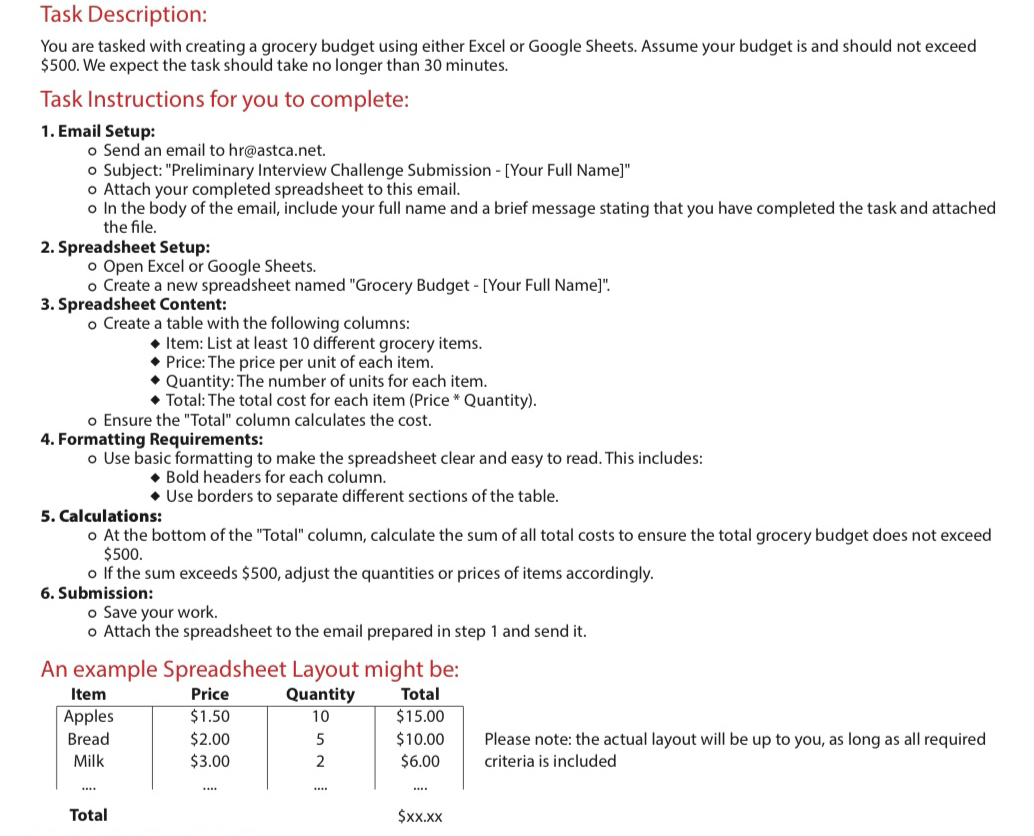
An example Spreadsheet Layout might be:
tableItemPrice,Quantity,Total,tablePlease note: the actual layout will be up to you, as long as all requiredcriteria is includedApples$$
Step by Step Solution
There are 3 Steps involved in it
1 Expert Approved Answer
Step: 1 Unlock

Question Has Been Solved by an Expert!
Get step-by-step solutions from verified subject matter experts
Step: 2 Unlock
Step: 3 Unlock
 Study Help