







Question: Task-1 1. Create a Blank workbook in sheet one and rename it with title basic math operations. 2. Save the Workbook as ExcelLab.xlsx in Document
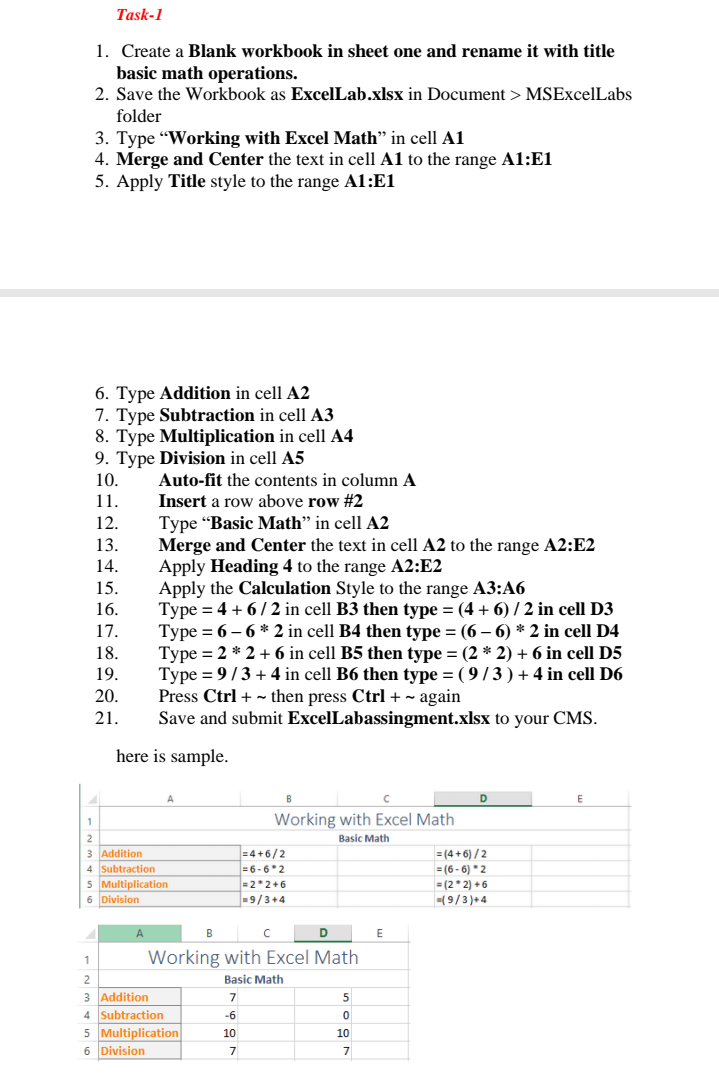
Task-1 1. Create a Blank workbook in sheet one and rename it with title basic math operations. 2. Save the Workbook as ExcelLab.xlsx in Document > MSExcelLabs folder 3. Type "Working with Excel Math in cell A1 4. Merge and Center the text in cell A1 to the range A1:E1 5. Apply Title style to the range A1:E1 6. Type Addition in cell A2 7. Type Subtraction in cell A3 8. Type Multiplication in cell A4 9. Type Division in cell A5 10. Auto-fit the contents in column A 11. Insert a row above row #2 12. Type Basic Math in cell A2 13. Merge and Center the text in cell A2 to the range A2:E2 14. Apply Heading 4 to the range A2:E2 15. Apply the Calculation Style to the range A3:A6 16. Type = 4 + 6/2 in cell B3 then type = (4 + 6)/2 in cell D3 17. Type = 6-6* 2 in cell B4 then type = (6-6)* 2 in cell 04 18. Type = 2 * 2 +6 in cell B5 then type = (2 * 2) + 6 in cell D5 19. Type = 9/3 + 4 in cell B6 then type = (9/3) + 4 in cell D6 20. Press Ctrl + - then press Ctrl + - again 21. Save and submit ExcelLabassingment.xlsx to your CMS. here is sample. D 1 Working with Excel Math Basic Math 2 3 Addition 4 Subtraction 5 Multiplication 6 Division = 4+6/2 = 6-62 =2*2 +6 -9/3+4 = (4+6)/2 = (6-6) 2 = ( 22) + 6 -(9/3)+4 E B C D 1 Working with Excel Math 2 Basic Math 3 Addition 7 5 4 Subtraction -6 0 5 Multiplication 10 10 6 Division 7 7
Step by Step Solution
There are 3 Steps involved in it

Get step-by-step solutions from verified subject matter experts
 Study Help