







Question: //task4 #include #include #include #include #include #define BUFFER_SIZE 1000 //Preprocessor macro int main(int argc, char *argv[]){ //main function with argument int fd,sz; char *buffer; if(argc
//task4
#include
#include
#include
#include
#include
#define BUFFER_SIZE 1000 //Preprocessor macro
int main(int argc, char *argv[]){ //main function with argument
int fd,sz;
char *buffer;
if(argc != 2){
return 0;
}
fd= fopen(argv[1], O_RDONLY); //to open the input file in read only mode
buffer=(char*) malloc(BUFFER_SIZE * sizeof(char)); //allocate memory using malloc
if (buffer==NULL){ //check if memory allocation is successful
return 0;
}
sz=read(fd,buffer,BUFFER_SIZE); //read the content of the file in buffer
buffer[sz]= '\0';
printf(' %s',buffer); //write content of buffer to stdout
free(buffer); //deallocate buffer memory
close(fd); //close file
return 1;
}
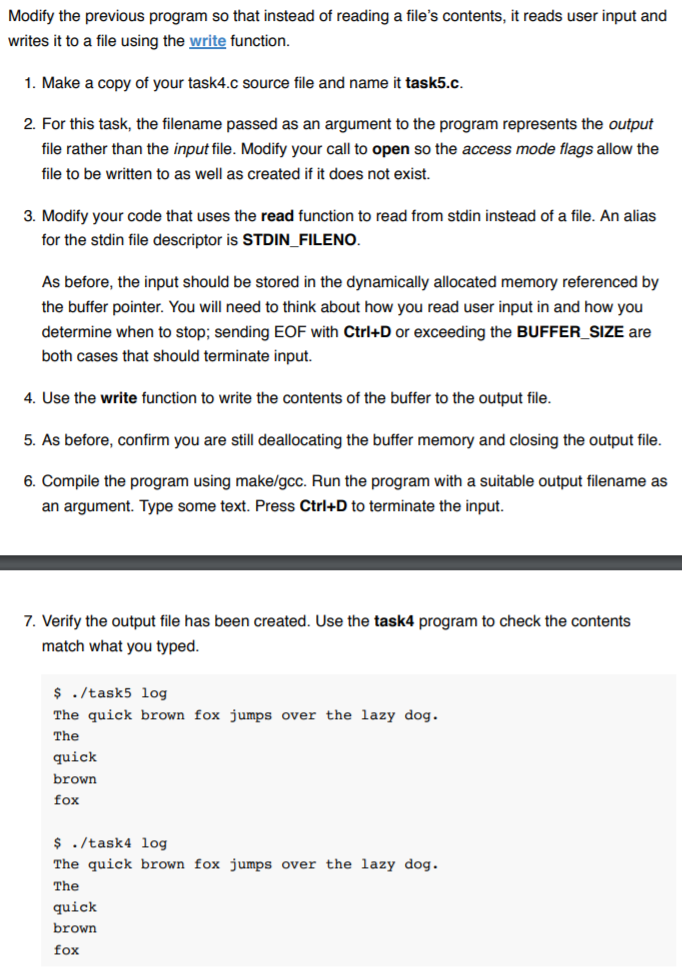
Modify the previous program so that instead of reading a file's contents, it reads user input and writes it to a file using the write function. 1. Make a copy of your task4.c source file and name it task5.c 2. For this task, the filename passed as an argument to the program represents the output file rather than the input file. Modify your call to open so the access mode flags allow the file to be written to as well as created if it does not exist. 3. Modify your code that uses the read function to read from stdin instead of a file. An alias for the stdin file descriptor is STDIN FILENO As before, the input should be stored in the dynamically allocated memory referenced by the buffer pointer. You will need to think about how you read user input in and how you determine when to stop; sending EOF with Ctrl+D or exceeding the BUFFER SIZE are both cases that should terminate input. 4. Use the write function to write the contents of the buffer to the output file 5. As before, confirm you are still deallocating the buffer memory and closing the output file 6. Compile the program using make/gcc. Run the program with a suitable output filename as an argument. Type some text. Press Ctri+D to terminate the input. 7. Verify the output file has been created. Use the task4 program to check the contents match what you typed ./task5 log The quick brown fox jumps over the lazy dog The quick brown fox ./task4 log The quick brown fox jumps over the lazy dog. The quick brown fox
Step by Step Solution
There are 3 Steps involved in it

Get step-by-step solutions from verified subject matter experts
 Study Help