Question: Tax Software Assignment # 1 - Tax Return Problem Note: This problem is for the 2019 tax year. Mike E. Jones and Joan A. Baxter,
Tax Software Assignment # 1 - Tax Return Problem
Note: This problem is for the 2019 tax year.
Mike E. Jones and Joan A. Baxter, each age 43, married on September 7, 2015. Mike and Joan will file a joint return for 2019. Mike's Social Security number is 111-11-1112. Joan's Social Security number is 111-11-1113, and she adopted "Jones" as her married name. They live at 201 Riverview Dr, Augusta, GA 30901.
Mike was divorced from Sally Jones in March 2014. Under the divorce agreement, Mike is to pay Sally $2,000 per month for the next 8 years or until Sally's death, whichever occurs first. Mike pays Sally $24,000 in 2019. In addition, in January 2019, Mike pays Sally $50,000, which is designated as being for her share of the marital property. Also, Mike is responsible for all prior years' income taxes. Sally's Social Security number is 123-45-6788.
Mike's salary for 2019 is $145,000, and his employer, Facebook, Inc. (Federal I.D. No. 98- 7654321), provides him with group term life insurance equal to three times his annual salary. His employer withheld $23,000 for Federal income taxes and $5,000 for state income taxes. The proper amounts were withheld for FICA taxes.
Joan recently graduated from law school and is employed by Legal Liability, Inc. (Federal I.D. No. 11-1111111), as a prosecutor. She receives a salary of $45,000 in 2019. Her employer withheld $8,000 for Federal income taxes and $2,000 for state income taxes. The proper amounts were withheld for FICA taxes.
Joan has $1,000 in qualified dividends on Mesa Corporation stock she inherited. Mike and Joan receive a $1,800 refund on their 2018 state income taxes. They itemized deductions on their 2018 Federal income tax return (total of $17,000).
Mike and Joan pay $3,500 interest and $1,500 property taxes on their personal residence in 2019. Their charitable contributions total $9,500 (all to their church). They paid sales taxes of $1,500, for which they maintain the receipts. Both spouses had health insurance for all months of 2019 and want to contribute to the Presidential Election Campaign.
Required:
THIS RETURN IS FOR 2019 - TAX LAWS IN EFFECT FOR 2019 WILL APPLY
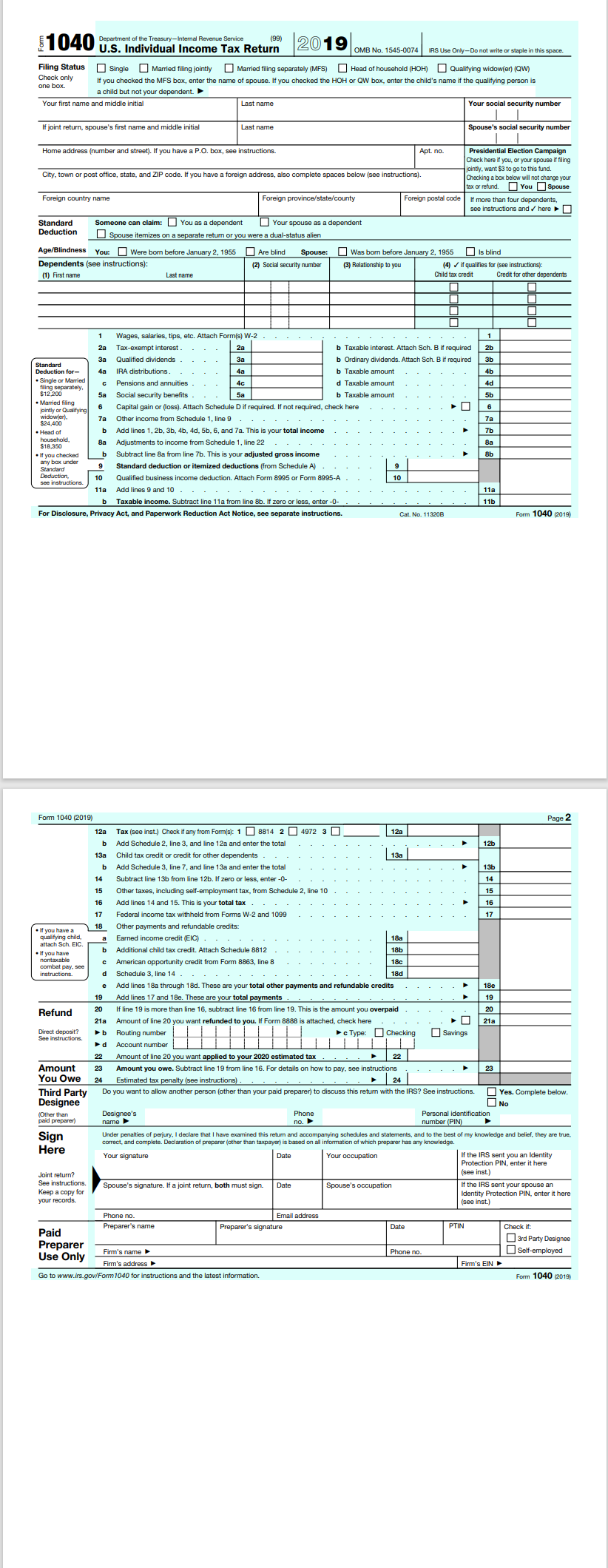
Compute the Jones' net tax payable (or refund due) for 2019. Use and PRINT OUT Form 1040 and Schedule A, Schedule B and the Qualified Dividends and Capital Gain Tax Worksheet to complete this tax return. You are required to complete the 2019 Federal tax return using 2019 Intuit ProConnect Tax Software. You are required to submit the filing copy of the return in pdf format in D2L (courses) to the assignment folder in the module
ment of the Treasury- Internal Revenue Service_ 1040 U.S. Individual Income Tax Return 2019 OMB No. 1545-0074 IRS Use Only-Do not write or staple in this space Filing Status Single ]Married filling jointly Married filing separately (MFS) Head of household (HOH) [Qualifying widow(er) (QW Check only one box. if you checked the MFS box, enter the name of spouse. If you checked the HOH or QW box, enter the child's name if the qualifying person is a child but not your dependent. Your first name and middle initial Last name Your social security number If joint return, spouse's first name and middle initial Last name Spouse's social security number Home address (number and street). If you have a P.O. box, see instructions Apt. no Presidential Election Campaign Check here if you, or your spouse if filing pintly, want $3 to go to this fund. City, town or post office, state, and ZIP code. If you have a foreign address, also complete spaces below (see instructions) Checking a box below will not change your tax or refund. You Spouse Foreign country name Foreign province/state/county Foreign postal code | If more than four dependents, see instructions and / here Standard Someone can claim: You as a dependent Your spouse as a dependent Deduction Spouse itemizes on a separate return or you were a dual-status alien Age/Blindness You: ]Were born before January 2, 1955 ] Are blind Spouse: ]Was born before January 2, 1955 Is blind Dependents (see instructions): (2) Social security number (3) Relationship to you (4) . if qualifies for (see instructions) 1) First name Last name Child tax credit Credit for other dependents Wages, salaries, tips, etc. Attach Form(s) W-2 . 2a Tax-exempt interest . b Taxable interest. Attach Sch. B if required Qualified dividends 38 b Ordinary dividends. Attach Sch. B if required Standard Deduction for butions . b T . Single or Married ons and annuities d Taxable amount filing separately, $12 200 58 enefits Sa b Taxable amount . Married filing 6 jointly or Qualityin in or (loss). Attach Schedule D if required. If not required, check here 6 widowter). 7a $24.400 Other income from Schedule 1, line 9 7a Head of b Add lines 1, 2b, 3b, 4b, 4d, 5b, 6, and 7a. This is your total income 7b 83 8a $18,350 Adjustments to income from Schedule 1, line 22 If you checked b Subtract line 8a from line 7b. This is your adjusted gross inco 8b any box under Standard deduction or itemized deductions (from Schedule A) . 10 Qualified business inc deduction. Attach Form 8995 or Form 10 118 Add lines 9 and 10 118 Taxable income. Subtract line 11a from line 8b. If zero or less, enter -0- 116 For Disclosure, Privacy Act, and Paperwork Reduction Act Notice, see separate instructions. Cat. No. 11320B Form 1040 (2019) Form 1040 (2019) Page 2 12a Tax (see inst.) Check if any from Form(s): 1 8814 2 4972 3 12a b Add Schedule 2, line 3, and line 12a and enter the total 12b 3a Child tax credit or credit for other dependents 13a b Add Schedule 3, line 7, and line 13a and enter the total Subtract line 13b from line 12b. If zero or less, enter -0- Other taxes, including self- ment tax, from Schedule 2, line 10 . 15 Add lines 14 and 15. This is your total tax 16 held from Forms W-2 and 1099 17 Other payments and refund if you have a credit (EIC) If you have Additional child tax credit. Attach Schedule 8812 18b nontaxable 18c combat pay American opportunity credit from Form 8863, line 8 nstructions. d Schedule 3, line 14 - 18d Add lines 18a through 18d. These are your total other p lable credits 180 19 Add lines 17 and 18e. These are your total payments 19 Refund 20 If line 19 is more than line 16, subtract line 16 from line 19. This is the amount you overpaid 20 21a Amount of line 20 you w anded to you. If Form 8888 is attached, check here 21a Direct deposit? See instructions. Routing nu c Type: Checking Savings d Account num 22 Amount of line 20 you want applied to your 2020 estimated tax . Amount 23 Amount you owe. Subtract line 19 from line 16. For details on how to pay, see instructions 23 You Owe 24 Estimated tax penalty (see instructions) . 24 Third Party Do you want to allow another person (other than your paid preparer) to discuss this return with the IRS? See instructions. Yes. Complete below. Designee No Other than Designee's Phone Personal identification paid preparer name no. number (PIN) Sign Under penalties of perjury, I declare that I have examined this return and accompanying schedules and statements, and to the best of my knowledge and belief, they are true. correct, and complete. Declaration of preparer (other than taxpayer) is based on all information of which preparer has any knowledge. Here Your signature Date Your occupation If the IRS sent you an Identity Protection PIN, enter it here Joint return? See instructions Date Spouse's occupation If the IRS sent your spouse an Keep a copy for Spouse's signature. If a joint return, both must sign. dentity Protection PIN, enter it here your records. (see inst) Phone no. Email address Preparer's name Preparer's signature Date PTIN Check it Paid 3rd Party Designee Preparer Firm's name Phone no. Self-employed Use Only Firm's address Firm's EIN Go to www.irs.gov/Form 1040 for instructions and the latest information. Form 1040 (2019)
Step by Step Solution
There are 3 Steps involved in it
1 Expert Approved Answer
Step: 1 Unlock
Question Has Been Solved by an Expert!
Get step-by-step solutions from verified subject matter experts
Step: 2 Unlock
Step: 3 Unlock
Students Have Also Explored These Related Accounting Questions!









 Study Help