





Question: Temperature converter program import java.util.Scanner; import java.lang.ProcessBuilder; import java.util.Scanner; import java.text.DecimalFormat; import java.text.NumberFormat; import java.io.*; public class tempconvtr { /** */ static void pressAnyKeyToContinue() {
 Temperature converter program import java.util.Scanner; import java.lang.ProcessBuilder; import java.util.Scanner; import java.text.DecimalFormat;
import java.text.NumberFormat; import java.io.*; public class tempconvtr { /** */ static void
Temperature converter program
import java.util.Scanner;
import java.lang.ProcessBuilder;
import java.util.Scanner;
import java.text.DecimalFormat;
import java.text.NumberFormat;
import java.io.*;
public class tempconvtr
{
/**
*/
static void pressAnyKeyToContinue()
{
System.out.print(" Press Enter key to continue...");
try { System.in.read(); }
catch(Exception e) {}
System.out.print(" ");
}
/**
*/
static void clrscr()
{
//Clears Screen in java
try {
if (System.getProperty("os.name").contains("Windows"))
new ProcessBuilder("cmd", "/c", "cls").inheritIO().start().waitFor();
else {
//Runtime.getRuntime().exec("clear");
System.out.print("\033[H\033[2J");
System.out.flush();
}
} catch (IOException | InterruptedException ex) {}
}
/**
*/
public static void main (String [] args)
{
Scanner keyboard = new Scanner (System.in);
DecimalFormat df = new DecimalFormat("###,###,###,###,###.00");
double C, F, K;
double fromTempVal, toTempVal = 0.0;
char fromTempTyp, toTempTyp;
String fromTemp = "";
String toTemp = "";
clrscr();
System.out.print(" ");
System.out.print("********************** Temperature ");
System.out.println("Converter ***********************");
System.out.print("** Conversion between celsius (C), ");
System.out.println("Fahrenheit (F), and Kelvin (K) ** ");
System.out.println(" Convert");
System.out.print(" from (C, F, or K): ");
fromTempTyp = ((keyboard.next()).toUpperCase()).charAt(0);
System.out.print(" to (C, F, or K): ");
toTempTyp = ((keyboard.next()).toUpperCase()).charAt(0);
System.out.print(" Enter Temperature: ");
fromTempVal = Double.parseDouble(keyboard.next());
if (((fromTempTyp == 'C') && (toTempTyp == 'C')) ||
((fromTempTyp == 'F') && (toTempTyp == 'F')) ||
((fromTempTyp == 'K') && (toTempTyp == 'K')))
toTempVal = fromTempVal;
else if ((fromTempTyp == 'C') && (toTempTyp == 'F'))
{
// Celsius to Fahrenheit
C = fromTempVal;
F = 1.80*C + 32;
toTempVal = F;
}
else if ((fromTempTyp == 'C') && (toTempTyp == 'K'))
{
// Celsius to Kelvin:
C = fromTempVal;
K = C + 271.15;
toTempVal = K;
}
else if ((fromTempTyp == 'F') && (toTempTyp == 'C'))
{
// Fahrenheit to Celsius
F = fromTempVal;
C = (F - 32.0)/1.80;
toTempVal = C;
}
else if ((fromTempTyp == 'F') && (toTempTyp == 'K'))
{
// Fahrenheit to Kelvin
F = fromTempVal;
K = 5.0/9.0*(F - 32.0) + 273.15;
toTempVal = K;
}
else if ((fromTempTyp == 'K') && (toTempTyp == 'C'))
{
// Kelvin to Celsius
K = fromTempVal;
C = K - 273.15;
toTempVal = C;
}
else if ((fromTempTyp == 'K') && (toTempTyp == 'F'))
{
// Kelvin to Fahrenheit
K = fromTempVal;
F = 1.8*(K - 273.0) + 32.0;
toTempVal = F;
}
else
{
System.out.println("Invalid temperature type, terminating..");
System.exit(0);
}
String msg = " " + Double.toString(fromTempVal) + " degrees";
switch (fromTempTyp)
{
case 'C': fromTemp = " Celsius";
msg += fromTemp;
break;
case 'F': fromTemp = " Fahrenheit";
msg += fromTemp;
break;
case 'K': fromTemp = " Kelvin";
msg += fromTemp;
break;
default:
{
System.exit(0);
System.out.println("Invalid temperature type, terminating..");
}
break;
}
msg += " is equal to " + Double.toString(toTempVal) + " degrees";
switch (toTempTyp)
{
case 'C': toTemp = " Celsius.";
msg += toTemp;
break;
case 'F': toTemp = " Fahrenheit.";
msg += toTemp;
break;
case 'K': toTemp = " Kelvin.";
msg += toTemp;
break;
default:
{
System.exit(0);
System.out.println("Invalid temperature type, terminating..");
}
break;
}
//System.out.println(msg+" ");
System.out.print(" ");
String txt = " %.2f degrees %s is equal to %.2f degrees %s";
System.out.printf(" %.2f degrees%s is equal to %.2f degrees%s", fromTempVal, fromTemp, toTempVal, toTemp);
System.out.print(" ");
pressAnyKeyToContinue();
}
}

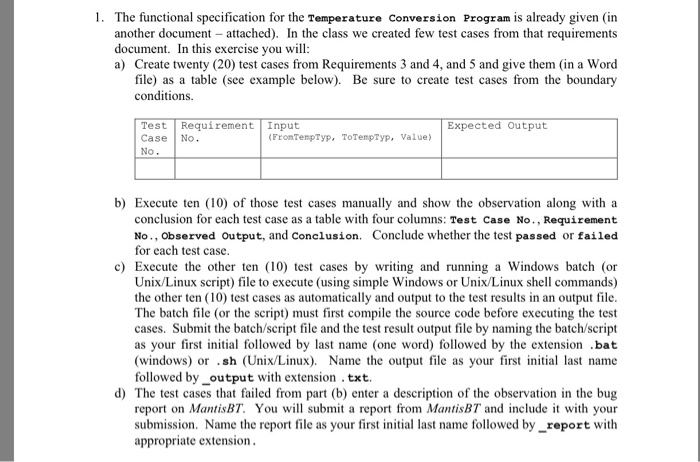
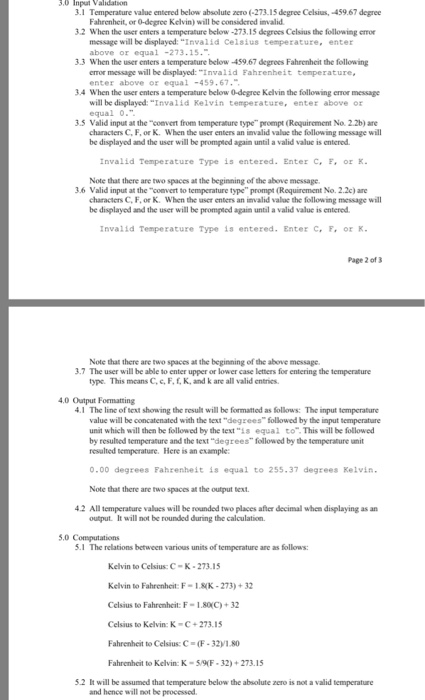
1. The functional specification for the Temperature Conversion Program is already given (in another document attached). In the class we created few test cases from that requirements document. In this exercise you will a) Create twenty (20) test cases from Requirements 3 and 4, and 5 and give them in a Word file) as a table (see example below). Be sure to create test cases from the boundary conditions. Test Requirement Input Case No No Expected Output (FronTempTyp, ToTenpTyp, Value) b) Execute ten (10) of those test cases manually and show the observation along with a conclusion for each test case as a table with four columns: Test Case No., Requirement No., observed Output, and Conclusion Conclude whether the test passed or failed for each test casc c) Execute the other ten (10) test cases by writing and running a Windows batch (or Unix/Linux script) file to execute (using simple Windows or Unix/Linux shell commands) the other ten (10) test cases as automatically and output to the test results in an output file The batch file (or the script) must first compile the source code before executing the test cases. Submit the batch/script file and the test rest output file by naming the batch/script as your first initial followed by last name (one word) followed by the extension .bat (windows) or .sh (Unix/Linux). Name the output file as your first iniial last name followed by_output with extension .txt. d) The test cases that failed from part (b) enter a description of the observation in the bug report on MantisBT. You will submit a report from MantisBT and include it with your submission. Name the report file as your first initial last name followed by_report with appropriate extension 1. The functional specification for the Temperature Conversion Program is already given (in another document attached). In the class we created few test cases from that requirements document. In this exercise you will a) Create twenty (20) test cases from Requirements 3 and 4, and 5 and give them in a Word file) as a table (see example below). Be sure to create test cases from the boundary conditions. Test Requirement Input Case No No Expected Output (FronTempTyp, ToTenpTyp, Value) b) Execute ten (10) of those test cases manually and show the observation along with a conclusion for each test case as a table with four columns: Test Case No., Requirement No., observed Output, and Conclusion Conclude whether the test passed or failed for each test casc c) Execute the other ten (10) test cases by writing and running a Windows batch (or Unix/Linux script) file to execute (using simple Windows or Unix/Linux shell commands) the other ten (10) test cases as automatically and output to the test results in an output file The batch file (or the script) must first compile the source code before executing the test cases. Submit the batch/script file and the test rest output file by naming the batch/script as your first initial followed by last name (one word) followed by the extension .bat (windows) or .sh (Unix/Linux). Name the output file as your first iniial last name followed by_output with extension .txt. d) The test cases that failed from part (b) enter a description of the observation in the bug report on MantisBT. You will submit a report from MantisBT and include it with your submission. Name the report file as your first initial last name followed by_report with appropriate extension

Step by Step Solution

There are 3 Steps involved in it

1 Expert Approved Answer
Step: 1 Unlock blur-text-image
Question Has Been Solved by an Expert!

Get step-by-step solutions from verified subject matter experts

Step: 2 Unlock
Step: 3 Unlock

Students Have Also Explored These Related Databases Questions!