







Question: template? * Finder(?const? ?K?& ?key?, ?Node? * ?node?); Node? * root_; // DECLARE ANY HELPER FUNCTIONS }; template? ::Find(?const? ?K?& ?key?) { Node? * node
template?
struct? ?Node
{
Node() : parent_(0), left_(0), right_(0) { }
bool? IsRoot() ?const? { ?return?(parent_ == NULL); }
bool? IsExternal() ?const? { ?return?((left_ == NULL) && (right_ == NULL)); }
K? key_;
Node?* left_;
Node?* parent_;
Node?* right_;
V? value_;
};
template?
class? ?BinarySearchTree
{
public? :
bool? Find(?const? ?K?& ?key?);
int? size(); // NEW MEMBER FUNCTION TO BE IMPLEMENTED
private? :
Node?* Finder(?const? ?K?& ?key?, ?Node?* ?node?);
Node?* root_;
// DECLARE ANY HELPER FUNCTIONS
};
template?
bool? ?BinarySearchTree?::Find(?const? ?K?& ?key?) {
Node?* node = Finder(?key?, root_);
if? (!node->IsExternal()) ?// found ?
return? ?true? ;
else? ?// not found
?return? ?false? ;
} template?
Node?* ?BinarySearchTree?::Finder(?const? ?K?& ?key?, ?Node?* ?node?) {
if? (?node?->IsExternal())
?return?(?node?);
if? (?key? == ?node?->key_)
?return?(?node?);
else? ?if? (?key? key_)
?return?(Finder(?key?, ?node?->left_));
else
?return?(Finder(?key?, ?node?->right_));
}
/ew function to be implemented
template?
int BinarySearchTree::size() { }
Space for any helper functions:
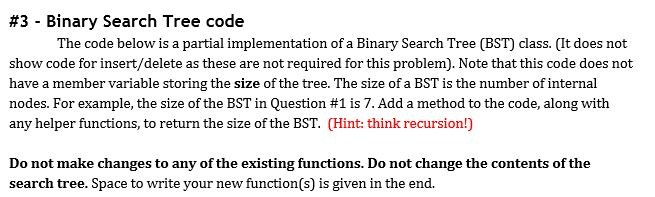
#3 - Binary Search Tree code The code below is a partial implementation of a Binary Search Tree (BST) class. (It does not show code for insert/delete as these are not required for this problem), Note that this code does not have a member variable storing the size of the tree. The size of a BST is the number of internal nodes. For example, the size of the BST in Question #1 is 7, Add a method to the code, along with any helper functions, to return the size of the BST. (Hint: think recursion!) Do not make changes to any of the existing functions. Do not change the contents of the search tree. Space to write your new function(s) is given in the end
Step by Step Solution
There are 3 Steps involved in it

Get step-by-step solutions from verified subject matter experts
 Study Help