







Question: Term - by - Document Matrix A 'term - by - document' matrix is a matrix that relates search terms to documents that contain relevant
TermbyDocument Matrix
A 'termbydocument' matrix is a matrix that relates search terms to documents that contain
relevant search terms. Consider a simple example with nine search terms and seven document titles
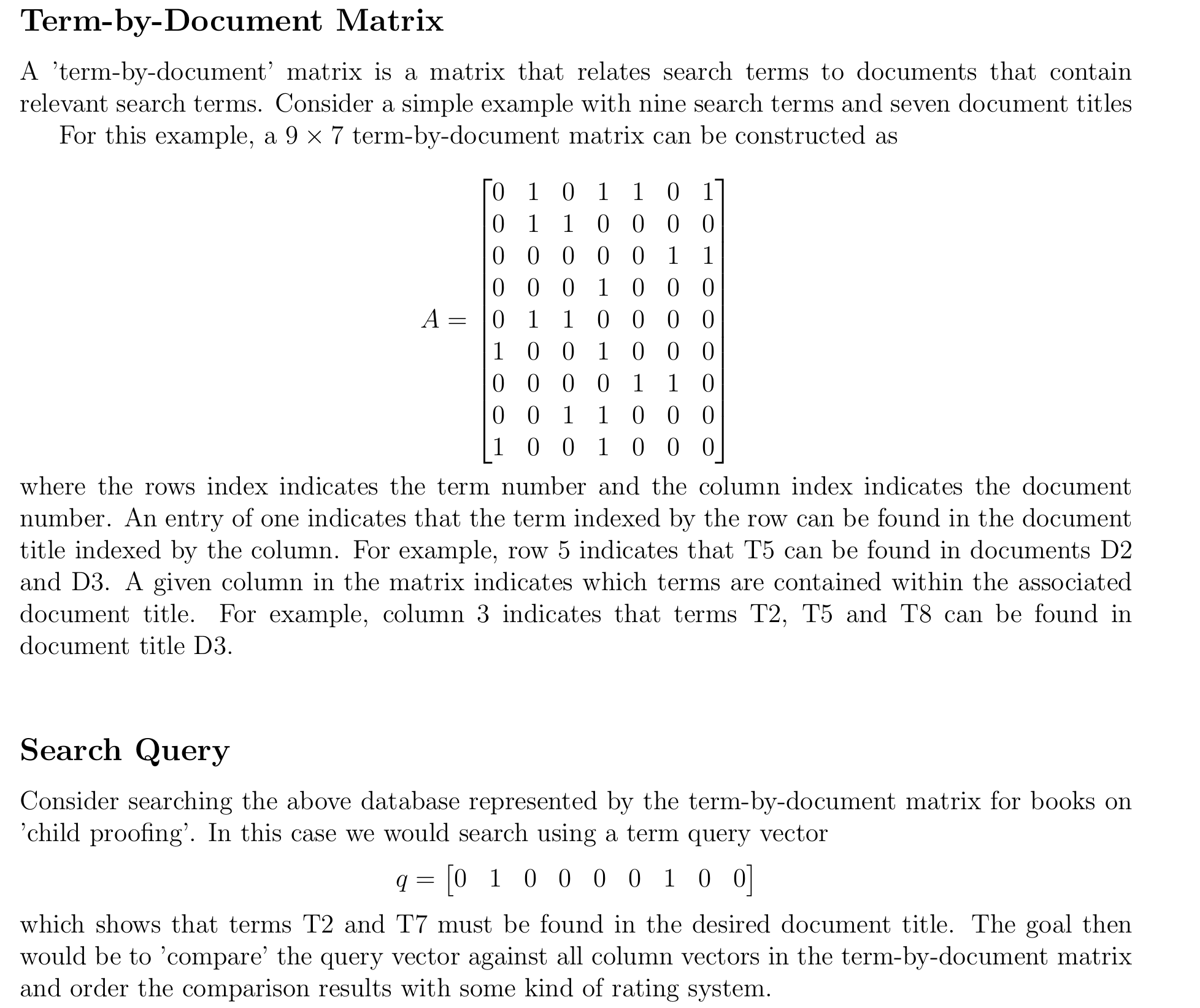
For this example, a termbydocument matrix can be constructed as
where the rows index indicates the term number and the column index indicates the document
number. An entry of one indicates that the term indexed by the row can be found in the document
title indexed by the column. For example, row indicates that T can be found in documents D
and D A given column in the matrix indicates which terms are contained within the associated
document title. For example, column indicates that terms T T and T can be found in
document title D
Search Query
Consider searching the above database represented by the termbydocument matrix for books on
'child proofing'. In this case we would search using a term query vector
which shows that terms T and T must be found in the desired document title. The goal then
would be to 'compare' the query vector against all column vectors in the termbydocument matrix
and order the comparison results with some kind of rating system.
Given the termbydocument matrix A and the query vector q shown in the previous sections above,
use Python and Numpy to perform the following computations.
Construct the matrix A and the query vector q
Construct a new matrix A by normalizing the columns of A so that each column in A has
unit norm.
Normalize the query vector q to form a unit vector q
Compute the dot product between q and every column vector of A Interpret your calculation
and determine which document titles are most related to the query.
Upload your welldocumented Python script py le to the Search query matrix application
Assignment in Canvas. Make sure to create a comments section that provides the
results of your computation and explains your results within your Python script
or you will not receive credit
Step by Step Solution
There are 3 Steps involved in it
1 Expert Approved Answer
Step: 1 Unlock

Question Has Been Solved by an Expert!
Get step-by-step solutions from verified subject matter experts
Step: 2 Unlock
Step: 3 Unlock
 Study Help