







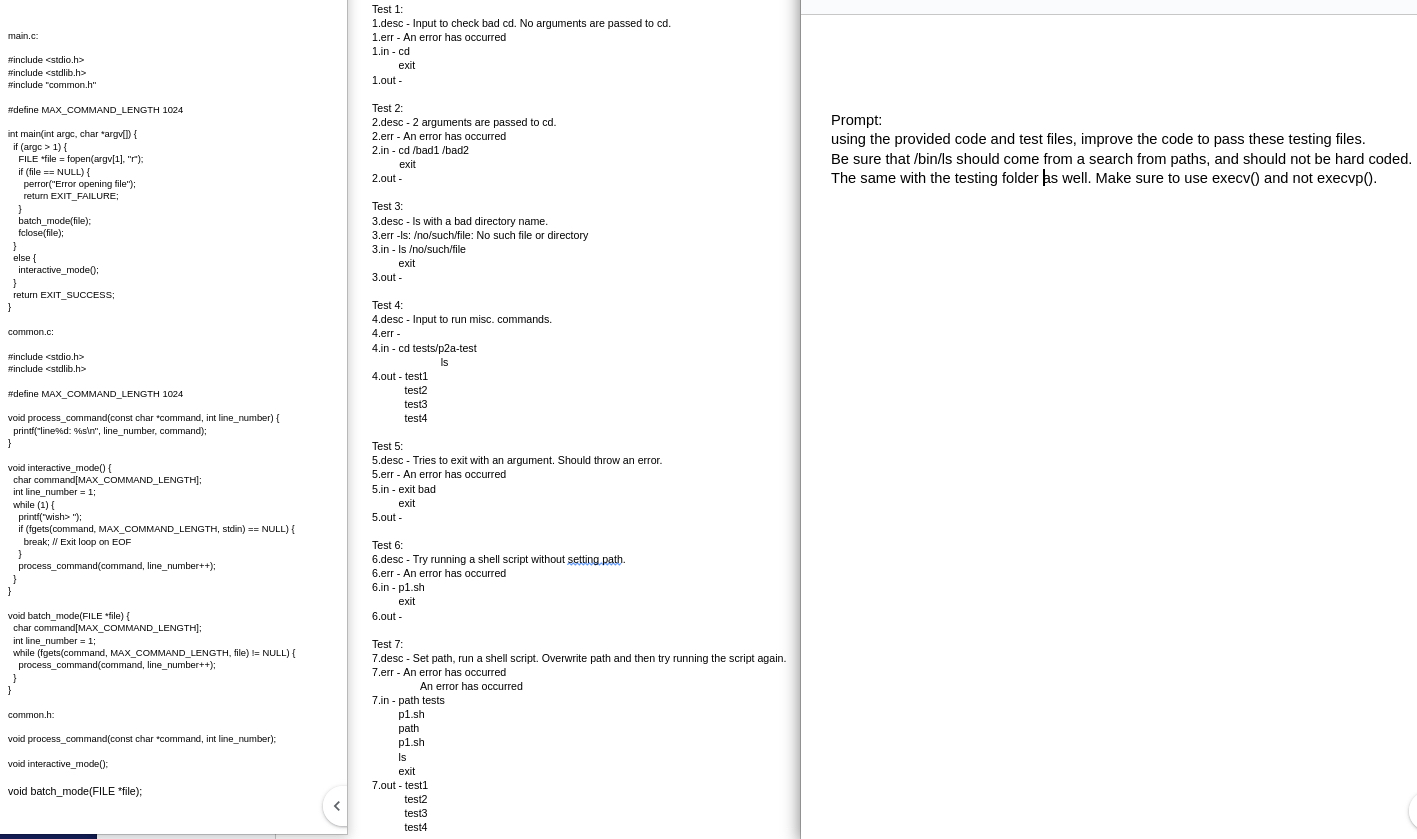
Question: Test 1 : 1 . desc - Input to check bad cd . No arguments are passed to cd . 1 . err - An
Test :
desc Input to check bad cd No arguments are passed to cd
err An error has occurred
in cd
exit
out
Test :
desc arguments are passed to
err An error has occurred
in cd badbad
exit
out
Test :
desc Is with a bad directory name.
err Is: nosuchfile: No such file or directory
in Is nosuchfile
exit
out
Test :
desc Input to run misc. commands.
err
in cd testspatest
outtest is
test test
test
test
void processcommandconst char "command, int linenumber
printflined: sin linenumber, command;
void interactivemode
char commandMAXCOMMANDLENGTH;
int linenumber ;
while f
printfwish;
if fgetscommand MAXCOMMANDLENGTH, stdin NULL
break; Exit loop on EOF
processcommandcommand linenumber;
void batchmodeFILE file
char commandMAXCOMMANDLENGTH;
int linenumber ;
while fgetscommand MAXCOMMANDLENGTH, file NULL
processcommandcommand linenumber;
common.h:
void processcommandconst char command int linenumber;
void interactivemode:
void batchmodeFILE file;
Test :
desc Tries to exit with an argument. Should throw an error.
err An error has occurred
in exit bad
exit
out
Test :
desc Try running a shell script without setting path.
err An error has occurred
in
psh
exit
out
Test :
desc Set path, run a shell script. Overwrite path and then try running the script again.
err An error has occurred
An error has occurred
in path tests
psh
path
psh
Is
exit
out test
test
test
Prompt:
using the provided code and test files, improve the code to pass these testing files.
Be sure that binls should come from a search from paths, and should not be hard coded. The same with the testing folder as well. Make sure to use execv and not execvp
Step by Step Solution
There are 3 Steps involved in it
1 Expert Approved Answer
Step: 1 Unlock

Question Has Been Solved by an Expert!
Get step-by-step solutions from verified subject matter experts
Step: 2 Unlock
Step: 3 Unlock
 Study Help