







Question: Text Based Game Cheat Sheet (Links to an external 1. Use the following starter code for your TextBasedGame class: class TextBasedGame { public void intro()
Text Based Game Cheat Sheet (Links to an external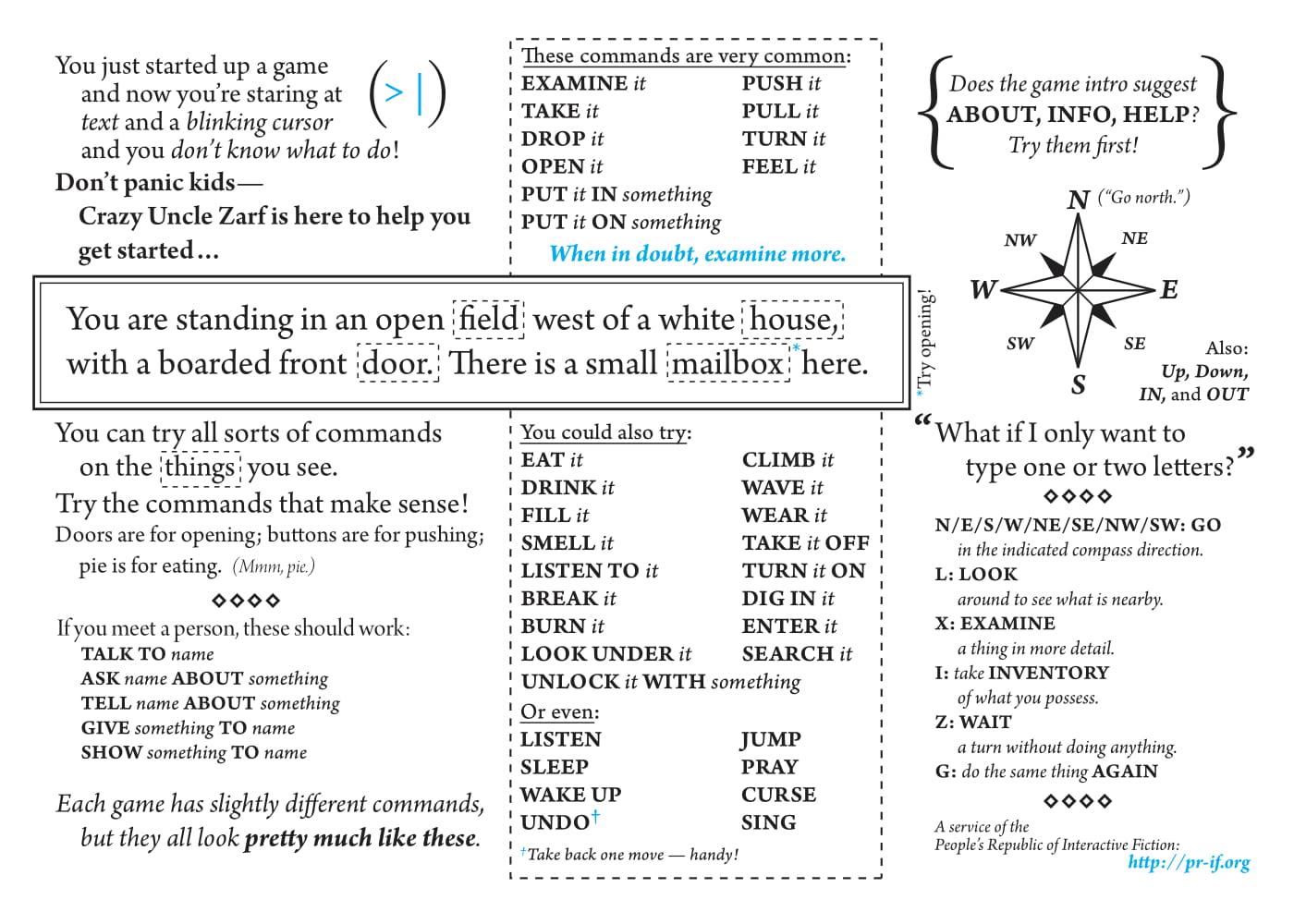
1. Use the following starter code for your TextBasedGame class:
class TextBasedGame { public void intro() { System.out.println("You are standing in an open field west of a white house, with a boarded front door. There is a small mailbox here"); } } Important Note: The TextBasedGame class cannot hold the main method. You will need a separate class to hold the main method. The other class may be named Main or Application or your project name.
2. Create a method for the TextBasedGame class that will take a command as input from the user. In the input method, use conditional statements to handle these commands-
- about - if the user inputs this command, run the intro method
- help - if the user inputs this command, run a help method that will display a list of commands
- open - if the user inputs this command, ask the user which item to open, then run the open method (see below).
- quit - if the user inputs this command, end the game
- One additional command. Select it from the Text Based Game Cheat Sheet. (Links to an external site.) Create a method for the command and call that method if the user inputs the command.
Hint: For your conditional statements, read this Module topic on how to compare two String instances in an if clause and pay close attention to the last section on Scanner: Comparing Strings
3. Create an open method with the following header:
public void open(String item)
The parameter item will hold the item being opened.
This method should display a message indicating which item has been opened. For example, depending on the argument provided when the method is called, the open method might display:
mailbox is open.
Optionally, display a message indicating what is found inside. You decide what is found in the item. For example, this might be displayed (not required):
key is found inside
4. In the main method of your other class (which may be called Main, Application or project name), create an instance of the TextBasedGame class and call the input method for testing. Be sure to test all commands.
5. Copy and paste the output of your program into a multi-line comment at the bottom of your .java file or paste it into the submission window (2 points)
/* This is a multi-line comment in Java */
Final Check Before Submitting:
- You should have these six (6) methods in the TextBasedGame class:
- input
- intro
- about
- help
- open
- quit
- one additional method for a command from the Text Based Game Cheat Sheet. (Links to an external site.)
- The main method in the other class (Main, Application or project name) should create an instance of the TextBasedGame class and use that instance to call the input method.
- Test each command.
- Paste your output for all test runs into a multi-line comment at the bottom of your .java file or in the assignment submission window.
(1) intro suggest You just started up a game and now you're staring at text and a blinking cursor and you don't know what to do! Don't panic kids Crazy Uncle Zarf is here to help you get started... These commands are very common: EXAMINE it PUSH it I TAKE it PULL it DROP it TURN it I OPEN it FEEL it PUT it IN something PUT it ON something When in doubt, examine more. Does the game ABOUT, INFO, HELP? Try them first! N ("Go north.") NW NE W E You are standing in an open field west of a white house, with a boarded front door. There is a small mailbox here. *Try opening! SW SE Also: Up, Down, IN, and OUT What if I only want to type one or two letters?' 22 You can try all sorts of commands on the things you see. Try the commands that make sense! Doors are for opening; buttons are for pushing; pie is for eating. (Mmm, pie.) If you meet a person, these should work: TALK TO name ASK name ABOUT something TELL name ABOUT something GIVE something TO name SHOW something To name You could also try: I EAT it CLIMB it DRINK it WAVE it FILL it WEAR it SMELL it TAKE it OFF LISTEN TO it TURN it ON BREAK it DIG IN it BURN it ENTER it LOOK UNDER it SEARCH it UNLOCK it WITH something ! Or even: LISTEN JUMP SLEEP PRAY WAKE UP CURSE UNDO SING + Take back one move handy! N/E/S/W/NE/SE/NW/SW: GO in the indicated compass direction. L: LOOK around to see what is nearby. X: EXAMINE a thing in more detail. I: take INVENTORY of what you possess. Z: WAIT a turn without doing anything. G: do the same thing AGAIN Each game has slightly different commands, but they all look pretty much like these. A service of the People's Republic of Interactive Fiction: http://pr-if.org (1) intro suggest You just started up a game and now you're staring at text and a blinking cursor and you don't know what to do! Don't panic kids Crazy Uncle Zarf is here to help you get started... These commands are very common: EXAMINE it PUSH it I TAKE it PULL it DROP it TURN it I OPEN it FEEL it PUT it IN something PUT it ON something When in doubt, examine more. Does the game ABOUT, INFO, HELP? Try them first! N ("Go north.") NW NE W E You are standing in an open field west of a white house, with a boarded front door. There is a small mailbox here. *Try opening! SW SE Also: Up, Down, IN, and OUT What if I only want to type one or two letters?' 22 You can try all sorts of commands on the things you see. Try the commands that make sense! Doors are for opening; buttons are for pushing; pie is for eating. (Mmm, pie.) If you meet a person, these should work: TALK TO name ASK name ABOUT something TELL name ABOUT something GIVE something TO name SHOW something To name You could also try: I EAT it CLIMB it DRINK it WAVE it FILL it WEAR it SMELL it TAKE it OFF LISTEN TO it TURN it ON BREAK it DIG IN it BURN it ENTER it LOOK UNDER it SEARCH it UNLOCK it WITH something ! Or even: LISTEN JUMP SLEEP PRAY WAKE UP CURSE UNDO SING + Take back one move handy! N/E/S/W/NE/SE/NW/SW: GO in the indicated compass direction. L: LOOK around to see what is nearby. X: EXAMINE a thing in more detail. I: take INVENTORY of what you possess. Z: WAIT a turn without doing anything. G: do the same thing AGAIN Each game has slightly different commands, but they all look pretty much like these. A service of the People's Republic of Interactive Fiction: http://pr-if.org
Step by Step Solution
There are 3 Steps involved in it

Get step-by-step solutions from verified subject matter experts
 Study Help