







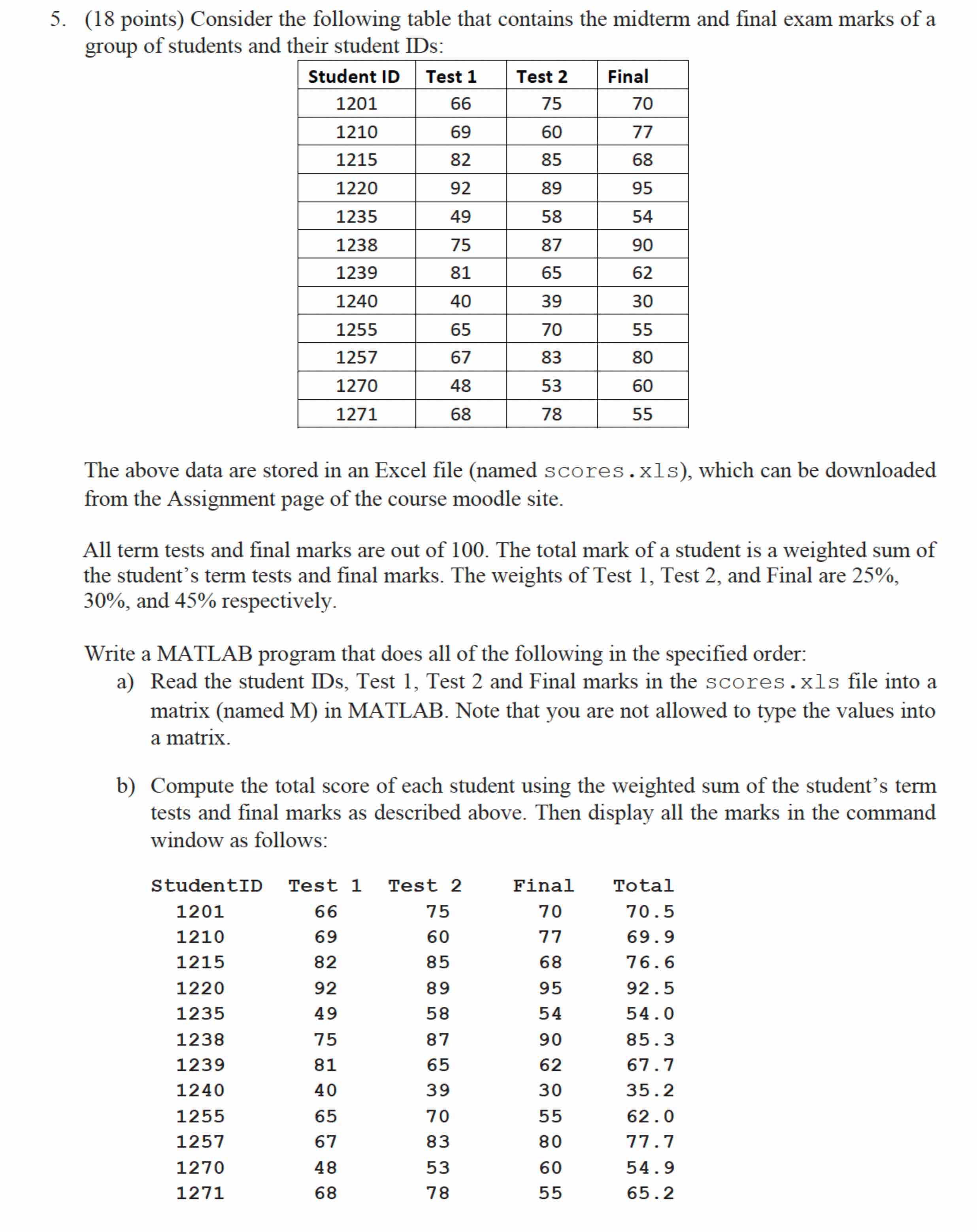
Question: The above data are stored in an Excel file ( named scores.xls ) , which can be downloaded from the Assignment page of the course
The above data are stored in an Excel file named scores.xls which can be downloaded from the Assignment page of the course moodle site. points Consider the following table that contains the midterm and final exam marks of a
group of students and their student IDs:
The above data are stored in an Excel file named scores.xls which can be downloaded
from the Assignment page of the course moodle site.
All term tests and final marks are out of The total mark of a student is a weighted sum of
the student's term tests and final marks. The weights of Test Test and Final are
and respectively.
Write a MATLAB program that does all of the following in the specified order:
a Read the student IDs, Test Test and Final marks in the scores.xls file into a
matrix named M in MATLAB. Note that you are not allowed to type the values into
a matrix.
b Compute the total score of each student using the weighted sum of the student's term
tests and final marks as described above. Then display all the marks in the command
window as follows:
All term tests and final marks are out of The total mark of a student is a weighted sum of the students term tests and final marks. The weights of Test Test and Final are and respectively.
Write a MATLAB program that does all of the following in the specified order:
a
Read the student IDs, Test Test and Final marks in the scores.xls file into a matrix named M in MATLAB. Note that you are not allowed to type the values into a matrix.
b
Compute the total score of each student using the weighted sum of the students term tests and final marks as described above. Then display all the marks in the command window as follows:
Step by Step Solution
There are 3 Steps involved in it
1 Expert Approved Answer
Step: 1 Unlock

Question Has Been Solved by an Expert!
Get step-by-step solutions from verified subject matter experts
Step: 2 Unlock
Step: 3 Unlock
 Study Help