







Question: The assignment here is to write an app using a database named CIT 3 2 1 with a collection named students; we will provide a
The assignment here is to write an app using a database named CIT with a collection named students; we will provide a CSV file of the data. You need to use Vue.js to display pages.
The database contains documents. The first rows of the CSV file look like this:
sid lastname firstname major hrsattempted gpapoints
Astaire Humphrey CIT
Bacall Katharine EET
Bergman Bette EET
Bogart Cary CIT
Brando James WEB
Cagney Marlon CIT
GPA is calculated as gpapoints divided by hrsattempted. GPA points would have been arrived at by adding points for each credit hour of A points for each credit hour of B and so on Humphrey Astaire would have a gpa of
The CSV file will be on the course website. It is named CITcsv
Here is what your model should look like. The model is named Student.js
var mongoose requiremongoose;
mongoose.connectmongodb::CIT;
var studentSchema new mongoose.Schema
sid: type: Number, required: true, unique: true
lastname: type: String, required: true
firstname: type: String, required: true
major: type: String, required: true
hrsattempted: type: Number, required: true
gpapoints: type: Number, required: true
;
module.exports mongoose.modelStudent studentSchema;
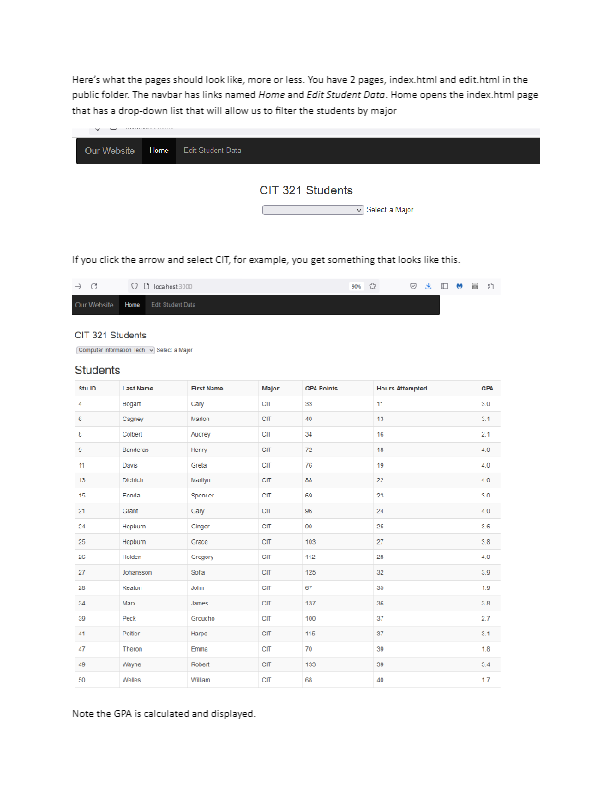
Heres what the pages should look like, more or less. You have pages, index.html and edit.html in the public folder. The navbar has links named Home and Edit Student Data. Home opens the index.html page that has a dropdown list that will allow us to filter the students by major If you click the arrow and select CIT, for example, you get something that looks like this.
Note the GPA is calculated and displayed.
You can calculate the gpa a couple of ways, but this will work.
studentgpapoints student.hrsattemptedtoFixed
On the other hand, when you click the navbar link for Edit Student Data, you get this, with the first
record displaying as the page loads.
The operation of this page is described in the lecture notes for the week of Vue.js in the carssale
example. But The buttons should allow you to step forward and backward thru the data and not exceed
the limits and you should be able to update the major, gpa points and hrs attempted of a student. You
should also be able to delete a student.
Here are the requirements.
Use Vue.js and Bootstrap. Your pages do not need to look exactly like mine, but they need to
convey the same information.
Your database and collection, along with your model, must be compatible with mine.
The index page should allow filtering all students by major and displaying their GPA
The Edit Student data pages should allow displaying each document one at a time, allowing editing major, gpa points, and hrs attempted.
You should be able to delete a student.
you need to put yout two JavaScript files somewhere in the public public folder and link them to the appropriate html page.
Your routes in index.js should only have to provide data. Formatting is done thru Vue.js
Step by Step Solution
There are 3 Steps involved in it
1 Expert Approved Answer
Step: 1 Unlock

Question Has Been Solved by an Expert!
Get step-by-step solutions from verified subject matter experts
Step: 2 Unlock
Step: 3 Unlock
 Study Help