Question: The assignment specification The java file JabberServer.java package com.bham.fsd.assignments.jabberserver; import java.sql.Connection; import java.sql.DriverManager; import java.sql.ResultSet; import java.sql.SQLException; import java.util.ArrayList; import java.util.Collections; import java.io.BufferedReader; import java.io.FileReader;
The assignment specification
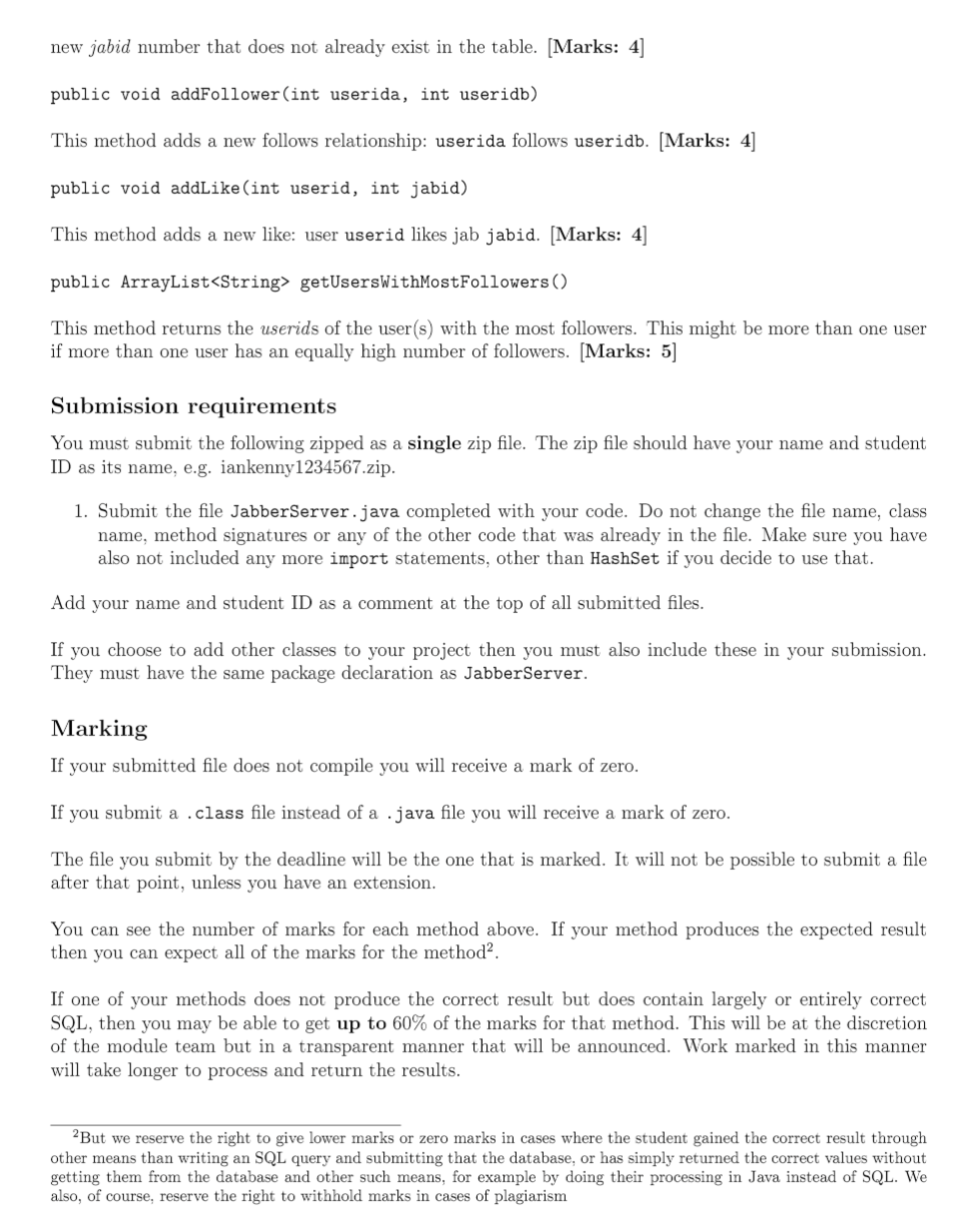
![{ return conn; } public static void main(String[] args) { JabberServer jabber](https://dsd5zvtm8ll6.cloudfront.net/si.experts.images/questions/2024/09/66f53411d6fa1_68166f5341156d68.jpg)
The java file JabberServer.java
package com.bham.fsd.assignments.jabberserver;
import java.sql.Connection; import java.sql.DriverManager; import java.sql.ResultSet; import java.sql.SQLException; import java.util.ArrayList; import java.util.Collections; import java.io.BufferedReader; import java.io.FileReader; import java.io.IOException; import java.sql.PreparedStatement;
public class JabberServer { private static String dbcommand = "jdbc:postgresql://127.0.0.1:5432/postgres"; private static String db = "postgres"; private static String pw = "";
private static Connection conn; public static Connection getConnection() { return conn; }
public static void main(String[] args) { JabberServer jabber = new JabberServer(); JabberServer.connectToDatabase(); jabber.resetDatabase(); /* * Put calls to your methods here to test them. */ } public ArrayList getFollowerUserIDs(int userid) {
/* * Add your code to this method here. * Remove the 'return null' statement and add your own return statement. */ return null; }
public ArrayList getFollowingUserIDs(int userid) {
/* * Add your code to this method here. * Remove the 'return null' statement and add your own return statement. */ return null; } public ArrayList> getMutualFollowUserIDs() {
/* * Add your code to this method here. * Remove the 'return null' statement and add your own return statement. */ return null; }
public ArrayList> getLikesOfUser(int userid) { /* * Add your code to this method here. * Remove the 'return null' statement and add your own return statement. */ return null; } public ArrayList> getTimelineOfUser(int userid) { /* * Add your code to this method here. * Remove the 'return null' statement and add your own return statement. */ return null; }
public void addJab(String username, String jabtext) { /* * Add your code to this method here. */ } public void addUser(String username, String emailadd) { /* * Add your code to this method here. */ } public void addFollower(int userida, int useridb) { /* * Add your code to this method here. */ } public void addLike(int userid, int jabid) { /* * Add your code to this method here. */ } public ArrayList getUsersWithMostFollowers() { /* * Add your code to this method here. * Remove the 'return null' statement and add your own return statement. */ return null; } public JabberServer() {} public static void connectToDatabase() {
try { conn = DriverManager.getConnection(dbcommand,db,pw);
}catch(Exception e) { e.printStackTrace(); } }
/* * Utility method to print an ArrayList of ArrayLists to the console. */ private static void print2(ArrayList> list) { for (ArrayList s: list) { print1(s); System.out.println(); } } /* * Utility method to print an ArrayList to the console. */ private static void print1(ArrayList list) { for (String s: list) { System.out.print(s + " "); } }
public void resetDatabase() { dropTables(); ArrayList defs = loadSQL("jabberdef"); ArrayList data = loadSQL("jabberdata"); executeSQLUpdates(defs); executeSQLUpdates(data); } private void executeSQLUpdates(ArrayList commands) { for (String query: commands) { try (PreparedStatement stmt = conn.prepareStatement(query)) { stmt.executeUpdate(); } catch (SQLException e) { e.printStackTrace(); } } }
private ArrayList loadSQL(String sqlfile) { ArrayList commands = new ArrayList(); try { BufferedReader reader = new BufferedReader(new FileReader(sqlfile + ".sql")); String command = ""; String line = ""; while ((line = reader.readLine())!= null) { if (line.contains(";")) { command += line; command = command.trim(); commands.add(command); command = ""; } else { line = line.trim(); command += line + " "; } } reader.close(); } catch (IOException e) { e.printStackTrace(); } return commands; }
private void dropTables() { String[] commands = { "drop table jabberuser cascade;", "drop table jab cascade;", "drop table follows cascade;", "drop table likes cascade;"}; for (String query: commands) { try (PreparedStatement stmt = conn.prepareStatement(query)) { stmt.executeUpdate(); } catch (SQLException e) { e.printStackTrace(); } } } }
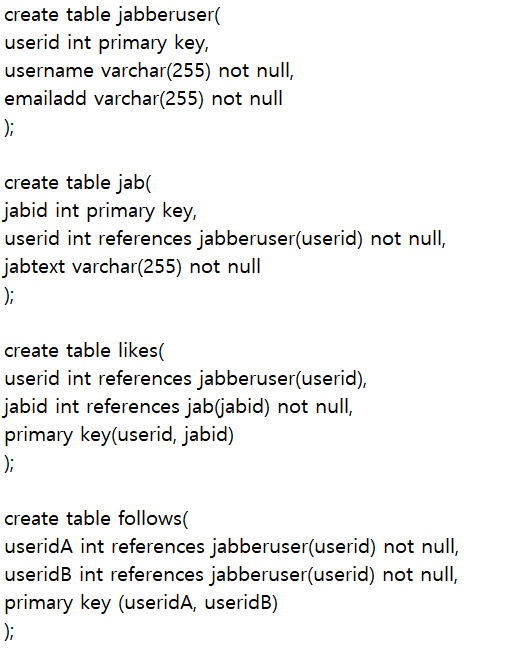
The SQL definitions
The SQL data
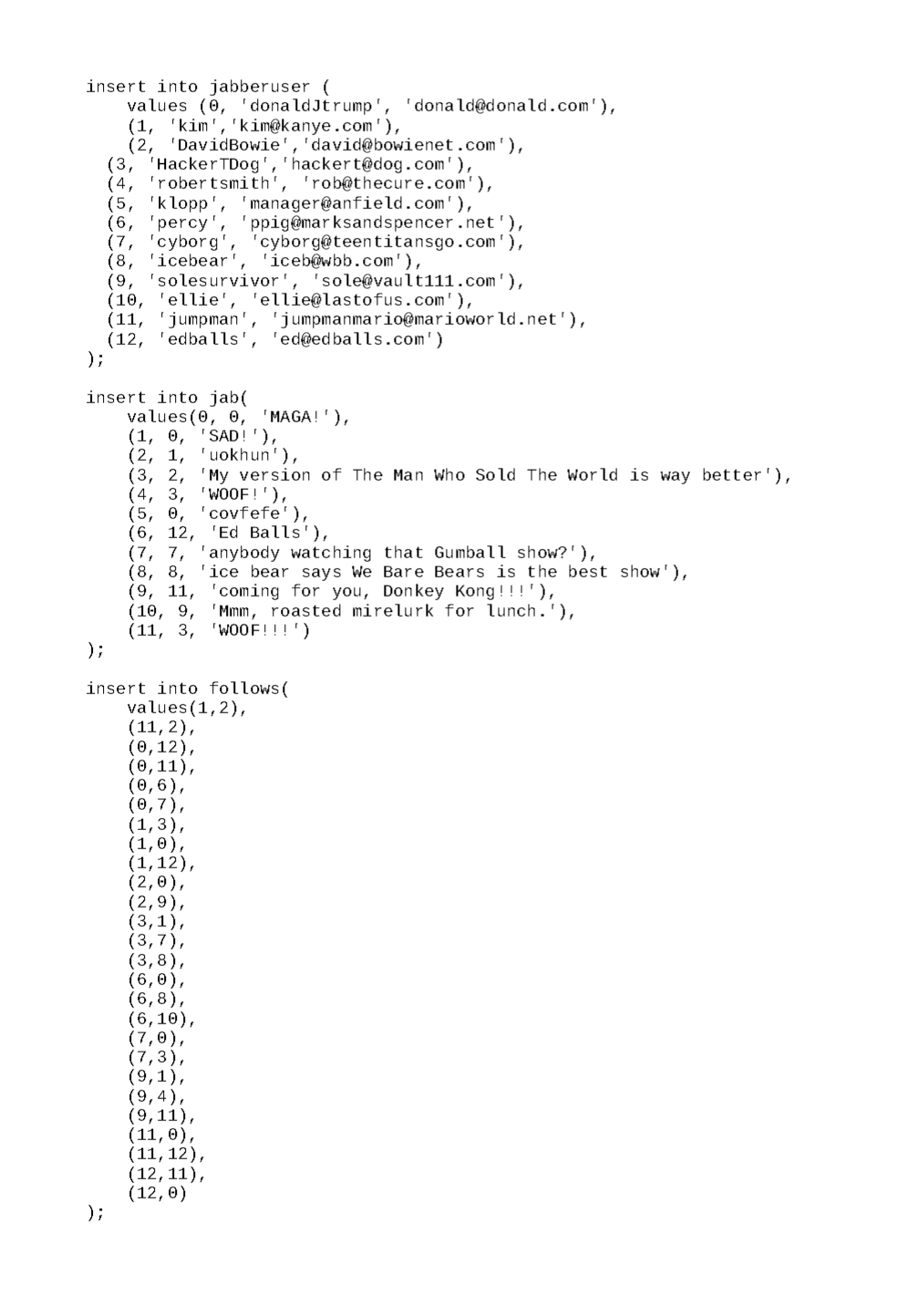
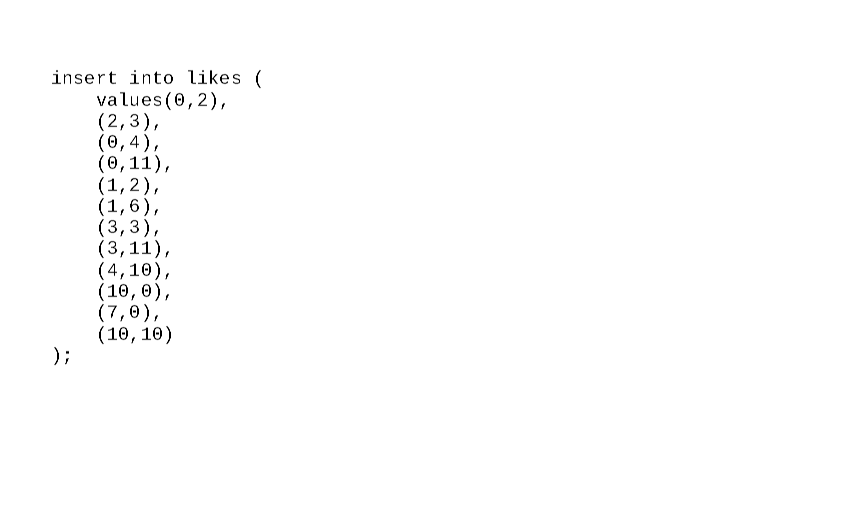
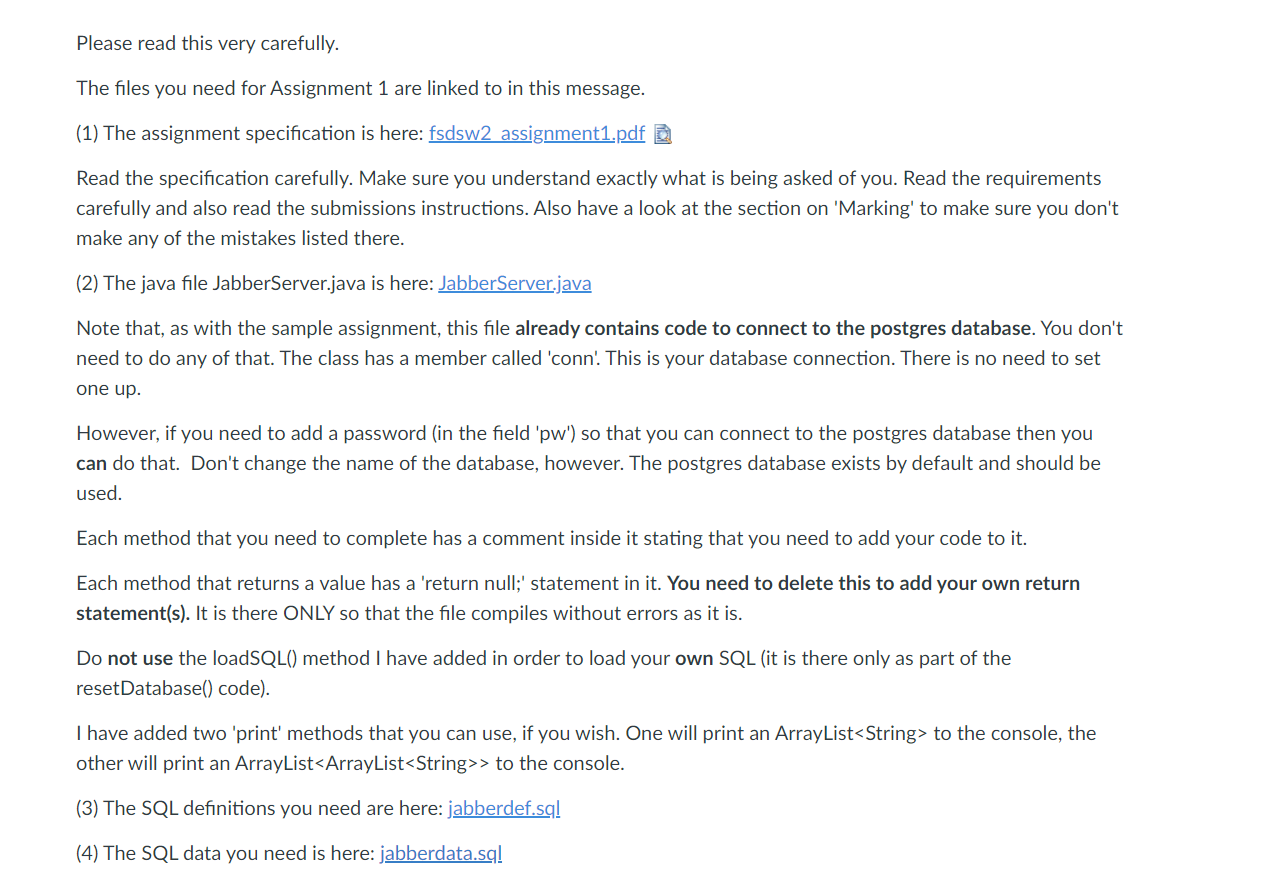
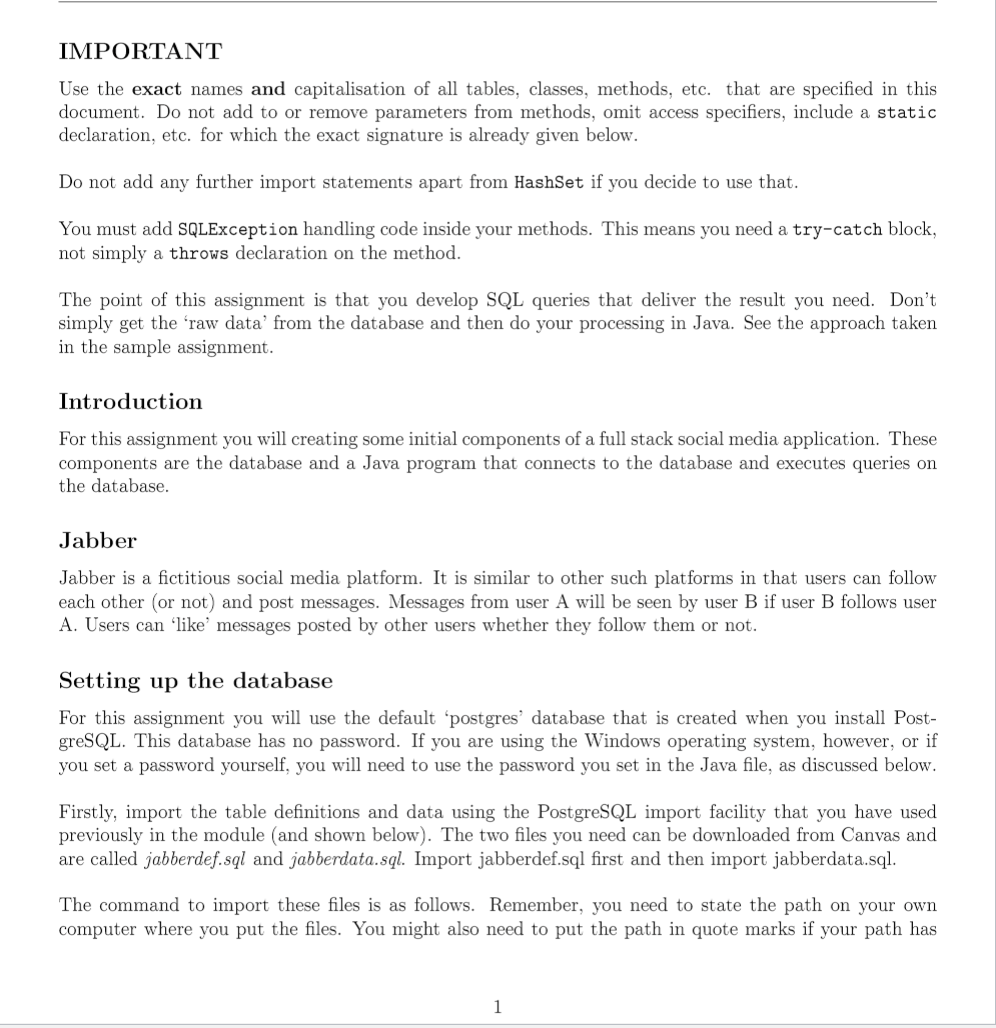
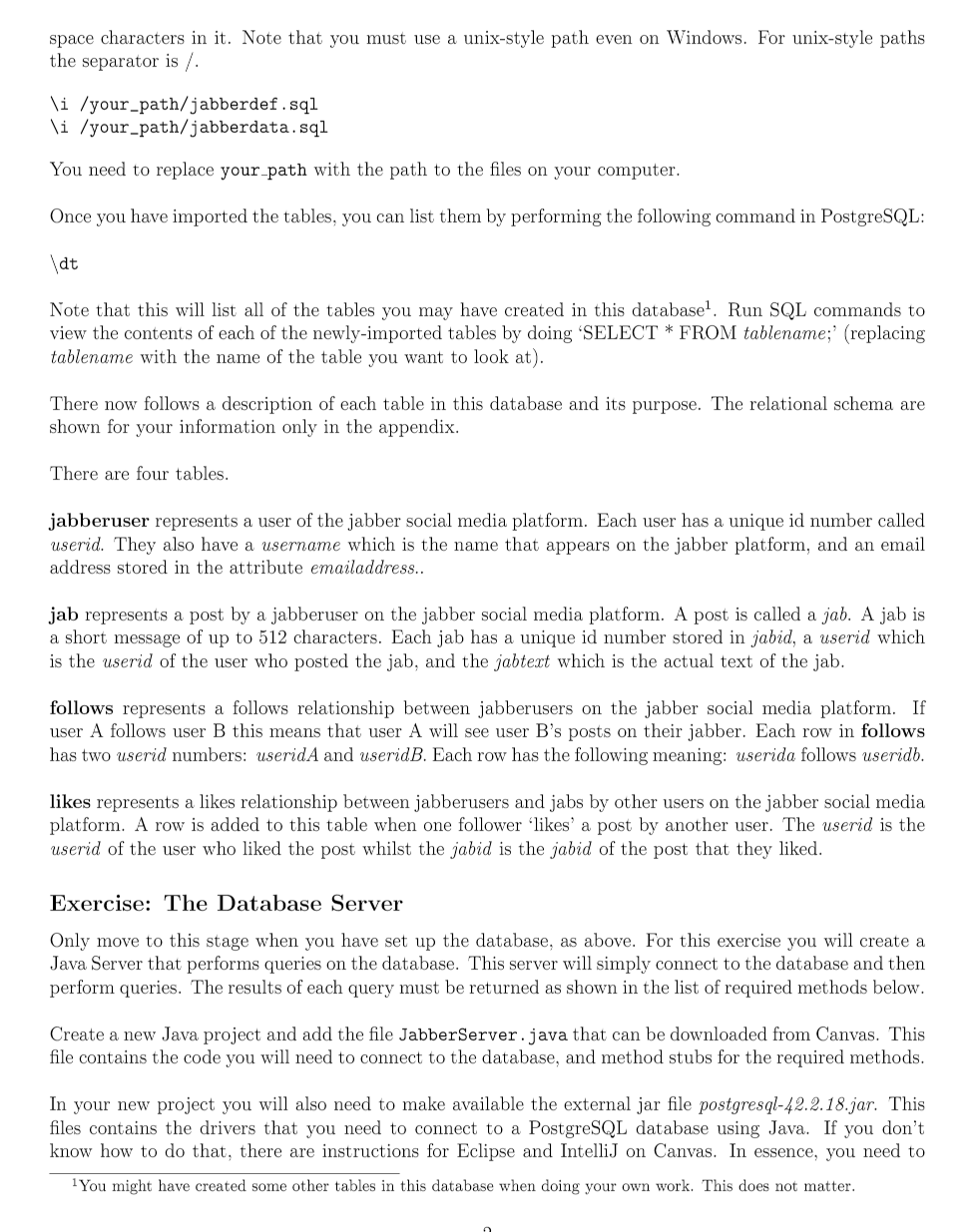
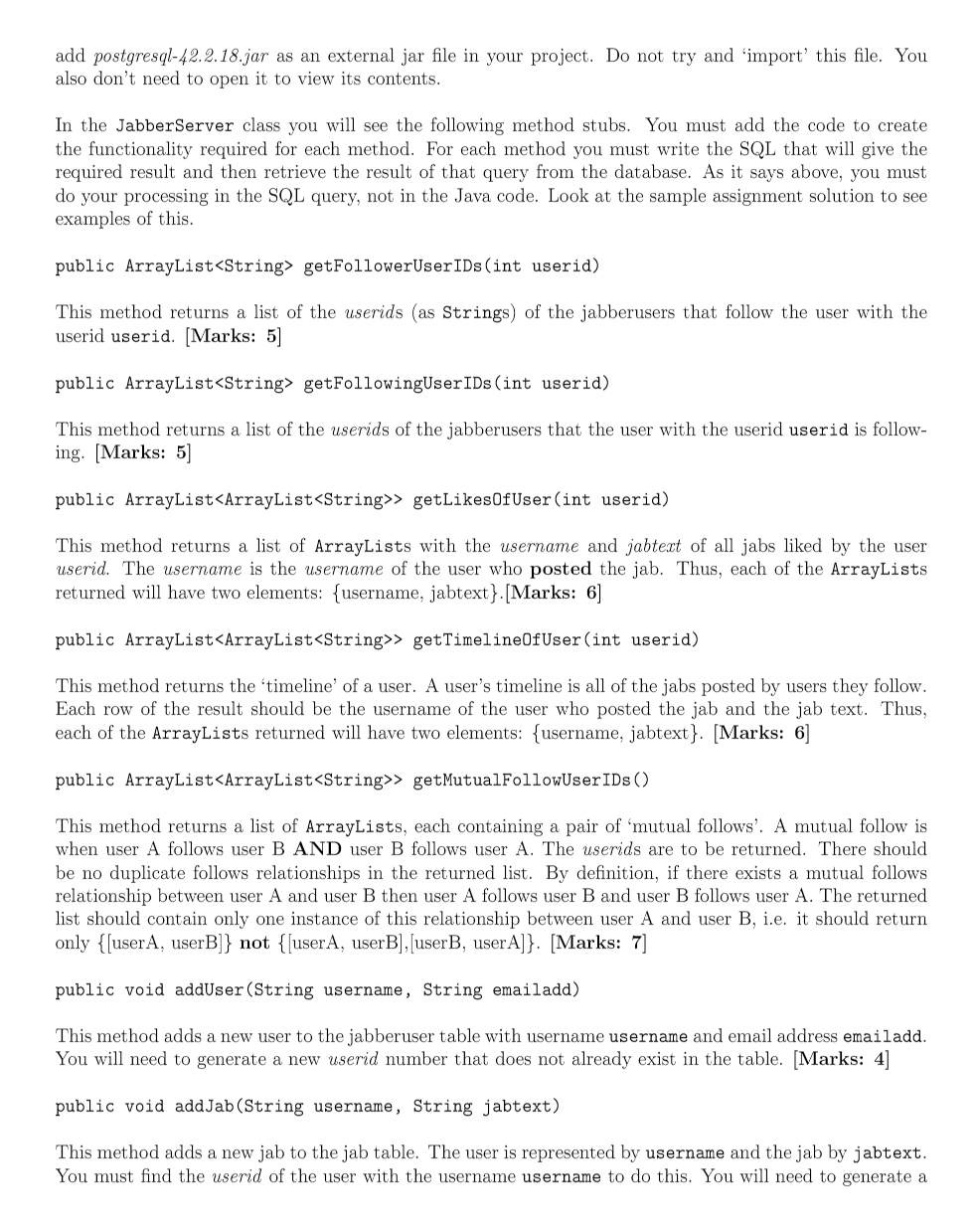
Please read this very carefully. The files you need for Assignment 1 are linked to in this message. (1) The assignment specification is here: fsdsw2 assignment1.pdf Read the specification carefully. Make sure you understand exactly what is being asked of you. Read the requirements carefully and also read the submissions instructions. Also have a look at the section on 'Marking' to make sure you don't make any of the mistakes listed there. (2) The java file JabberServer.java is here: JabberServer.java Note that, as with the sample assignment, this file already contains code to connect to the postgres database. You don't need to do any of that. The class has a member called 'conn! This is your database connection. There is no need to set one up. However, if you need to add a password (in the field 'pw') so that you can connect to the postgres database then you can that. Don't change the name of the database, however. The postgres database exists by ult and should be used. Each method that you need to complete has a comment inside it stating that you need to add your code to it. Each method that returns a value has a 'return null;' statement in it. You need to delete this to add your own return statement(s). It is there ONLY so that the file compiles without errors as it is. Do not use the loadSQL() method I have added in order to load your own SQL (it is there only as part of the resetDatabasel) code). I have added two 'print' methods that you can use, if you wish. One will print an ArrayList to the console, the other will print an ArrayList> to the console. (3) The SQL definitions you need are here: jabberdef.sql (4) The SQL data you need is here: jabberdata.sq! IMPORTANT Use the exact names and capitalisation of all tables, classes, methods, etc. that are specified in this document. Do not add to or remove parameters from methods, omit access specifiers, include a static declaration, etc. for which the exact signature is already given below. Do not add any further import statements apart from HashSet if you decide to use that. You must add SQLException handling code inside your methods. This means you need a try-catch block, not simply a throws declaration on the method. The point of this assignment is that you develop SQL queries that deliver the result you need. Don't simply get the raw data from the database and then do your processing in Java. See the approach taken in the sample assignment. Introduction For this assignment you will creating some initial components of a full stack social media application. These components are the database and a Java program that connects to the database and executes queries on the database. Jabber Jabber is a fictitious social media platform. It is similar to other such platforms in that users can follow each other or not) and post messages. Messages from user A will be seen by user B if user B follows user A. Users can 'like' messages posted by other users whether they follow them or not. Setting up the database For this assignment you will use the default 'postgres' database that is created when you install Post- greSQL. This database has no password. If you are using the Windows operating system, however, or if you set a password yourself, you will need to use the password you set in the Java file, as discussed below. Firstly, import the table definitions and data using the PostgreSQL import facility that you have used previously in the module (and shown below). The two files you need can be downloaded from Canvas and are called jabberdef.sql and jabberdata.sql. Import jabberdef.sql first and then import jabberdata.sql. The command to import these files is as follows. Remember, you need to state the path on your own computer where you put the files. You might also need to put the path in quote marks if your path has 1 space characters in it. Note that you must use a unix-style path even on Windows. For unix-style paths the separator is / \i /your-path/jabberdef.sql \i /your-path/jabberdata.sql You need to replace your path with the path to the files on your computer. Once you have imported the tables, you can list them by performing the following command in PostgreSQL: lat Note that this will list all of the tables you may have created in this database? Run SQL commands to view the contents of each of the newly-imported tables by doing 'SELECT * FROM tablename;' (replacing tablename with the name of the table you want to look at). There now follows a description of each table in this database and its purpose. The relational schema are shown for your information only in the appendix. There are four tables. jabberuser represents a user of the jabber social media platform. Each user has a unique id number called userid. They also have a username which is the name that appears on the jabber platform, and an email address stored in the attribute emailaddress.. jab represents a post by a jabberuser on the jabber social media platform. A post is called a jab. A jab is a short message of up to 512 characters. Each jab has a unique id number stored in jabid, a userid which is the userid of the user who posted the jab, and the jabtext which is the actual text of the jab. follows represents a follows relationship between jabberusers on the jabber social media platform. If user A follows user B this means that user A will see user B's posts on their jabber. Each row in follows has two userid numbers: useridA and userid B. Each row has the following meaning: userida follows useridb. likes represents a likes relationship between jabberusers and jabs by other users on the jabber social media platform. A row is added to this table when one follower 'likes' a post by another user. The userid is the userid of the user who liked the post whilst the jabid is the jabid of the post that they liked. Exercise: The Database Server Only move to this stage when you have set up the database, as above. For this exercise you will create a Java Server that performs queries on the database. This server will simply connect to the database and then perform queries. The results of each query must be returned as shown in the list of required methods below. Create a new Java project and add the file JabberServer.java that can be downloaded from Canvas. This file contains the code you will need to connect to the database, and method stubs for the required methods. In your new project you will also need to make available the external jar file postgresql-42.2.18.jar. This files contains the drivers that you need to connect to a PostgreSQL database using Java. If you don't know how to do that, there are instructions for Eclipse and IntelliJ on Canvas. In essence, you need to You might have created some other tables in this database when doing your own work. This does not matter. add postgresql-42.2.18.jar as an external jar file in your project. Do not try and 'import this file. You also don't need to open it to view its contents. In the JabberServer class you will see the following method stubs. You must add the code to create the functionality required for each method. For each method you must write the SQL that will give the required result and then retrieve the result of that query from the database. As it says above, you must do your processing in the SQL query, not in the Java code. Look at the sample assignment solution to see examples of this. public ArrayList getFollowerUserIDs (int userid) This method returns a list of the userids (as Strings) of the jabberusers that follow the user with the userid userid. (Marks: 5] public ArrayList getFollowingUserIDs(int userid) This method returns a list of the userids of the jabberusers that the user with the userid userid is follow- ing. (Marks: 5] public ArrayList> getLikesOfUser(int userid) This method returns a list of ArrayLists with the username and jabtext of all jabs liked by the user userid. The username is the username of the user who posted the jab. Thus, each of the ArrayLists returned will have two elements: {username, jabtext}. [Marks: 6] public ArrayList> getTimelineOfUser(int userid) This method returns the timeline' of a user. A user's timeline is all of the jabs posted by users they follow. Each row of the result should be the username of the user who posted the jab and the jab text. Thus, each of the ArrayLists returned will have two elements: {username, jabtext}. [Marks: 6] public ArrayList> getMutualFollowUser IDs () This method returns a list of ArrayLists, each containing a pair of 'mutual follows'. A mutual follow is when user A follows user B AND user B follows user A. The userids are to be returned. There should be no duplicate follows relationships in the returned list. By definition, if there exists a mutual follows relationship between user A and user B then user A follows user B and user B follows user A. The returned list should contain only one instance of this relationship between user A and user B, i.e. it should return only {[userA, userB]} not {[userA, userB], [user B, userA]}. [Marks: 7] public void addUser (String username, String emailadd) This method adds a new user to the jabberuser table with username username and email address emailadd. You will need to generate a new userid number that does not already exist in the table. (Marks: 4] public void addJab(String username, String jabtext) This method adds a new jab to the jab table. The user is represented by username and the jab by jabtext. You must find the userid of the user with the username username to do this. You will need to generate a new jabid number that does not already exist in the table. (Marks: 4] public void addFollower(int userida, int useridb) This method adds a new follows relationship: userida follows useridb. (Marks: 4] public void addLike(int userid, int jabid) This method adds a new like: user userid likes jab jabid. (Marks: 4] public ArrayList getUsersWithMostFollowers () This method returns the userids of the user(s) with the most followers. This might be more than one user if more than one user has an equally high number of followers. (Marks: 5] Submission requirements You must submit the following zipped as a single zip file. The zip file should have your name and student ID as its name, e.g. iankenny1234567.zip. 1. Submit the file JabberServer.java completed with your code. Do not change the file name, class name, method signatures or any of the other code that was already in the file. Make sure you have also not included any more import statements, other than HashSet if you decide to use that. Add your name and student ID as a comment at the top of all submitted files. If you choose to add other classes to your project then you must also include these in your submission. They must have the same package declaration as JabberServer. Marking If your submitted file does not compile you will receive a mark of zero. If you submit a .class file instead of a .java file you will receive a mark of zero. The file you submit by the deadline will be the one that is marked. It will not be possible to submit a file after that point, unless you have an extension. You can see the number of marks for each method above. If your method produces the expected result then you can expect all of the marks for the method. If one of your methods does not produce the correct result but does contain largely or entirely correct SQL, then you may be able to get up to 60% of the marks for that method. This will be at the discretion of the module team but in a transparent manner that will be announced. Work marked in this manner will take longer to process and return the results. 2But we reserve the right to give lower marks or zero marks in cases where the student gained the correct result through other means than writing an SQL query and submitting that the database, or has simply returned the correct values without getting them from the database and other such means, for example by doing their processing in Java instead of SQL. We also, of course, reserve the right to withhold marks in cases of plagiarism Appendix: the relational schemas jabberuser userid int, username varchar(255), emailaddress varchar(255) Primary key: userid Foreign key: 6 Not null: username, emailaddress Unique: 0 Default: 0 Check: 0 jab userid int, jabid int, jabtext varchar(512)) Primary key: jabid Foreign key: jabberuser(userid) Not null: userid, jabtext Unique: 0 Default: 0 Check: 0 follows useridA int, userid B int) Primary key: {useridA, useridB} Foreign key: jabberuser(userid) Not null: 0 Unique: 0 Default: 0 Check: 0 likes userid int, jabid int) Primary key: {userid, jabid} Foreign key: jabberuser(userid), jab(jabid) Not null: 0 Unique: 0 Default: 0 Check: 0 create table jabberuser userid int primary key, username varchar(255) not null, emailadd varchar(255) not null ); create table jab jabid int primary key, userid int references jabberuser(userid) not null, jabtext varchar(255) not null ); create table likes userid int references jabberuser(userid), jabid int references jab(jabid) not null, primary key(userid, jabid) ); create table follows useridA int references jabberuser(userid) not null, useridB int references jabberuser(userid) not null, primary key (userida, useridB) ); insert into jabberuser ( values (o, 'donaldstrump', 'donald@donald.com'), (1, 'kim','kimkanye.com'), (2, 'DavidBowie', 'david@bowienet.com'), (3, 'Hacker TDog','hackert@dog.com'), (4, 'robertsmith' 'rob@thecure.com'), (5, 'klopp', 'manager@anfield.com'), (6, percy' ppig@marksandspencer .net'), (7, cyborg', 'cyborg@teentitansgo.com'), (8, 'icebear', 'icebowbb.com'), (9, 'solesurvivor', 'sole@vault111.com'), (10, 'ellie', 'ellie@lastofus.com'), (11, jumpman', jumpmanmario@marioworld.net'). (12, 'edballs', 'ed@edballs.com') ); insert into jab values(0, 0, 'MAGA!'), (1, 0, 'SAD!'), (2, 1, 'uokhun'), (3, 2, 'My version of The Man Who Sold The World is way better'), (4, 3, 'WOOF!'), (5, 0, 'covfefe'), (6, 12, 'Ed Balls'), (7, 7, anybody watching that Gumball show?'), (8, 8, 'ice bear says We Bare Bears is the best show'), (9, 11, 'coming for you, Donkey Kong!!!'), (10, 9, 'Mmm, roasted mirelurk for lunch.'), (11, 3, 'WOOF!!!') ); insert into follows values(1,2), (11,2), (0,12), (0, 11), (0,6), (0,7), (1,3), (1, 0), (1,12), (2,0), (2,9), (3,1), (3,7), (3,8), (6,6), (6,8), (6,10), (7,0), (7,3), (9,1), (9,4), (9, 11), (11,0), (11, 12), (12, 11), (12, 0) insert into likes ( values(0,2), (2,3), (0,4), (0, 11), (1,2), (1,6), (3, 3), (3,11), (4,10), (10,0), (7,0), (10, 10) ); Please read this very carefully. The files you need for Assignment 1 are linked to in this message. (1) The assignment specification is here: fsdsw2 assignment1.pdf Read the specification carefully. Make sure you understand exactly what is being asked of you. Read the requirements carefully and also read the submissions instructions. Also have a look at the section on 'Marking' to make sure you don't make any of the mistakes listed there. (2) The java file JabberServer.java is here: JabberServer.java Note that, as with the sample assignment, this file already contains code to connect to the postgres database. You don't need to do any of that. The class has a member called 'conn! This is your database connection. There is no need to set one up. However, if you need to add a password (in the field 'pw') so that you can connect to the postgres database then you can that. Don't change the name of the database, however. The postgres database exists by ult and should be used. Each method that you need to complete has a comment inside it stating that you need to add your code to it. Each method that returns a value has a 'return null;' statement in it. You need to delete this to add your own return statement(s). It is there ONLY so that the file compiles without errors as it is. Do not use the loadSQL() method I have added in order to load your own SQL (it is there only as part of the resetDatabasel) code). I have added two 'print' methods that you can use, if you wish. One will print an ArrayList to the console, the other will print an ArrayList> to the console. (3) The SQL definitions you need are here: jabberdef.sql (4) The SQL data you need is here: jabberdata.sq! IMPORTANT Use the exact names and capitalisation of all tables, classes, methods, etc. that are specified in this document. Do not add to or remove parameters from methods, omit access specifiers, include a static declaration, etc. for which the exact signature is already given below. Do not add any further import statements apart from HashSet if you decide to use that. You must add SQLException handling code inside your methods. This means you need a try-catch block, not simply a throws declaration on the method. The point of this assignment is that you develop SQL queries that deliver the result you need. Don't simply get the raw data from the database and then do your processing in Java. See the approach taken in the sample assignment. Introduction For this assignment you will creating some initial components of a full stack social media application. These components are the database and a Java program that connects to the database and executes queries on the database. Jabber Jabber is a fictitious social media platform. It is similar to other such platforms in that users can follow each other or not) and post messages. Messages from user A will be seen by user B if user B follows user A. Users can 'like' messages posted by other users whether they follow them or not. Setting up the database For this assignment you will use the default 'postgres' database that is created when you install Post- greSQL. This database has no password. If you are using the Windows operating system, however, or if you set a password yourself, you will need to use the password you set in the Java file, as discussed below. Firstly, import the table definitions and data using the PostgreSQL import facility that you have used previously in the module (and shown below). The two files you need can be downloaded from Canvas and are called jabberdef.sql and jabberdata.sql. Import jabberdef.sql first and then import jabberdata.sql. The command to import these files is as follows. Remember, you need to state the path on your own computer where you put the files. You might also need to put the path in quote marks if your path has 1 space characters in it. Note that you must use a unix-style path even on Windows. For unix-style paths the separator is / \i /your-path/jabberdef.sql \i /your-path/jabberdata.sql You need to replace your path with the path to the files on your computer. Once you have imported the tables, you can list them by performing the following command in PostgreSQL: lat Note that this will list all of the tables you may have created in this database? Run SQL commands to view the contents of each of the newly-imported tables by doing 'SELECT * FROM tablename;' (replacing tablename with the name of the table you want to look at). There now follows a description of each table in this database and its purpose. The relational schema are shown for your information only in the appendix. There are four tables. jabberuser represents a user of the jabber social media platform. Each user has a unique id number called userid. They also have a username which is the name that appears on the jabber platform, and an email address stored in the attribute emailaddress.. jab represents a post by a jabberuser on the jabber social media platform. A post is called a jab. A jab is a short message of up to 512 characters. Each jab has a unique id number stored in jabid, a userid which is the userid of the user who posted the jab, and the jabtext which is the actual text of the jab. follows represents a follows relationship between jabberusers on the jabber social media platform. If user A follows user B this means that user A will see user B's posts on their jabber. Each row in follows has two userid numbers: useridA and userid B. Each row has the following meaning: userida follows useridb. likes represents a likes relationship between jabberusers and jabs by other users on the jabber social media platform. A row is added to this table when one follower 'likes' a post by another user. The userid is the userid of the user who liked the post whilst the jabid is the jabid of the post that they liked. Exercise: The Database Server Only move to this stage when you have set up the database, as above. For this exercise you will create a Java Server that performs queries on the database. This server will simply connect to the database and then perform queries. The results of each query must be returned as shown in the list of required methods below. Create a new Java project and add the file JabberServer.java that can be downloaded from Canvas. This file contains the code you will need to connect to the database, and method stubs for the required methods. In your new project you will also need to make available the external jar file postgresql-42.2.18.jar. This files contains the drivers that you need to connect to a PostgreSQL database using Java. If you don't know how to do that, there are instructions for Eclipse and IntelliJ on Canvas. In essence, you need to You might have created some other tables in this database when doing your own work. This does not matter. add postgresql-42.2.18.jar as an external jar file in your project. Do not try and 'import this file. You also don't need to open it to view its contents. In the JabberServer class you will see the following method stubs. You must add the code to create the functionality required for each method. For each method you must write the SQL that will give the required result and then retrieve the result of that query from the database. As it says above, you must do your processing in the SQL query, not in the Java code. Look at the sample assignment solution to see examples of this. public ArrayList getFollowerUserIDs (int userid) This method returns a list of the userids (as Strings) of the jabberusers that follow the user with the userid userid. (Marks: 5] public ArrayList getFollowingUserIDs(int userid) This method returns a list of the userids of the jabberusers that the user with the userid userid is follow- ing. (Marks: 5] public ArrayList> getLikesOfUser(int userid) This method returns a list of ArrayLists with the username and jabtext of all jabs liked by the user userid. The username is the username of the user who posted the jab. Thus, each of the ArrayLists returned will have two elements: {username, jabtext}. [Marks: 6] public ArrayList> getTimelineOfUser(int userid) This method returns the timeline' of a user. A user's timeline is all of the jabs posted by users they follow. Each row of the result should be the username of the user who posted the jab and the jab text. Thus, each of the ArrayLists returned will have two elements: {username, jabtext}. [Marks: 6] public ArrayList> getMutualFollowUser IDs () This method returns a list of ArrayLists, each containing a pair of 'mutual follows'. A mutual follow is when user A follows user B AND user B follows user A. The userids are to be returned. There should be no duplicate follows relationships in the returned list. By definition, if there exists a mutual follows relationship between user A and user B then user A follows user B and user B follows user A. The returned list should contain only one instance of this relationship between user A and user B, i.e. it should return only {[userA, userB]} not {[userA, userB], [user B, userA]}. [Marks: 7] public void addUser (String username, String emailadd) This method adds a new user to the jabberuser table with username username and email address emailadd. You will need to generate a new userid number that does not already exist in the table. (Marks: 4] public void addJab(String username, String jabtext) This method adds a new jab to the jab table. The user is represented by username and the jab by jabtext. You must find the userid of the user with the username username to do this. You will need to generate a new jabid number that does not already exist in the table. (Marks: 4] public void addFollower(int userida, int useridb) This method adds a new follows relationship: userida follows useridb. (Marks: 4] public void addLike(int userid, int jabid) This method adds a new like: user userid likes jab jabid. (Marks: 4] public ArrayList getUsersWithMostFollowers () This method returns the userids of the user(s) with the most followers. This might be more than one user if more than one user has an equally high number of followers. (Marks: 5] Submission requirements You must submit the following zipped as a single zip file. The zip file should have your name and student ID as its name, e.g. iankenny1234567.zip. 1. Submit the file JabberServer.java completed with your code. Do not change the file name, class name, method signatures or any of the other code that was already in the file. Make sure you have also not included any more import statements, other than HashSet if you decide to use that. Add your name and student ID as a comment at the top of all submitted files. If you choose to add other classes to your project then you must also include these in your submission. They must have the same package declaration as JabberServer. Marking If your submitted file does not compile you will receive a mark of zero. If you submit a .class file instead of a .java file you will receive a mark of zero. The file you submit by the deadline will be the one that is marked. It will not be possible to submit a file after that point, unless you have an extension. You can see the number of marks for each method above. If your method produces the expected result then you can expect all of the marks for the method. If one of your methods does not produce the correct result but does contain largely or entirely correct SQL, then you may be able to get up to 60% of the marks for that method. This will be at the discretion of the module team but in a transparent manner that will be announced. Work marked in this manner will take longer to process and return the results. 2But we reserve the right to give lower marks or zero marks in cases where the student gained the correct result through other means than writing an SQL query and submitting that the database, or has simply returned the correct values without getting them from the database and other such means, for example by doing their processing in Java instead of SQL. We also, of course, reserve the right to withhold marks in cases of plagiarism Appendix: the relational schemas jabberuser userid int, username varchar(255), emailaddress varchar(255) Primary key: userid Foreign key: 6 Not null: username, emailaddress Unique: 0 Default: 0 Check: 0 jab userid int, jabid int, jabtext varchar(512)) Primary key: jabid Foreign key: jabberuser(userid) Not null: userid, jabtext Unique: 0 Default: 0 Check: 0 follows useridA int, userid B int) Primary key: {useridA, useridB} Foreign key: jabberuser(userid) Not null: 0 Unique: 0 Default: 0 Check: 0 likes userid int, jabid int) Primary key: {userid, jabid} Foreign key: jabberuser(userid), jab(jabid) Not null: 0 Unique: 0 Default: 0 Check: 0 create table jabberuser userid int primary key, username varchar(255) not null, emailadd varchar(255) not null ); create table jab jabid int primary key, userid int references jabberuser(userid) not null, jabtext varchar(255) not null ); create table likes userid int references jabberuser(userid), jabid int references jab(jabid) not null, primary key(userid, jabid) ); create table follows useridA int references jabberuser(userid) not null, useridB int references jabberuser(userid) not null, primary key (userida, useridB) ); insert into jabberuser ( values (o, 'donaldstrump', 'donald@donald.com'), (1, 'kim','kimkanye.com'), (2, 'DavidBowie', 'david@bowienet.com'), (3, 'Hacker TDog','hackert@dog.com'), (4, 'robertsmith' 'rob@thecure.com'), (5, 'klopp', 'manager@anfield.com'), (6, percy' ppig@marksandspencer .net'), (7, cyborg', 'cyborg@teentitansgo.com'), (8, 'icebear', 'icebowbb.com'), (9, 'solesurvivor', 'sole@vault111.com'), (10, 'ellie', 'ellie@lastofus.com'), (11, jumpman', jumpmanmario@marioworld.net'). (12, 'edballs', 'ed@edballs.com') ); insert into jab values(0, 0, 'MAGA!'), (1, 0, 'SAD!'), (2, 1, 'uokhun'), (3, 2, 'My version of The Man Who Sold The World is way better'), (4, 3, 'WOOF!'), (5, 0, 'covfefe'), (6, 12, 'Ed Balls'), (7, 7, anybody watching that Gumball show?'), (8, 8, 'ice bear says We Bare Bears is the best show'), (9, 11, 'coming for you, Donkey Kong!!!'), (10, 9, 'Mmm, roasted mirelurk for lunch.'), (11, 3, 'WOOF!!!') ); insert into follows values(1,2), (11,2), (0,12), (0, 11), (0,6), (0,7), (1,3), (1, 0), (1,12), (2,0), (2,9), (3,1), (3,7), (3,8), (6,6), (6,8), (6,10), (7,0), (7,3), (9,1), (9,4), (9, 11), (11,0), (11, 12), (12, 11), (12, 0) insert into likes ( values(0,2), (2,3), (0,4), (0, 11), (1,2), (1,6), (3, 3), (3,11), (4,10), (10,0), (7,0), (10, 10) )









 Study Help