







Question: The Assignment Use a text editor, such as Notepad or Dreamweaver create your assignment and also make sure the (X)HTML(5) file you create is validated.
The Assignment
Use a text editor, such as Notepad or Dreamweaver create your assignment and also make sure the (X)HTML(5) file you create is validated.
Overview: Create a user login for a Web Student Information System (SIS) that validates user data and verifies the students name and student number.
Task Description: Scenario
Suppose that you have been hired to design the interface for a new Web based Student Information System (SIS). The interface gives students access to their accounts.
In order to access the SIS, a student must login with a valid student name and an eight-digit student number. An email address is also required if the student wants email confirmation of any transaction (The user will indicate this by checking a box signifying the user wants email confirmation). Develop the login script that first validates and then verifies the user input.
Validation makes sure that the user has entered all the required data: student name, student number and email address (if requested). The student number field should contain a eight-digit number and the email address must contain an @ and a period. If the input is not valid, alert the user to correct the particular error in the appropriate box.
Verification checks that the user has an account, i.e., that the user name and student number match the name and student number for one of the Web students. If the input is not verified, alert the user that an account for them cannot be found. When the input is both validated and verified, alert the user with a simple welcome message that they have entered to system and sends an email (if requested) indicating the transaction taken place (Student Registration or Transcript).
Program Design and Implementation
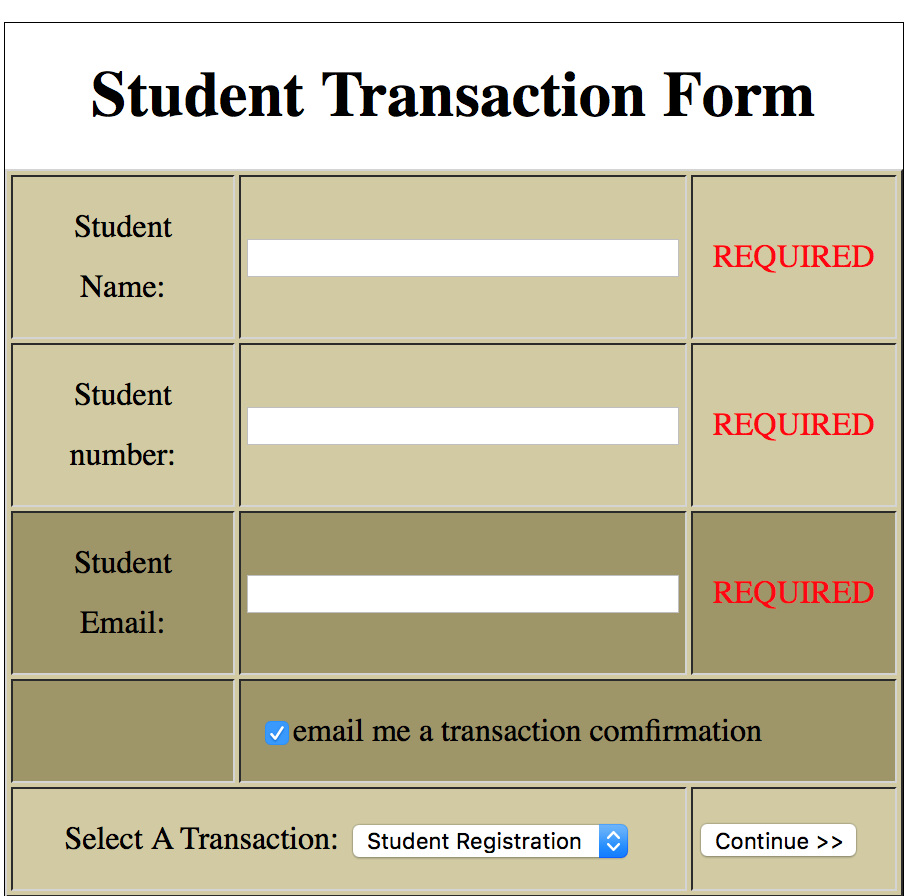
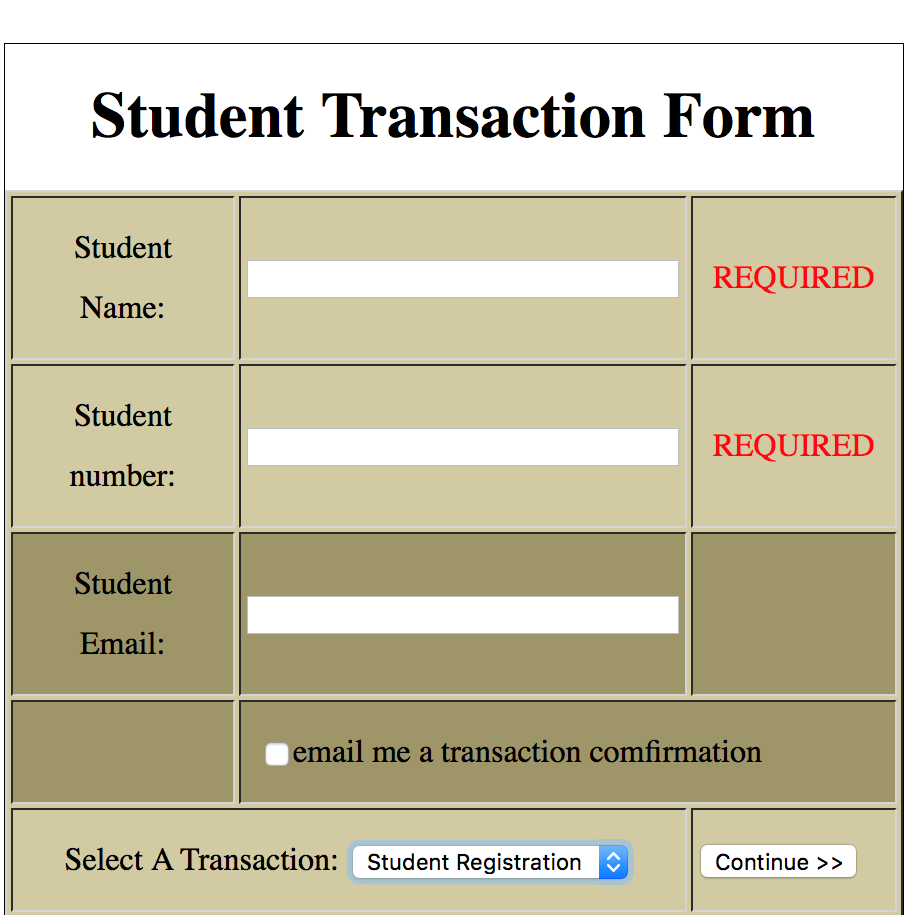
Design the HTML interface. The interface should have two text fields, a password field (for the student number), a checkbox for indicating an email confirmation is requested, a drop-down list allowing the student to indicate what type of transaction they wish to do, and a button as input elements as shown in the figure below. Be sure to give each input element a unique name attribute.
Below is an example to illustrate the HTML form requirements. You can tailor to your own style as long as the form has all key elements.
Email confirmation wanted
Email Confirmation not wanted
Modularize your JavaScript using two functions: validate and verify described below. Your event-driven program should call the validate function when the Continue button is pressed. If all the data has been entered correctly, the validate function then calls the verify function.
Validate Function:
INPUT: HTML Form that needs to be validated
PROCESS: Validates that all required information exists: Student Name, Student ID and Email Address (if required). The Student Number must also be an 8-digit numeric value and the email address must contain an @ and a period. Alerts the user about invalid data and its location. If all input is valid, alerts the user as to whether or not the user is found within the CRS.
OUPUT: Alert the user to correct the particular error in the appropriate box if necessary
Verification Function:
INPUT: HTML Form with Student Name and Student ID
PROCESS: Compares the form's Student Name and Student Number with the properties of a student object stored in a global array of students (for this exercise create an array of 3 students). Returns true if it finds the student object matches both.
OUPUT: Simple welcome message
Make sure to test you program with a variety of correct and incorrect input to ensure that your program is properly validating the data, properly verifying the student and that all alerts are working as described.
Thank You
Student Transaction Form Student REQUIRED Name: Student REQUIRED number Student REQUIRED Email email me a transaction comfirmation Select A Transaction: Student Registration Continue
Step by Step Solution
There are 3 Steps involved in it

Get step-by-step solutions from verified subject matter experts
 Study Help