







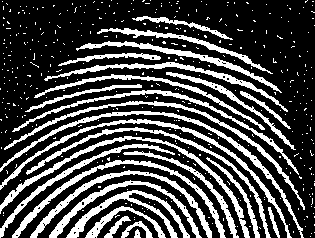
Question: The below code is an automated process that removes the black noise from the white thumbprint ridges in the thumbprint.png . How would you code
The below code is an automated process that removes the black noise from the white thumbprint ridges in the thumbprint.png
How would you code another automated process to remove the white noise on the background?
Code to remove black noise from white thumbprint.png:
Load the image
I imreadthumbprintpng;
Create the marker image
F ~imclearborder~I;
Create the mask image
G ~I;
Perform morphological reconstruction by dilation
H imreconstructF G;
Obtain the filled image
Hfilled ~H;
Display the original and filled images
figure;
subplot;
imshowI;
titleOriginal Image';
subplot;
imshowHfilled;
titleFilled Image';
Step by Step Solution
There are 3 Steps involved in it
1 Expert Approved Answer
Step: 1 Unlock

Question Has Been Solved by an Expert!
Get step-by-step solutions from verified subject matter experts
Step: 2 Unlock
Step: 3 Unlock
 Study Help