







Question: The challenge activity is: This program creates eight green spheres located at the corners of a cube. Extend the program by putting all eight spheres
The challenge activity is: "This program creates eight green spheres located at the corners of a cube. Extend the program by putting all eight spheres in a list. Then write a loop to turn the spheres magenta one by one. There should only be three lines of code inside your while loop: a rate statement, the line that changes the color of a sphere, and the line that updates the loop index. Use rate of 1 so you can see the spheres change color one by one."
The code shown in the image is here:
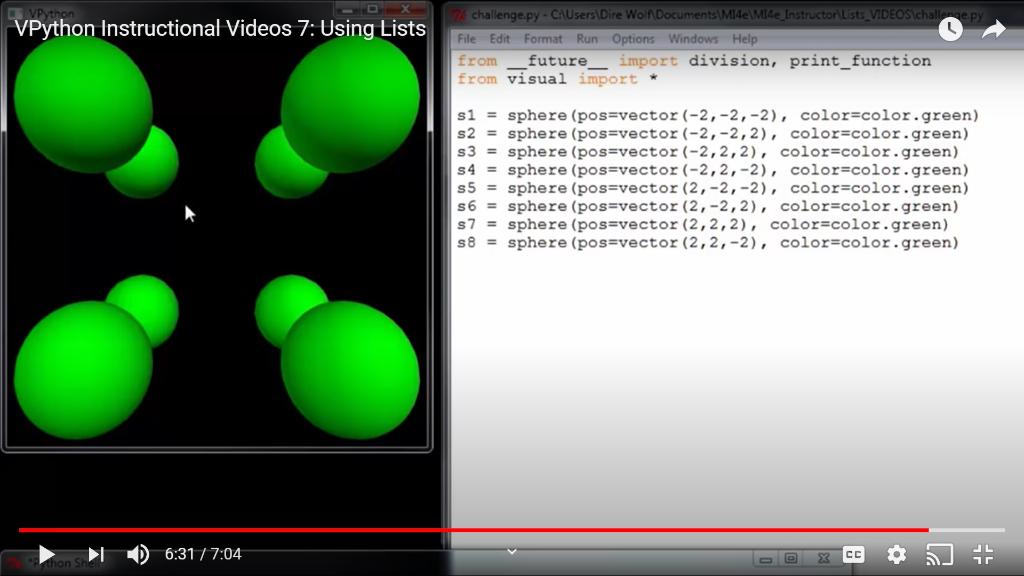
from visual import *
s1 = sphere(pos=vector(-2,-2,-2), color=color.green)
s2 = sphere(pos=vector(-2,-2,2), color=color.green)
s3 = sphere(pos=vector(-2,2,2), color=color.green)
s4 = sphere(pos=vector(-2,2,-2), color=color.green)
s5 = sphere(pos=vector(2,-2,-2), color=color.green)
s6 = sphere(pos=vector(2,-2,2), color=color.green)
s7 = sphere(pos=vector(2,2,2), color=color.green)
s8 = sphere(pos=vector(2,2,-2), color=color.green)
VP VPython Instructional Videos 7: Using Lists challenge.py - CAUsers\Dire Won Documents\Mide\Mide Instructor ust VIDEOS challepy File Edit Format Run Options Windows Help from future import division, print_function from visual import * si = sphere (pos=vector (-2,-2,-2), color=color.green) s2 = sphere (pos=vector(-2,-2,2), color=color.green) s3 = sphere (pos=vector(-2,2,2), color=color.green) s4 = sphere (pos=vector(-2,2,-2), color=color.green) s5 = sphere (pos=vector (2,-2,-2), color-color.green) s6 = sphere (pos=vector (2,-2,2), color=color.green) s7 = sphere (pos=vector (2,2,2), color=color.green) S8 = sphere (pos-vector (2,2,-2), color=color.green) 6:31 / 7:04 X VP VPython Instructional Videos 7: Using Lists challenge.py - CAUsers\Dire Won Documents\Mide\Mide Instructor ust VIDEOS challepy File Edit Format Run Options Windows Help from future import division, print_function from visual import * si = sphere (pos=vector (-2,-2,-2), color=color.green) s2 = sphere (pos=vector(-2,-2,2), color=color.green) s3 = sphere (pos=vector(-2,2,2), color=color.green) s4 = sphere (pos=vector(-2,2,-2), color=color.green) s5 = sphere (pos=vector (2,-2,-2), color-color.green) s6 = sphere (pos=vector (2,-2,2), color=color.green) s7 = sphere (pos=vector (2,2,2), color=color.green) S8 = sphere (pos-vector (2,2,-2), color=color.green) 6:31 / 7:04 X
Step by Step Solution
There are 3 Steps involved in it

Get step-by-step solutions from verified subject matter experts
 Study Help