







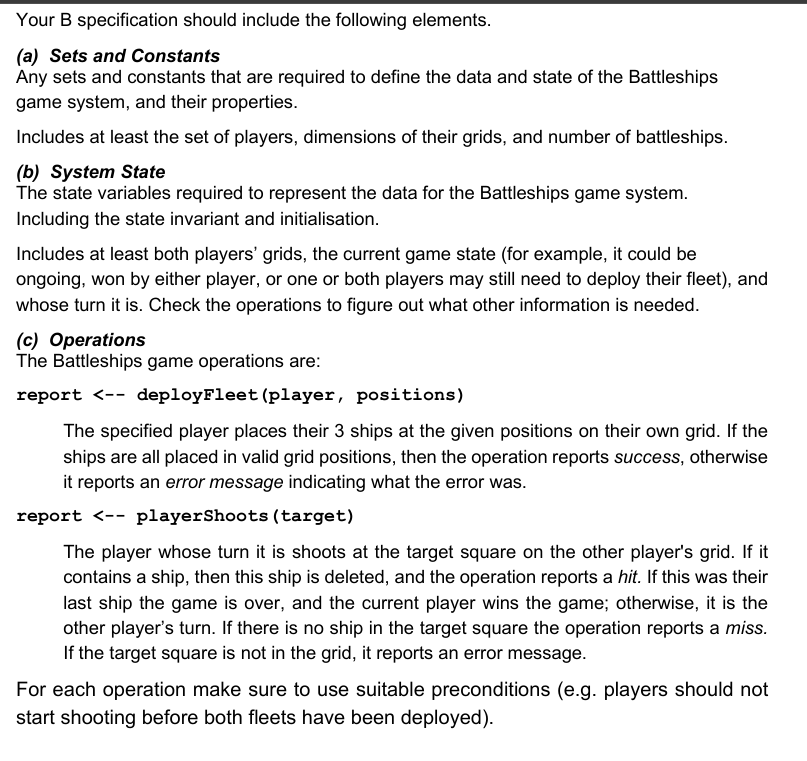
Question: the code i came up with for the battleship exercise is attached here. MACHINE BATTLE SETS Players = { Player 1 , Player 2 }
the code i came up with for the battleship exercise is attached here.
MACHINE BATTLE
SETS
Players Player Player;
Results Success Failure;
GameStates Deploying Ongoing, PlayerWin, PlayerWin;
Reports Hit Miss, InvalidMove Declare gameState values explicitly
CONSTANTS
Grid, FleetSize
PROPERTIES
Grid & A x grid
FleetSize Each player has ships
VARIABLES
playerShips, playerShips, Positions of Player s and Player s ships
playerShots, playerShots, Shots taken by Player and Player
currentPlayer, Whose turn it is
gameState Current state of the game
INVARIANT
playerShips : Grid &
playerShips : Grid &
cardplayerShips FleetSize &
cardplayerShips FleetSize &
playerShips playerShips & No overlapping ships
playerShots : Grid &
playerShots : Grid &
currentPlayer : Players &
gameState : GameStates Use the explicitly declared GameStates set
INITIALISATION
playerShips :
playerShips :
playerShots :
playerShots :
currentPlayer : Player
gameState : Deploying
OPERATIONS
Deploy Fleet Operation
report deployFleetplayer positions
PRE
player : Players &
positions : Grid &
cardpositions FleetSize &
player Player playerShips &
player Player playerShips &
player Player positions playerShips &
player Player positions playerShips
THEN
IF player Player THEN
playerShips : positions
ELSE
playerShips : positions
END
IF playerShips & playerShips THEN
gameState : Ongoing
END
report : Success
END;
Player Shoots Operation
report playerShootstarget
PRE
target : Grid &
gameState Ongoing
THEN
IF currentPlayer Player THEN
IF target : playerShips THEN
playerShips : playerShips target
report : Hit
IF cardplayerShips THEN
gameState : PlayerWin
ELSE
currentPlayer : Player
END
ELSE
report : Miss
currentPlayer : Player
END
playerShots : playerShots target
ELSE
IF target : playerShips THEN
playerShips : playerShips target
report : Hit
IF cardplayerShips THEN
gameState : PlayerWin
ELSE
currentPlayer : Player
END
ELSE
report : Miss
currentPlayer : Player
END
playerShots : playerShots target
END
END;
Enquiry Operation: shipsLeft
shipCounts shipsLeft
BEGIN
shipCounts :Player cardplayerShips Player cardplayerShips
END;
Enquiry Operation: shotsTaken
shotCount shotsTakenplayer
PRE
player : Players
THEN
IF player Player THEN
shotCount : cardplayerShots
ELSE
shotCount : cardplayerShots
END
END;
Enquiry Operation: gameStatus
report gameStatus
BEGIN
report : gameState
END
END
can u check whether the code is correct when animated in PRO B
The Battleships game is played as follows:
The game starts by each player placing their ships on their own grid, each player's ships in different grid squares.
Player has the first turn.
Player shoots at Player s ships, by selecting a target square on Player s grid. If there is a ship in the target square it is a hit and the ship is deleted from Player s fleet, otherwise it is a miss and there is no change to Player s fleet.
It is then Player s turn.
Player shoots at Player s ships, by selecting a target square on Player s grid. Registering a hit or miss, as above.
The players continue to take turns until all of one player's ships have been sunk, at this point the other player is the winner.
could u check whether the following works successfully or not?
deployFleet operation, playerShoots operation, shipLocations operation, shipsLeft operation, shotsTaken operation, gameStatus operation
else plz attach the edited code where these will work successfully.
Step by Step Solution
There are 3 Steps involved in it
1 Expert Approved Answer
Step: 1 Unlock

Question Has Been Solved by an Expert!
Get step-by-step solutions from verified subject matter experts
Step: 2 Unlock
Step: 3 Unlock
 Study Help