







Question: the code : import java.io.*; import java.util.Scanner; public class Dots { public static final int MAXPATTERN = 16; // maximun number of patterns public static
the code :
import java.io.*;
import java.util.Scanner;
public class Dots
{
public static final int MAXPATTERN = 16; // maximun number of patterns
public static final int STARTX = 0; // X location of drawing window
public static final int STARTY = 0; // Y location of drawing window
public static final int SOLX = 401; // X location of solution window
public static final int SOLY = STARTY; // Y location of solution window
private DrawingBoard board; // the drawing window
private DrawingBoard solutionBoard; // solution window
private SolutionDots solution; // the object that knows how to draw the solution
Scanner reader; // object for reading from user
private int pattern = 0; // the pattern we are currently on
/** the constructor: creates the boards, and opens stdin for reading from user
*/
public Dots()
{
board = new DrawingBoard(STARTX, STARTY);
solutionBoard = new DrawingBoard(SOLX, SOLY);
solution = new SolutionDots(solutionBoard);
reader = new Scanner(System.in);
}
/** Method which makes drawing calls. Your code goes in here. Do
not add any variables!
*/
public void drawPattern(int pattern)
{
int row; // loop variable
int col; // loop variable
int k; // extra loop variable
int COLS = 8; // constant
int ROWS = 8; // constant
board.clear();
//set title
board.setTitle("Your pattern " + pattern);
//draw the correct pattern
solution.draw(pattern);
// draw your pattern
// assume maximum number of dots in each row or col is 8
switch (pattern) {
case 1:
for (row = 0; row
for (col = 0; col 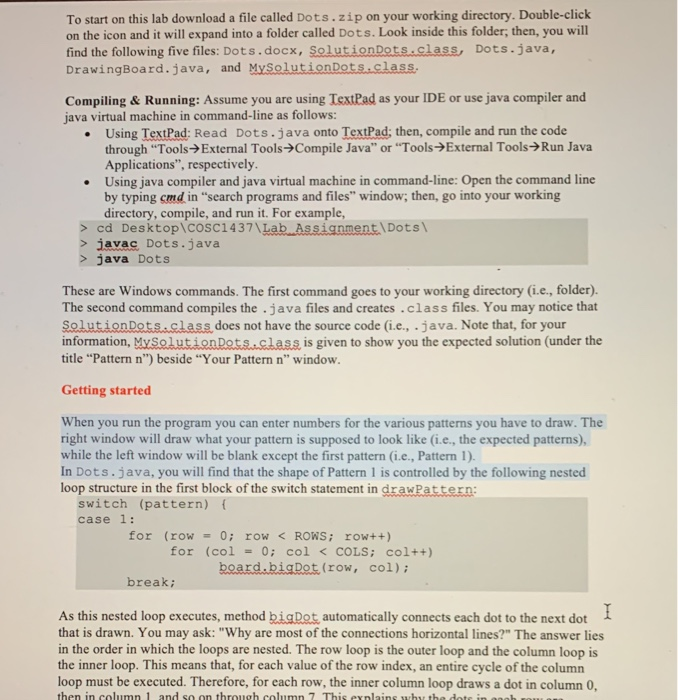
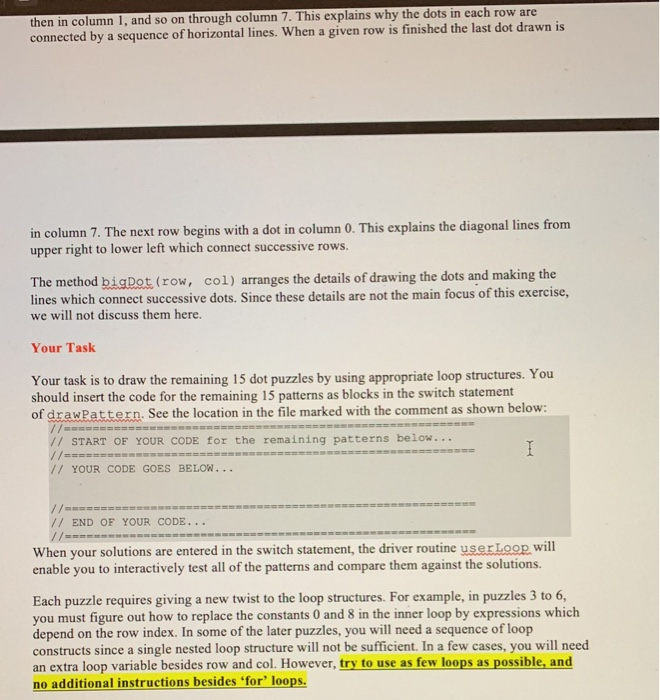
In this laboratory & assignment, you will draw a series of 16 dot patterns using nested for loops. You may think of the dot patterns as geometric puzzles to be solved using loop structures. To start on this lab download a file called Dots.zip on your working directory. Double-click on the icon and it will expand into a folder called Dots. Look inside this folder, then, you will find the following five files: Dots.docx, Solution Dots.class, Dots.java, DrawingBoard.java, and MySolution Dots.class. Compiling & Running: Assume you are using TextPad as your IDE or use java compiler and java virtual machine in command-line as follows: Using TextPad: Read Dots.java onto TextPad; then, compile and run the code through "Tools External Tools Compile Java" or "Tools External Tools Run Java Applications", respectively. Using java compiler and java virtual machine in command-line: Open the command line by typing cmd in "search programs and files" window; then, go into your working directory, compile, and run it. For example, > cd Desktop\cosC1437\Lab Assignment Dots > javac Dots.java > java Dots These are Windows commands. The first command goes to your working directory (i.e., folder). The second command compiles the .java files and creates.class files. You may notice that Solution Ratsastasis does not have the source code (i.e., .java. Note that, for your information, My Solution Dots.class is given to show you the expected solution (under the title "Pattern n") beside "Your Pattern n" window. Getting started When you run the program you can enter numbers for the various patterns you have to draw. The right window will draw what your pattern is supposed to look like (i.e., the expected patterns), while the left window will be blank except the first pattern (i.e., Pattern 1). In Dots.java, you will find that the shape of Pattern l is controlled by the following nested loop structure in the first block of the switch statement in drawPattern: switch (pattern) { case 1: for (row = 0; row cd Desktop\cosC1437\Lab Assignment Dots > javac Dots.java > java Dots These are Windows commands. The first command goes to your working directory (i.e., folder). The second command compiles the .java files and creates.class files. You may notice that Solution Ratsastasis does not have the source code (i.e., .java. Note that, for your information, My Solution Dots.class is given to show you the expected solution (under the title "Pattern n") beside "Your Pattern n" window. Getting started When you run the program you can enter numbers for the various patterns you have to draw. The right window will draw what your pattern is supposed to look like (i.e., the expected patterns), while the left window will be blank except the first pattern (i.e., Pattern 1). In Dots.java, you will find that the shape of Pattern l is controlled by the following nested loop structure in the first block of the switch statement in drawPattern: switch (pattern) { case 1: for (row = 0; row board.bigDot(row, col);
break;
//============================================================================
// START OF YOUR CODE for the remaining patterns below...
//============================================================================
// YOUR CODE GOES BELOW...
//============================================================================
// END OF YOUR CODE...
//============================================================================
default:
System.out.println("This one hasn't been done yet.");
break;
}
}
/** Metho to read in from user which pattern to do next. If the
* user enters an integer between 1 and MAXPATTERN this value is
* returned; if the user enters q it returns -1; if the user
* enters something else it returns the current pattern;
*/
public int getPattern()
{
//set the default pattern, in case its needed
int defaultPattern = ++pattern;
if (defaultPattern > MAXPATTERN) defaultPattern = 1;
int newPattern = defaultPattern;
System.out.print("What Pattern? [" + defaultPattern + " default, q to quit]: ");
//read user input
String answer = reader.nextLine();
//if user did not enter RETURN
if (answer.length() != 0) {
// a temporary scanner just to read the line
Scanner lineReader = new Scanner(answer);
//if an integer
if (lineReader.hasNextInt()) {
newPattern= lineReader.nextInt();
if (newPattern MAXPATTERN) {
System.out.println("Pattern out of range---set to default=" + defaultPattern);
newPattern = defaultPattern;
}
} else { /ot an integer
if (answer.charAt(0) == 'q') newPattern = -1;
//else newPattern = pattern;
}
}
//correctness check
assert ((newPattern == -1) || (newPattern >= 1 && newPattern 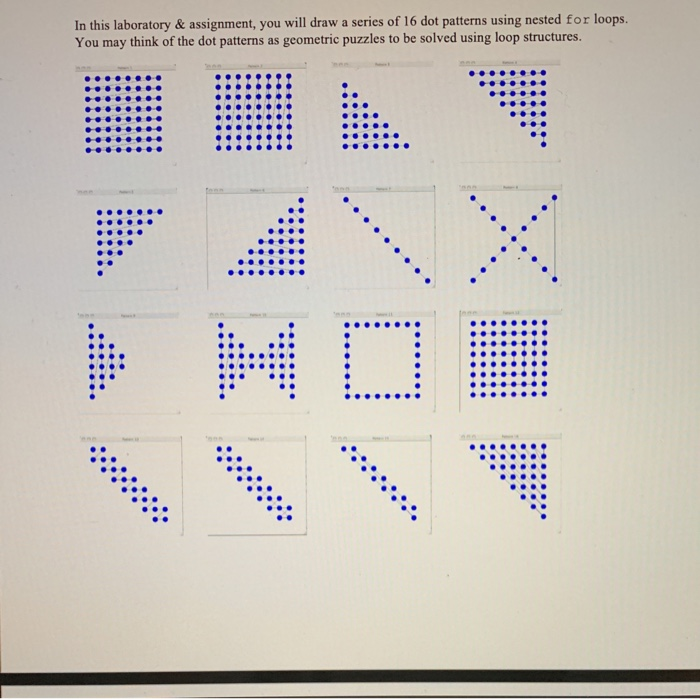
return newPattern;
}
/** Main loop. Check if user wants pattern, then execute it.
*/
public void UserLoop()
{
//System.out.println("Dot Patterns");
//System.out.println(" ");
boolean keepPlaying = true;
while (keepPlaying) {
// request next pattern code
pattern = getPattern();
//System.out.println("you said pattern: " + pattern);
//did the user want to quit?
if (pattern == -1)
keepPlaying = false;
else
drawPattern(pattern); // draw the pattern
}
}
public static void main(String args[])
{
// OPEN THE TEXT AND DRAWING WINDOWS:
Dots d = new Dots();
System.out.println("Welcome to the dot pattern generator.");
//THE BODY OF THE MAIN FUNCTION
d.UserLoop();
//THAT'S IT. QUIT WHEN USER HITS RETURN
System.out.println("Terminating Program. Good bye.");
System.exit(1);
} // end main public Dots()
} //end class Dots
Step by Step Solution
There are 3 Steps involved in it
1 Expert Approved Answer
Step: 1 Unlock

Question Has Been Solved by an Expert!
Get step-by-step solutions from verified subject matter experts
Step: 2 Unlock
Step: 3 Unlock
 Study Help