







Question: The code should be in MPLAB PROGRAM For the figure bellow (Batch Mix Simulator); Assume the following: - A. The three pumps have a flow
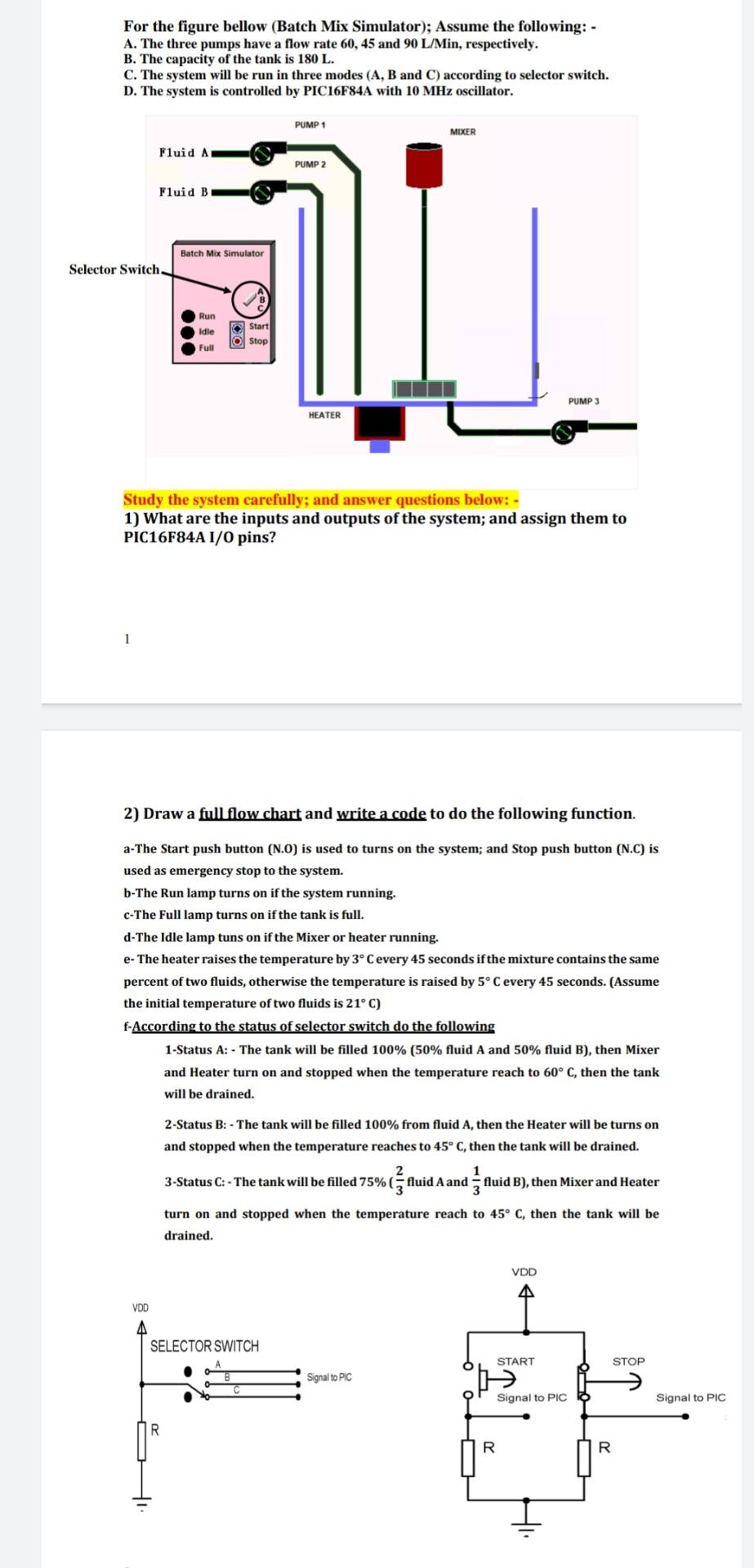
The code should be in "MPLAB PROGRAM"
For the figure bellow (Batch Mix Simulator); Assume the following: - A. The three pumps have a flow rate 60,45 and 90L/Min, respectively. B. The capacity of the tank is 180L. C. The system will be run in three modes (A, B and C) according to selector switch. D. The system is controlled by PIC16F84A with 10MHz oscillator. Study the system carefully; and answer questions below: - 1) What are the inputs and outputs of the system; and assign them to PIC16F84A I/0 pins? 2) Draw a full flow chart and write a code to do the following function. a-The Start push button (N.0) is used to turns on the system; and Stop push button (N.C) is used as emergency stop to the system. b-The Run lamp turns on if the system running. c-The Full lamp turns on if the tank is full. d-The Idle lamp tuns on if the Mixer or heater running. e- The heater raises the temperature by 3C every 45 seconds if the mixture contains the same percent of two fluids, otherwise the temperature is raised by 5C every 45 seconds. (Assume the initial temperature of two fluids is 21C ) f - According to the status of selector switch do the following 1-Status A: - The tank will be filled 100% ( 50% fluid A and 50% fluid B), then Mixer and Heater turn on and stopped when the temperature reach to 60C, then the tank will be drained. 2-Status B: - The tank will be filled 100% from fluid A, then the Heater will be turns on and stopped when the temperature reaches to 45C, then the tank will be drained. 3-Status C : - The tank will be filled 75% ( 32 fluid A and 31 fluid B), then Mixer and Heater turn on and stopped when the temperature reach to 45C, then the tank will be drained
Step by Step Solution
There are 3 Steps involved in it

Get step-by-step solutions from verified subject matter experts
 Study Help