







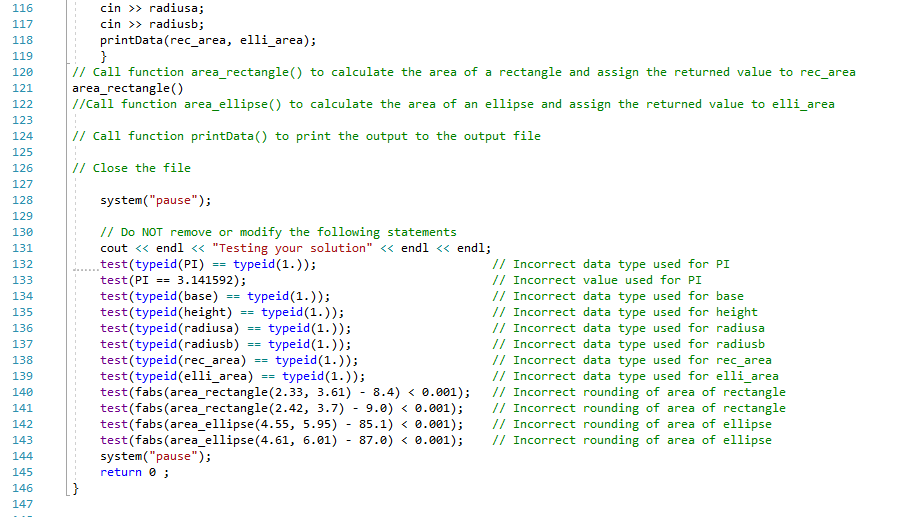
Question: The code shown below is what I have but I'm having trouble with the void printData part, can you please help me fix whatever errors
The code shown below is what I have but I'm having trouble with the void printData part, can you please help me fix whatever errors you see and explain what I'm doing wrong, thanks.
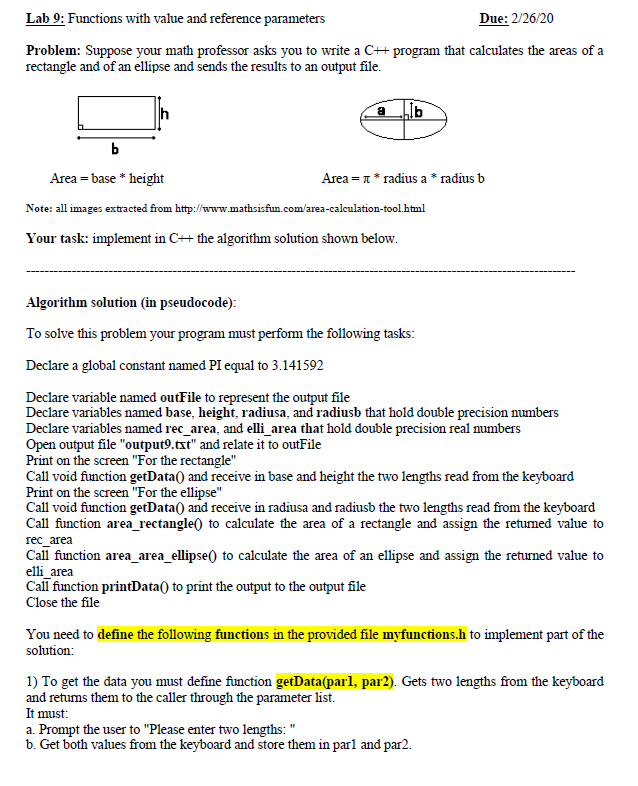
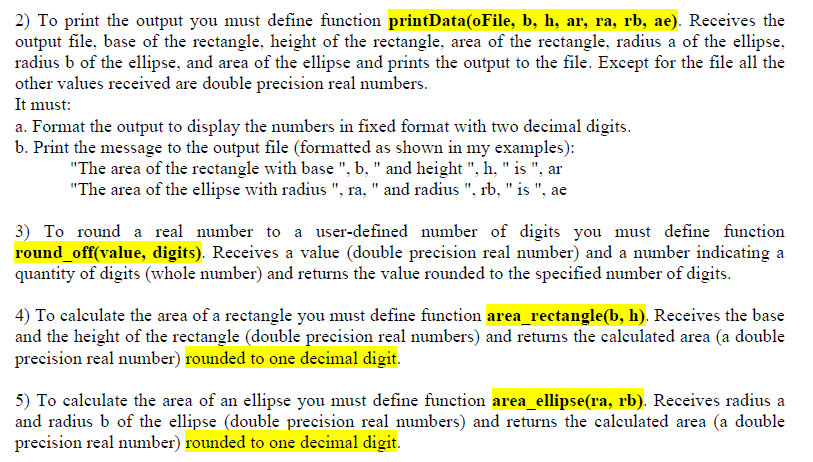
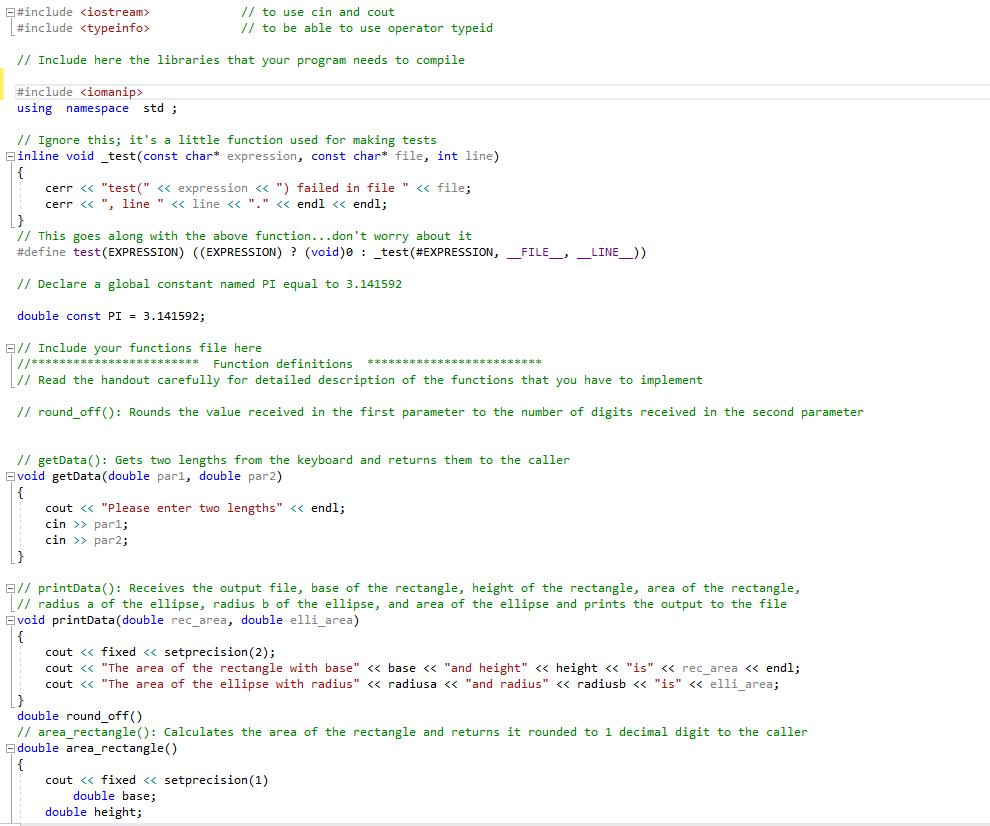
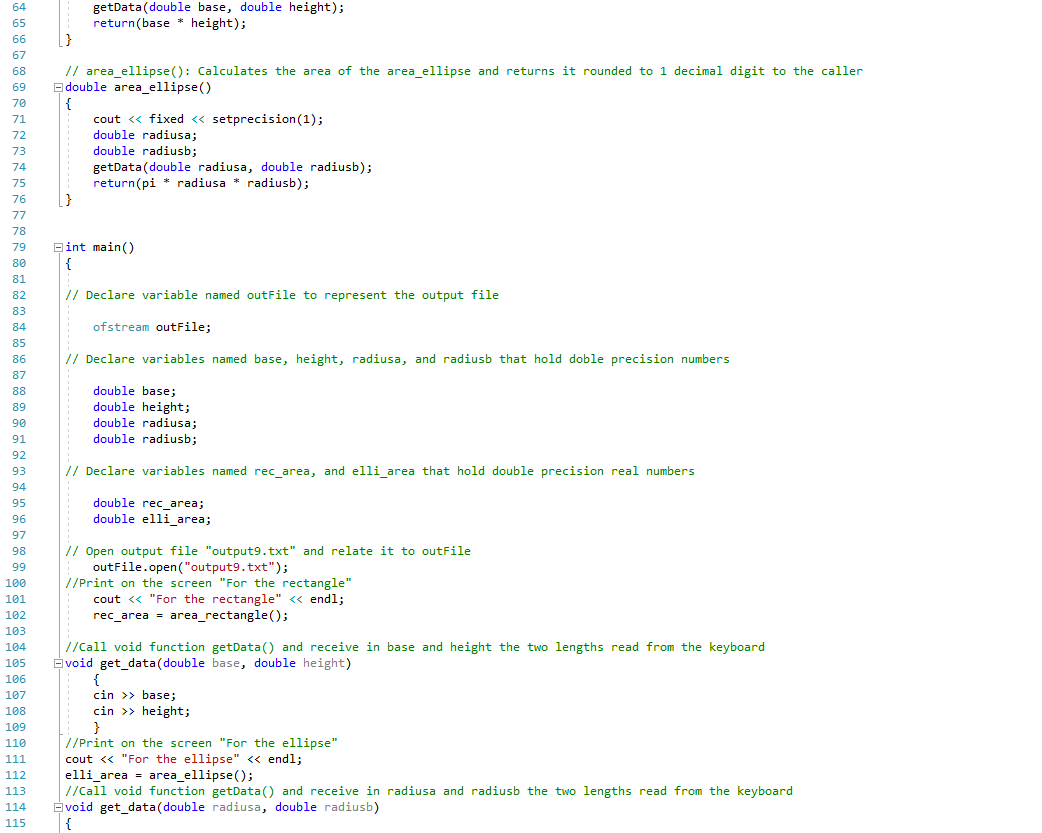
Lab 9: Functions with value and reference parameters Due: 2/26/20 Problem: Suppose your math professor asks you to write a C# program that calculates the areas of a rectangle and of an ellipse and sends the results to an output file. Ab Area = base * height Area=1* radius a * radius b Note: all images extracted from http://www.mathsisfun.com/area-calculation tool.html Your task: implement in C# the algorithm solution shown below. Algorithm solution (in pseudocode): To solve this problem your program must perform the following tasks: Declare a global constant named PI equal to 3.141592 Declare variable named outFile to represent the output file Declare variables named base, height, radiusa, and radiusb that hold double precision numbers Declare variables named rec_area, and elli_area that hold double precision real numbers Open output file "output9.txt" and relate it to outFile Print on the screen "For the rectangle" Call void function getData() and receive in base and height the two lengths read from the keyboard Print on the screen "For the ellipse" Call void function getData() and receive in radiusa and radiusb the two lengths read from the keyboard Call function area_rectangle to calculate the area of a rectangle and assign the retumed value to rec area Call function area_area_ellipse() to calculate the area of an ellipse and assign the returned value to elli_area Call function printData() to print the output to the output file Close the file You need to define the following functions in the provided file myfunctions.h to implement part of the solution: 1) To get the data you must define function getData(parl, par2). Gets two lengths from the keyboard and returns them to the caller through the parameter list. It must: a. Prompt the user to "Please enter two lengths: " b. Get both values from the keyboard and store them in parl and par2. 2) To print the output you must define function printData(oFile, b, h, ar, ra, rb, ae). Receives the output file, base of the rectangle, height of the rectangle, area of the rectangle, radius a of the ellipse, radius b of the ellipse, and area of the ellipse and prints the output to the file. Except for the file all the other values received are double precision real numbers. It must: a. Format the output to display the numbers in fixed format with two decimal digits. b. Print the message to the output file (formatted as shown in my examples): "The area of the rectangle with base", b," and height", h, "is", ar "The area of the ellipse with radius", ra," and radius", rb, "is", ae 3) To round a real number to a user-defined number of digits you must define function round_off(value, digits). Receives a value (double precision real number) and a number indicating a quantity of digits (whole number) and returns the value rounded to the specified number of digits. 4) To calculate the area of a rectangle you must define function area rectangle(b, h). Receives the base and the height of the rectangle (double precision real numbers) and returns the calculated area (a double precision real number) rounded to one decimal digit. 5) To calculate the area of an ellipse you must define function area_ellipse(ra, rb). Receives radius a and radius b of the ellipse (double precision real numbers) and returns the calculated area (a double precision real number) rounded to one decimal digit. #include
Step by Step Solution
There are 3 Steps involved in it

Get step-by-step solutions from verified subject matter experts
 Study Help