







Question: The code that I have does not seem to work. I think I messed up in the pseudocode. The original skeleton code is above and
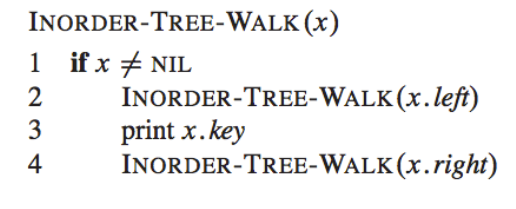
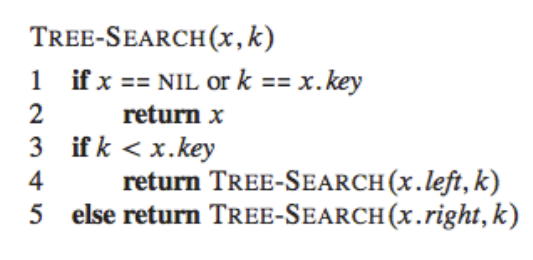
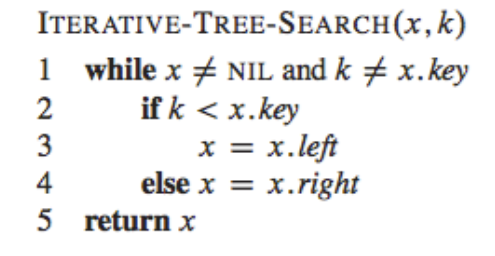
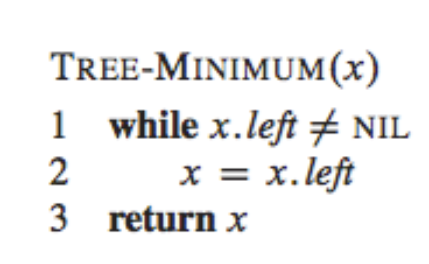
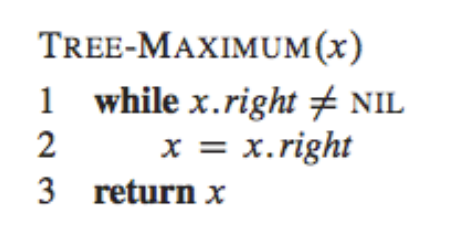
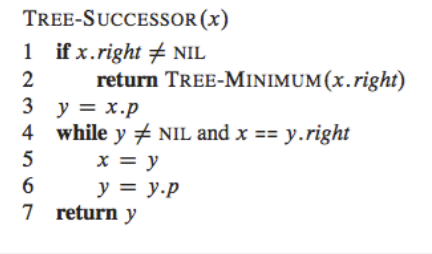
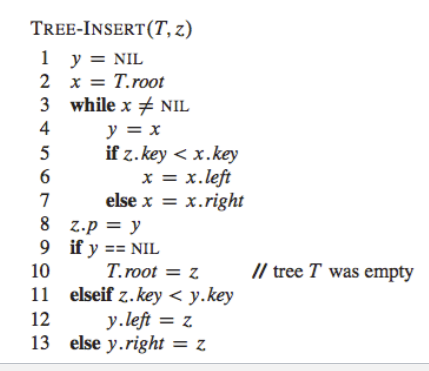
The code that I have does not seem to work. I think I messed up in the pseudocode. The original skeleton code is above and also the pseudocode.
package ds;
public class BinarySearchTree {
public TreeNode root;
public BinarySearchTree () {
root = null;
}
public void inorder_tree_walk (TreeNode x) {
}
public TreeNode search (TreeNode x, int k) {
}
public TreeNode iterative_search (int k) {
}
public TreeNode minimum () {
}
public TreeNode maximum () {
}
public TreeNode successor (TreeNode x) {
}
public void insert (int k) {
}
/**
* @param args
*/
public static void main(String[] args) {
// TODO Auto-generated method stub
int[] array = {15, 6, 18, 3, 7, 17, 20, 2, 4, 13, 9};
BinarySearchTree bst;
TreeNode n;
bst = new BinarySearchTree();
for (int i = 0; i
bst.insert(array[i]);
System.out.println("Inorder_tree_walk starts ------------------");
bst.inorder_tree_walk(bst.root);
System.out.println("Inorder_tree_walk ends ------------------");
System.out.print(" ");
System.out.println("Search starts ------------------");
n = bst.search(bst.root, 13);
System.out.println("found: " + n.key);
System.out.println("Search ends ------------------");
System.out.print(" ");
System.out.println("Iterative search starts ------------------");
n = bst.iterative_search(4);
System.out.println("found: " + n.key);
System.out.println("Iterative search ends ------------------");
System.out.print(" ");
System.out.println("Minimum starts ------------------");
n = bst.minimum();
System.out.println("Minimum key is " + n.key);
System.out.println("Minimum ends ------------------");
System.out.print(" ");
System.out.println("Maximum starts ------------------");
n = bst.maximum();
System.out.println("Maximum key is " + n.key);
System.out.println("Maximum ends ------------------");
System.out.print(" ");
System.out.println("Successor starts ------------------");
n = bst.successor(bst.root.left.right.right);
System.out.println("Successor key is " + n.key);
System.out.println("Successor ends ------------------");
System.out.print(" ");
}
}
-----------------------------------------------------------------------
package ds;
public class TreeNode {
public int key;
public TreeNode p;
public TreeNode left;
public TreeNode right;
public TreeNode () {
p = left = right = null;
}
public TreeNode (int k) {
key = k;
p = left = right = null;
}
}
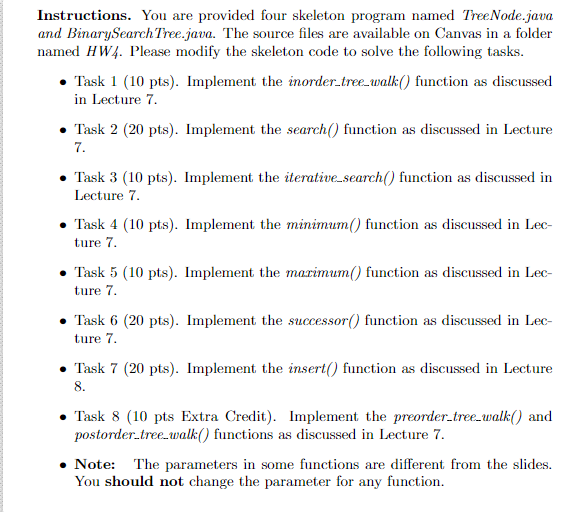
Instructions. You are provided four skeleton program named TreeNode.java and BinarySearchTree.java. The source files are available on Canvas in a folder Task (10 pts). Implement the inorder treewalk() function as discussed Task 2 (20 pts). Implement the search) function as discussed in Lecture . Task 3 (10 pts). Implement the iterative search) function as discussed in Task 4 (10 pts). Implement the minimum() function as discussed in Lec- Task 5 (10 pts). Implement the marunum() function as discussed in Lec- Task 6 (20 pts). Implement the successor() function as discussed in Lec- Task 7 (20 pts). Implement the insert) function as discussed in Lecture . Task 8 (10 pts Extra Credit). Implement the preorder treewalk and The parameters in some functions are different from the slides. named HW4. Please modify the skeleton code to solve the following tasks in Lecture 7 7 Lecture 7 ture 7 ture 7 ture 7 postordertree walk) functions as discussed in Lecture 7 Note: You should not change the parameter for any function
Step by Step Solution
There are 3 Steps involved in it

Get step-by-step solutions from verified subject matter experts
 Study Help