







Question: The codings are sample for the database, added a user and have set the password for guide. The main task is the first picture with
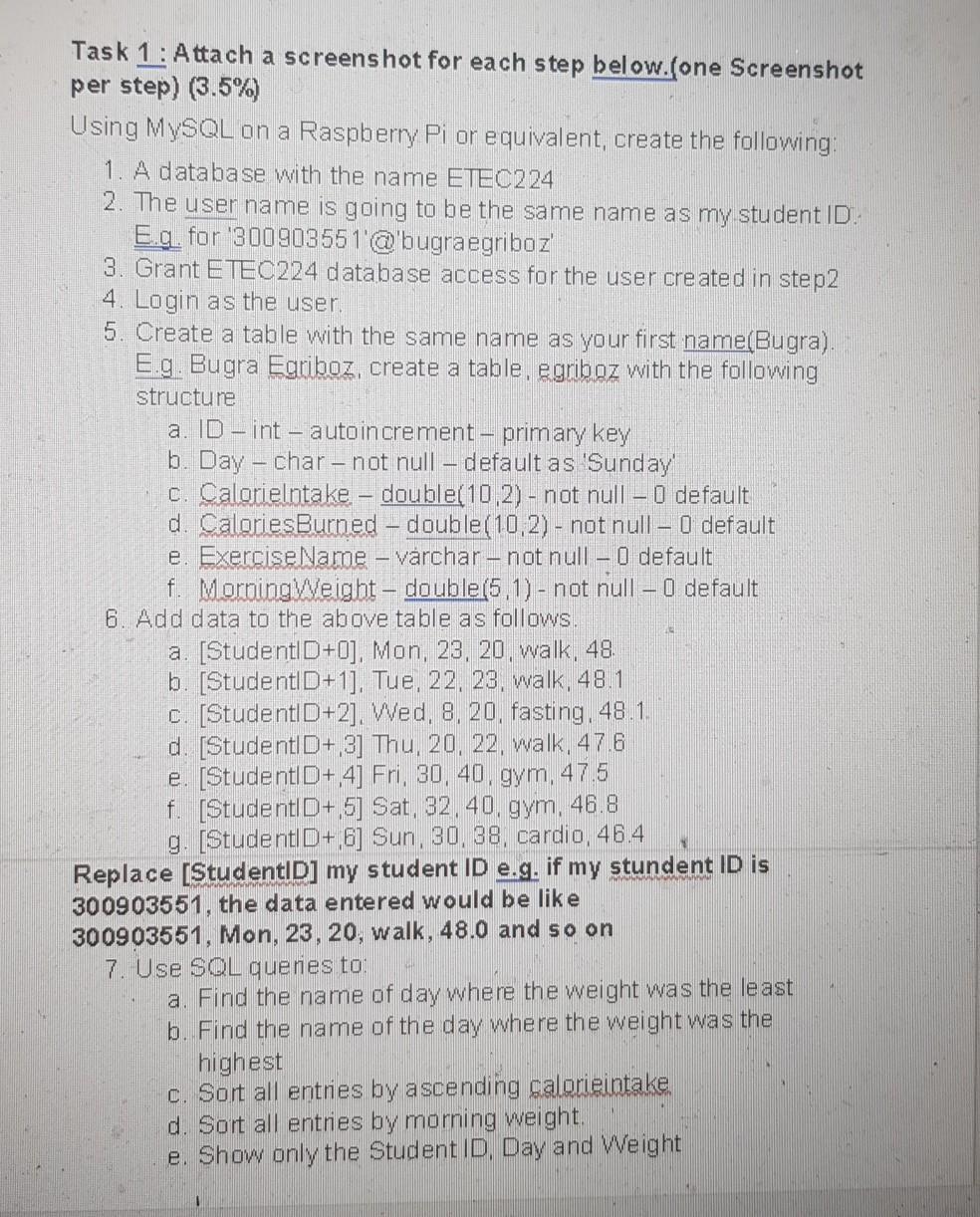
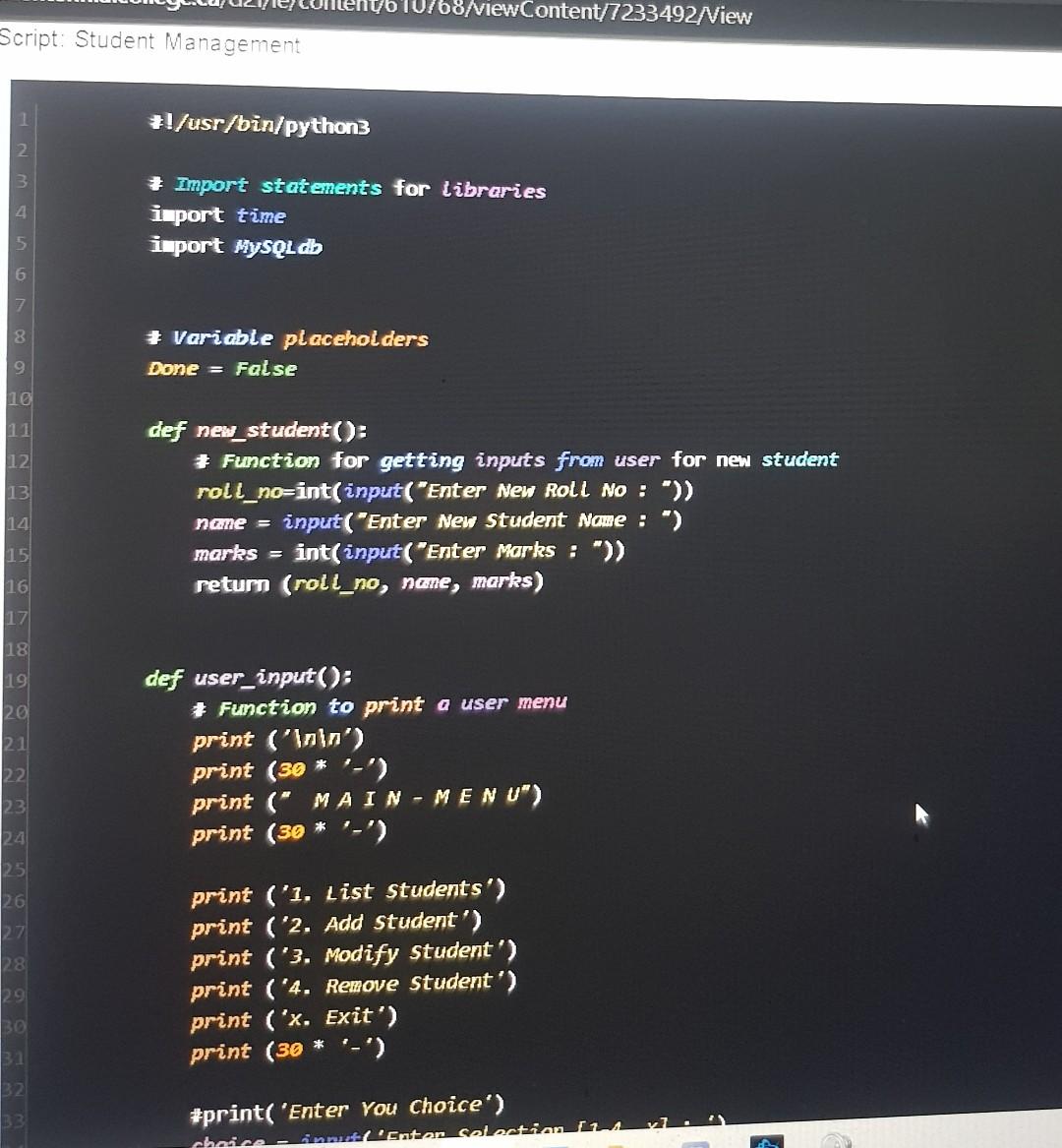
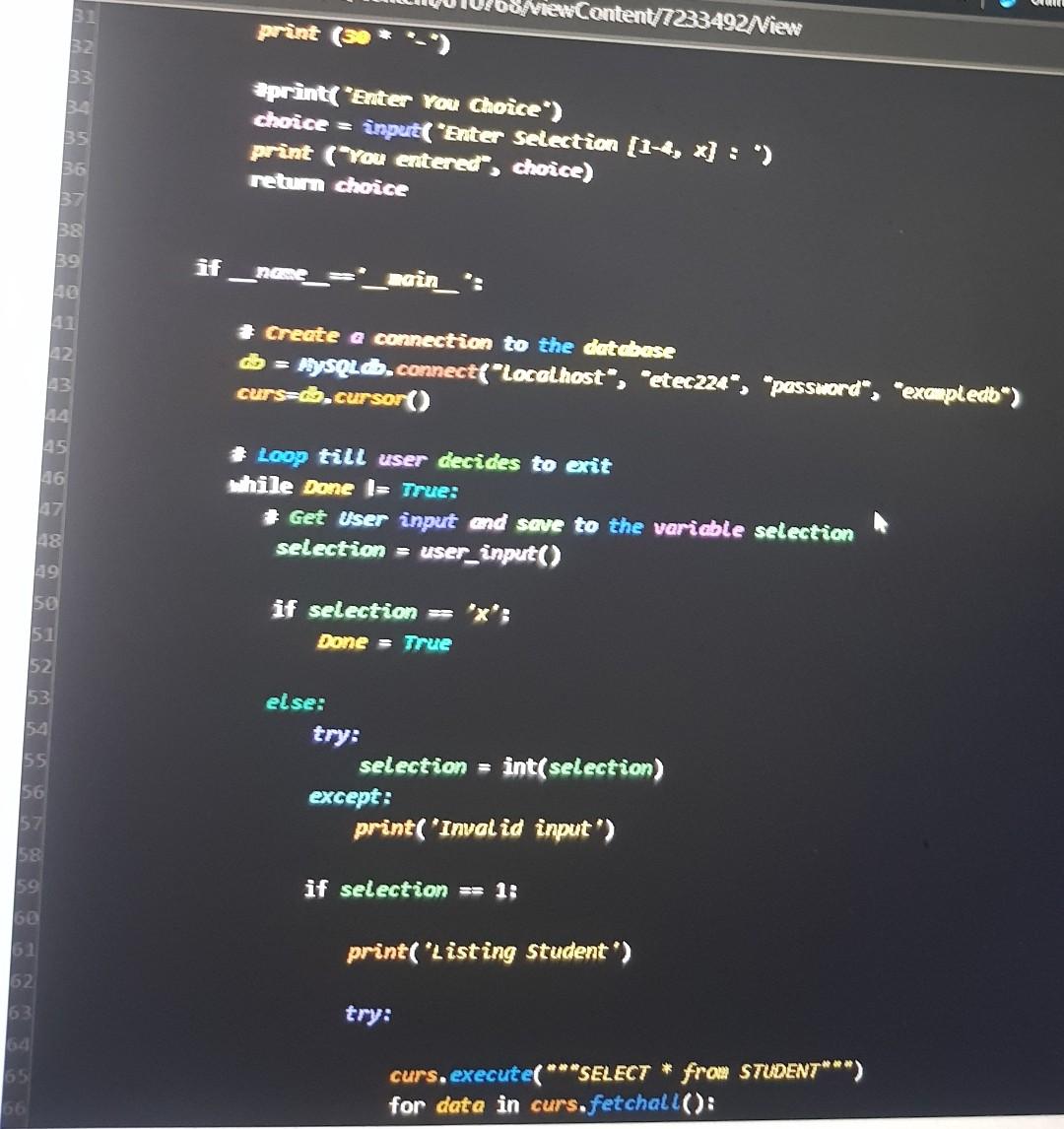
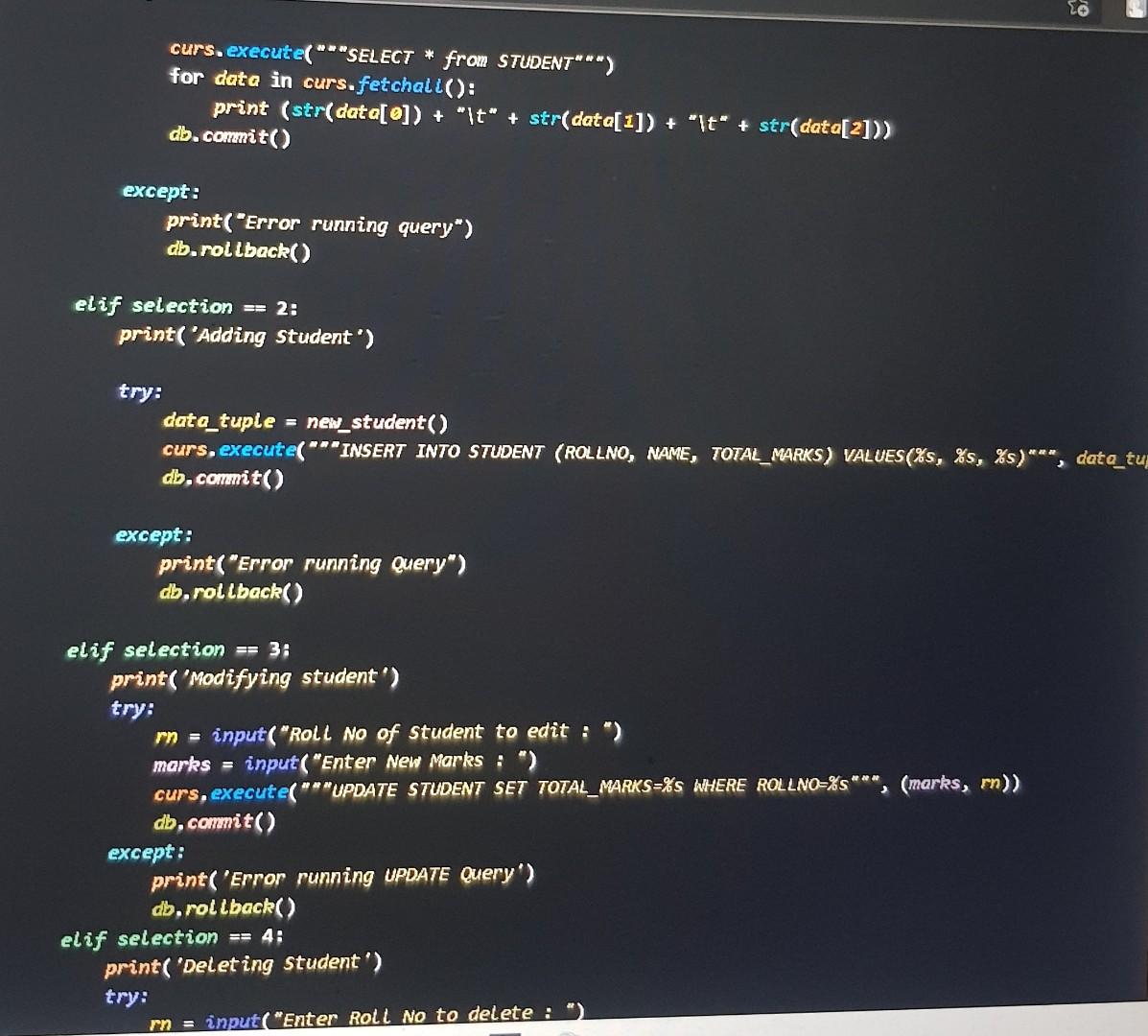
The codings are sample for the database, added a user and have set the password for guide. The main task is the first picture with steps provided.
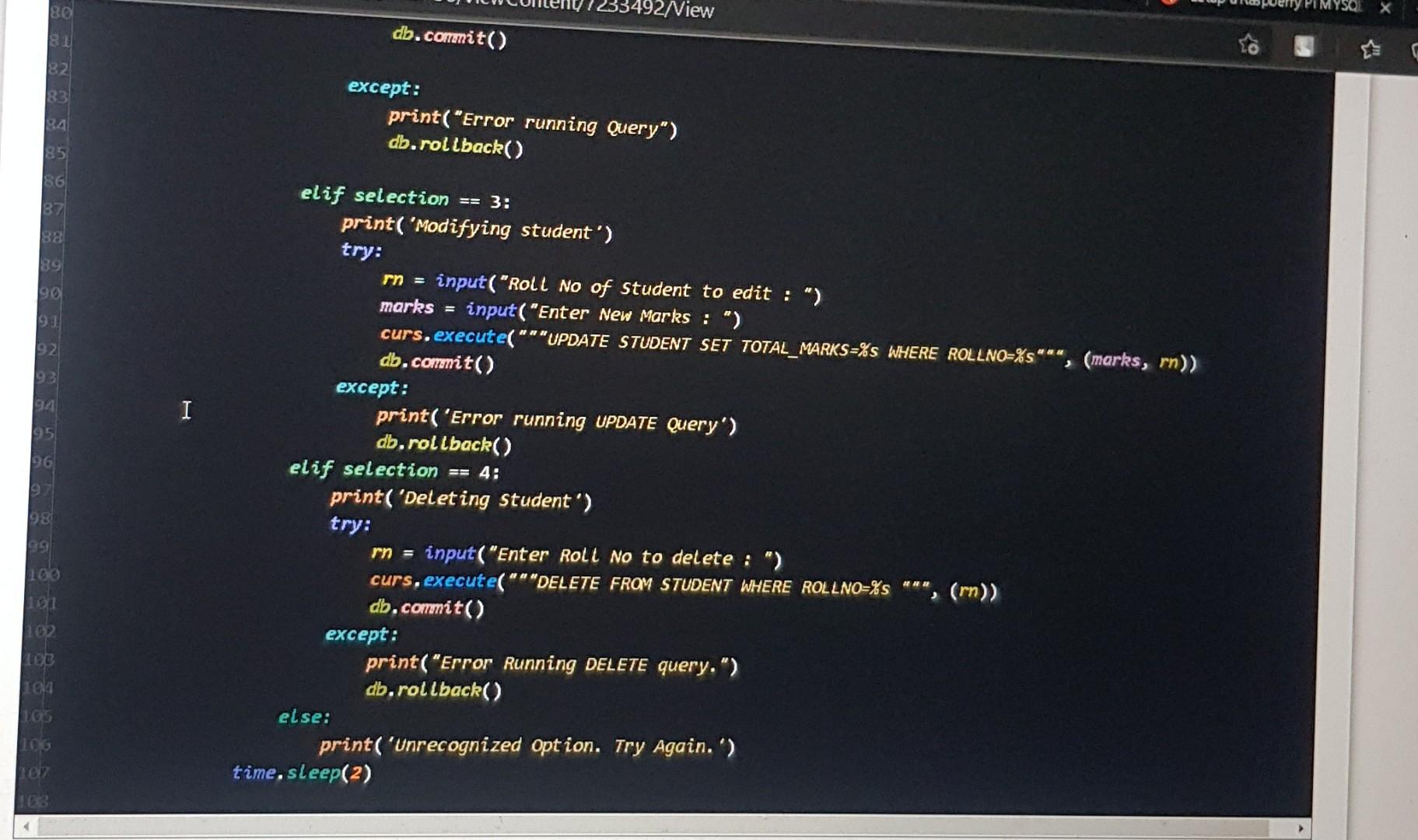
Task 1: Attach a screenshot for each step below.(one Screenshot per step) (3.5%) Using MySQL Ona Raspberry Pi or equivalent, create the following: 1. A database with the name ETEC224 2. The user name is going to be the same name as my student ID. E.g. for '300903551'@'bugraegriboz' 3. Grant ETEC224 database access for the user created in step2 4. Login as the user. 5. Create a table with the same name as your first name(Bugra). E.g. Bugra Egriboz, create a table, egriboz with the following structure a. ID - int auto increment - primary key b. Day - char - not null default as Sunday C. Calorielntake - double(10.2) - not null O default d. CaloriesBurned double(10,2)- not null - O default e. Exercise Name - varchar-not null - O default f. MorningWeight - double(5,1) - not null - O default 6. Add data to the above table as follows. a. [StudentlD+0], Mon, 23, 20, walk, 48. b. [Student|D+1], Tue, 22, 23, walk, 48.1 c. [StudentlD+2]. Wed, 8, 20, fasting. 48.1. d. [StudentlD+,3] Thu, 20, 22, walk, 47.6 e. [StudentlD+ 4] Fri, 30, 40, gym, 47.5 f. [StudentlD+ 5] Sat, 32, 40, gym, 46.8 g. [StudentlD+ 6] Sun, 30, 38, cardio, 46.4 Replace [StudentID] my student ID e.g. if my stundent ID is 300903551, the data entered would be like 300903551, Mon, 23, 20, walk, 48.0 and so on 7. Use SOL quenes to a. Find the name of day where the weight was the least b. Find the name of the day where the weight was the highest c. Sort all entries by ascending calorieintake d. Sort all entries by morning weight. e. Show only the Student ID, Day and Weight 10768/ViewContent/7233492 View Script: Student Management #!/usr/bin/python3 2 3. 4 * Import statements for libraries import time import MySQL db 5 6 8 Variable placeholders Done = False 9 10 12 13 14 15 16 17 18 19 def new_student(): * Function for getting inputs from user for new student roll_no=int(input("Enter New Roll No : ")) name = input("Enter New Student Name :") marks = int(input("Enter Marks : ")) return (roll_no, nane, marks) 20 21 def user_input(): Function to print a user menu print ('inin') print (36 * '-') print ("MAIN-MENU") print (30 * '-') 22 23 24 25 26 28 print ('1. List Students') print ('2. Add Student') print ('3. Modify Student') print ('4. Remove student') print ('x. Exit') print (30 '-') 32 #print( 'Enter You Choice') choice - intentan colection 12A NewContentT233492Niew print (se 33 B 35 aprint("Enter You Choice) choice = Inpuit 'Enter selection (1-4, x] : ) print ("You entered", choice) retum choice BE 37 38 39 agin': 2 # Create a connection to the database = MySQL d.connect("localhost", "etec224", "password", "exampledb) curs=d.cursor() 3 45 46 # Loop till user decides to exit While Done I= True: # Get User input and save to the variable selection selection = user_input() 48 if selection = 'X: Done = True 50 51 52 53 55 56 57 58 et se: try: selection = int(selection) except: print( 'Invalid input') 59 if selection == 1: 50 62 62 print('Listing Student') try: 63 14 curs, execute( ***SELECT * from STUDENT***) for data in curs.fetchall(): curs. execute("*"SELECT * from STUDENT***) for data in curs.fetchalt(): print (str(data[@]) + "It" + str(data[1]) + "it" + str(data[2])) db.commit() except: print("Error running query") db.rollback() elif selection == 2: print('Adding Student') try: data_tuple = new_student() curs, execute("**INSERT INTO STUDENT (ROLLNO, NAME, TOTAL_MARKS) VALUES(%s, %s, %)***, date_tup db.commit() except: print("Error running Query") db.rollback() elif selection == 3: print( 'Modifying student') try: input("Roll No of Student to edit :") marks = input("Enter New Marks :") curs, execute("*"UPDATE STUDENT SET TOTAL_MARKS=%S WHERE ROLL NO=%s***, (marks, mn)) db.commit() except: print('Error running UPDATE Query') db.rollback() elif selection == 4: print( 'Delet ing Student') try: input("Enter Roll No to delete : rn = BO 3492Niew 81 db.commit() R3 except: print("Error running Query") db.rollback() 85 86 B7 38 po 93 I 95 elif selection == 3: print('Modifying student') try: rn = input("Roll No of Student to edit :") marks = input("Enter New Marks :") curs, execute("*"UPDATE STUDENT SET TOTAL_MARKS=%S WHERE ROLLNO=%**", **", (marks, rn)) db.commit() except: print('Error running UPDATE Query') db.rollback() elif selection == 4: print('Deleting Student') try: rn = input("Enter Roll No to delete :") curs, execute("" "DELETE FROM STUDENT WHERE ROLLNO=%s "nu, **", (m)) db.commit() except: print("Error Running DELETE query.") db.rollback() else: print('Unrecognized Option. Try Again.') time. sleep(2) 98 99 10 LOG net 4
Step by Step Solution
There are 3 Steps involved in it

Get step-by-step solutions from verified subject matter experts
 Study Help