







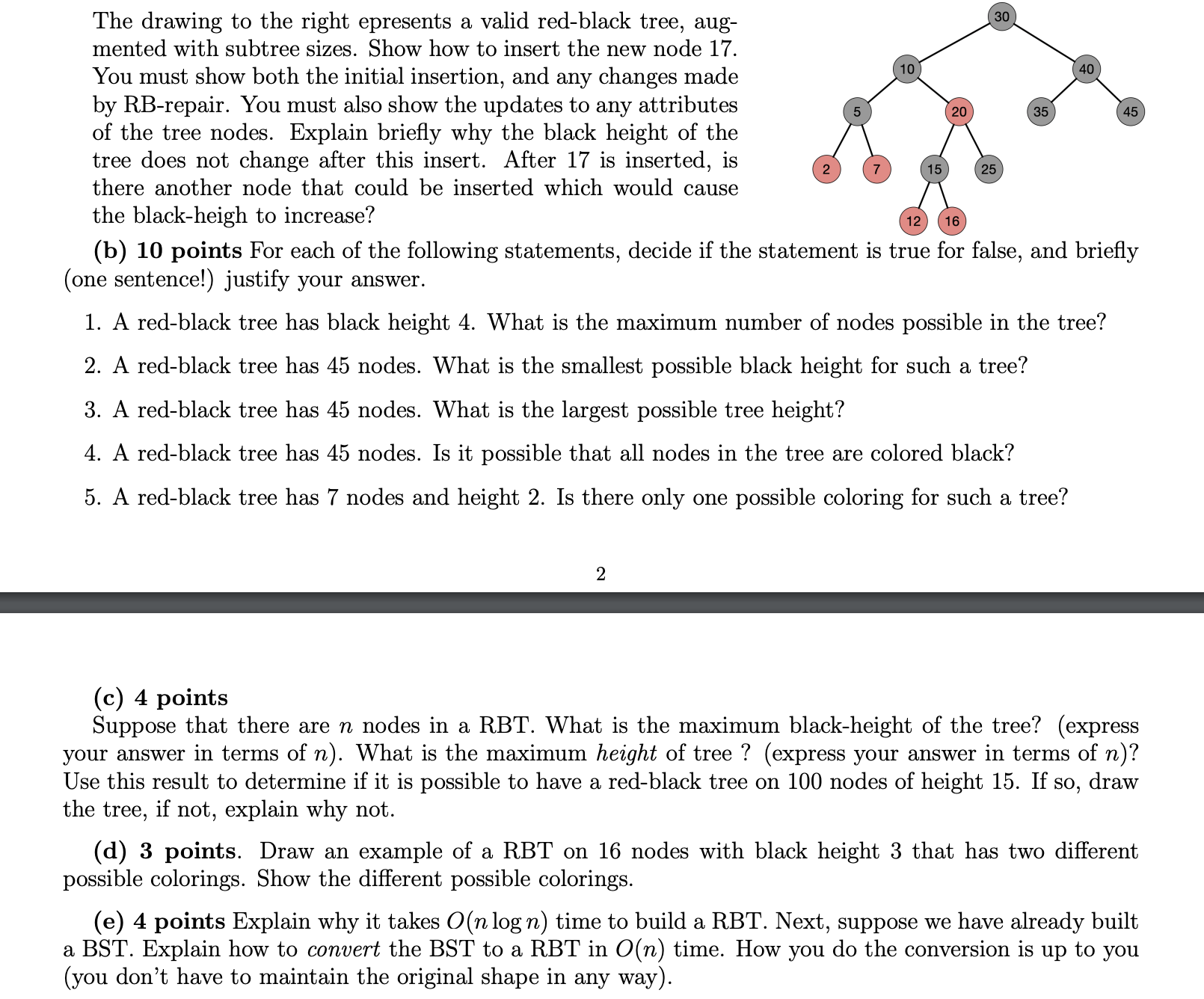
Question: The drawing to the right epresents a valid red - black tree, aug - mented with subtree sizes. Show how to insert the new node
The drawing to the right epresents a valid redblack tree, aug
mented with subtree sizes. Show how to insert the new node
You must show both the initial insertion, and any changes made
by RBrepair. You must also show the updates to any attributes
of the tree nodes. Explain briefly why the black height of the
tree does not change after this insert. After is inserted, is
there another node that could be inserted which would cause
the blackheigh to increase?
b points For each of the following statements, decide if the statement is true for false, and briefly
one sentence! justify your answer.
A redblack tree has black height What is the maximum number of nodes possible in the tree?
A redblack tree has nodes. What is the smallest possible black height for such a tree?
A redblack tree has nodes. What is the largest possible tree height?
A redblack tree has nodes. Is it possible that all nodes in the tree are colored black?
A redblack tree has nodes and height Is there only one possible coloring for such a tree?
c points
Suppose that there are n nodes in a RBT What is the maximum blackheight of the tree? express
your answer in terms of n What is the maximum height of tree? express your answer in terms of n
Use this result to determine if it is possible to have a redblack tree on nodes of height If so draw
the tree, if not, explain why not.
d points. Draw an example of a RBT on nodes with black height that has two different
possible colorings. Show the different possible colorings.
e points Explain why it takes On log n time to build a RBT Next, suppose we have already built
a BST Explain how to convert the BST to a RBT in On time. How you do the conversion is up to you
you don't have to maintain the original shape in any way solve step by step clearly
Step by Step Solution
There are 3 Steps involved in it
1 Expert Approved Answer
Step: 1 Unlock

Question Has Been Solved by an Expert!
Get step-by-step solutions from verified subject matter experts
Step: 2 Unlock
Step: 3 Unlock
 Study Help