







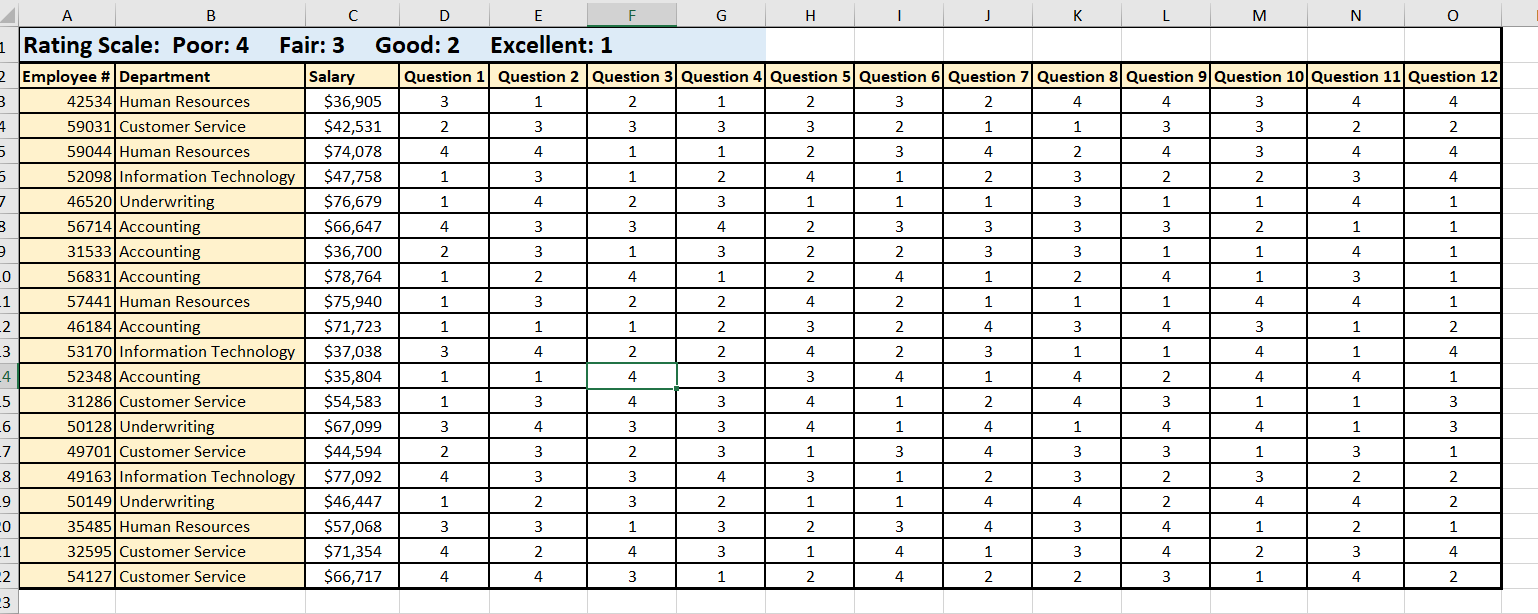
Question: The first sheet is individual responses, and second sheet is Average Q 3 Rating by Department sheet. Third sheet is for problem 3 . Write
The first sheet is individual responses, and second sheet is Average Q Rating by Department sheet. Third sheet is for problem Write a formula in cell Average Q Rating by DepartmentB which can be copied to cell
Average Q Rating by DepartmentB to calculate the average rating by department for
question Round the number to the nearest th
We will break down this function in steps.
Because there is only one criteria, use the AVERAGEIF function and add the $ to each column and row reference where
it is necessary. Copy the formula down. Check your answers to make sure the function works properly.
Select cell Average Q Rating by DepartmentB and add the round function to the formula. Check your answers to
make sure the function works properly.
When using the AVERAGEIF function, if there are no cells that meet the criteria, Excel will display a #DIV error. You
want the cell to display as or as dashes if the sheet is in Accounting format, so to avoid the #DIV error, you can use
the IFERROR function.
Syntax of complete function: IFERRORROUNDAVERAGEIFtableQues Ques Ques Ques Ques Ques Ques Ques Ques Ques Ques Ques ResponsetableAvailabilityof a cleardescriptiontableFeedbackabout jobperformancetableSufficienttrainingopportunitiestableAvailability offollowuptrainingtableAvailability of asupervisor toanswer yourquestionstableFeedback andevaluationregarding yourperformancetableRecognition byyour supervisorfor youraccomolishmentstableFariness insupervisionandemploymentopportunitiestableRelationshipwith yoursupervisortableYour rateof pay foryour worktablePaid timeoff youreceivetableBenefitsyoureceiveoorairioodxcellent
Step by Step Solution
There are 3 Steps involved in it
1 Expert Approved Answer
Step: 1 Unlock

Question Has Been Solved by an Expert!
Get step-by-step solutions from verified subject matter experts
Step: 2 Unlock
Step: 3 Unlock
 Study Help