







Question: The following code takes a binary string from user input and converts it into a decimal number. The input is recieved through the first textfield
The following code takes a binary string from user input and converts it into a decimal number. The input is recieved through the first textfield labeled binary string and when the "convert to decimal" button is presed, displays the output in the second textfield labeled decimal string. The method parseBinary is supposed to throw a NumberFormatException when any character other than a 0 or 1 is entered. However, I am having trouble getting the invalid character to display in the second textbox. Any suggestions how to fix this?
import java.awt.BorderLayout;
import java.awt.event.ActionListener;
import java.awt.event.ActionEvent;
import javax.swing.AbstractButton;
import javax.swing.JButton;
import javax.swing.JFrame;
import javax.swing.JLabel;
import javax.swing.JPanel;
import javax.swing.JTextField;
public class Test
{
static JTextField txt1 = new JTextField(30);
static JTextField txt2 = new JTextField(30);
static char invalidChar = ' ';
/**
* Converts a binary string into a decimal integer and
* back into a String then displays output in text field
*
* @param binaryString a string to hold binary string
* input from user
*/
private static void parseBinary(String binaryString) throws NumberFormatException
{
for(int i = 0; i
if(binaryString.charAt(i) != '0' && binaryString.charAt(i) != '1') {
invalidChar = binaryString.charAt(i);
throw new NumberFormatException();
}
else {
int decimalValue = Integer.parseInt(binaryString, 2);
String decimalString = Integer.toString(decimalValue);
txt2.setText(decimalString);
}
}
}
/**
* GUI interface for user input for method
* parseBinary
*
*/
public static void main(String[] args)
{
JFrame frame = new JFrame("Convert Binary to Decimal");
JPanel panel = new JPanel();
panel.setLayout(null);
JButton b1 = new JButton("Convert to Decimal");
b1.setBounds(0, 125, 593, 30);
txt1.setBounds(120, 20, 470, 30);
txt2.setBounds(120, 60, 470, 30);
JLabel lbl1 = new JLabel("Binary String");
lbl1.setBounds(10, 20, 300, 30);
JLabel lbl2 = new JLabel("Decimal String");
lbl2.setBounds(10, 60, 300, 30);
frame.setDefaultCloseOperation(JFrame.EXIT_ON_CLOSE);
frame.setVisible(true);
frame.setResizable(false);
frame.setSize(600, 200);
panel.add(b1);
panel.add(txt1);
panel.add(txt2);
panel.add(lbl1);
panel.add(lbl2);
frame.add(panel);
b1.addActionListener(new ActionListener()
{
public void actionPerformed(ActionEvent e)
{
try {
parseBinary(txt1.getText());
} catch (NumberFormatException ex) {
txt2.setText("Invalid format for binary string. Invalid character: " + invalidChar);
}
}
});
}
}
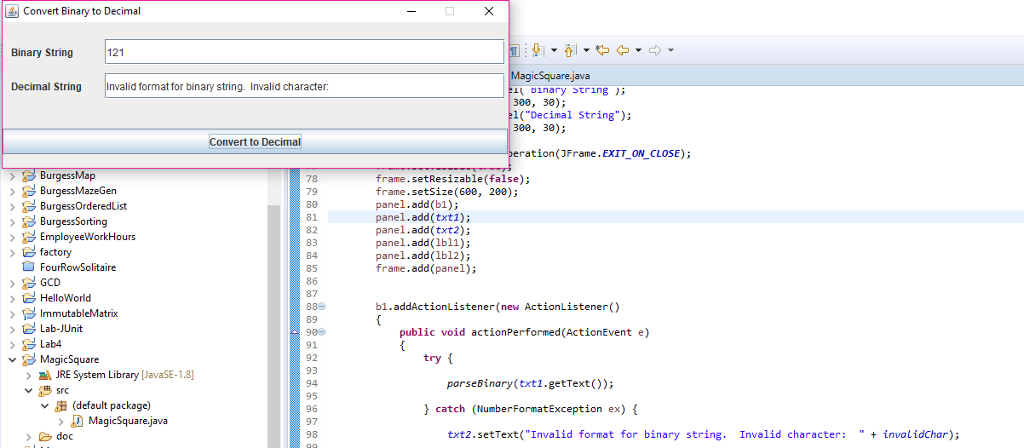
Convert Binary to Decimal Binary String 121 Decimal StringInvalid format for binary string. Invalid character 1( ?nary string ); 300, 30); (Decimal String"); 300, 30); Convert to Decimal ration(JFrame.EXIT ON CLOSE); BurgessMap 78 79 80 81 82 83 84 85 86 87 frame.setResizable (false); frame.setSize (60e, 200); panel.add (b1); panel.add(txti); panel.add (txt2); panel.add (1bl1); panel.add (1b12); frame.add(panel) > BurgessOrderedList BurgessSorting EmployeeWorkHouns > factory FourRowSolitaire GCD HelloWorld ImmutableMatrox Lab-JUnit b1.addActionListener(new ActionListener() 89 public void actionPerformed(ActionEvent e) 91 92 93 ? MagicSquare try JRE System Library [JavaSE-1.8] parseBinary (txti.getText)); srC 95 96 97 98 v (default package) catch (NumberFormatException ex) >?MagicSquare.java doc txt2.setText("Invalid format for binary string. Invalid character: invalidChar)
Step by Step Solution
There are 3 Steps involved in it

Get step-by-step solutions from verified subject matter experts
 Study Help