



Question: The following figure shows an activity with two EditText widgets, one for entering the name and the second for Mobile number. This application has three
The following figure shows an activity with two EditText widgets, one for entering the name and the second for Mobile number.
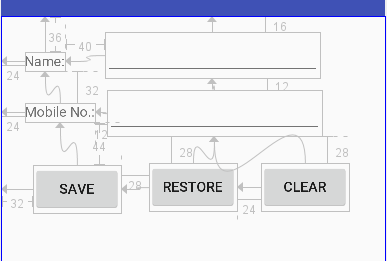
This application has three buttons with their functions as follows:
Button Save: saves the name and mobile number entered in the two EditText in Sharedpreferences (Key-Value Pairs)
Button Restore: retrieve the saved name and mobile from the SharedPreferences and write it in the corresponding EditText. In addition, if there no values saved in the SharedPreferences it should shows the word NO VALUES SAVED.
Button Clear: Clear the text written inside the two EditTexT, so both should be empty.
You are required to implement this app, with the described functionality. And attached two files only with the assignment
First File: Layout XML file
Second File: Java Class File for the activity.
Notes:
You can use any IDs for the widgets shown; also for constrains you can change the values from the shown in the figures.
Try to minimize your code as possible.
36 -40 ame 32 obile No 28 28 SAVE RESTORE 4- CLEAR 32 24
Step by Step Solution
There are 3 Steps involved in it

Get step-by-step solutions from verified subject matter experts