







Question: The following given is a code for C++ #include using namespace std; int main() { int speed, time; cout > speed; if (speed cout >
The following given is a code for C++
#include
using namespace std;
int main() { int speed, time; cout > speed; if (speed
cout > time; if (time
cout
for (int i = 1; i
return 0; }
The Output:
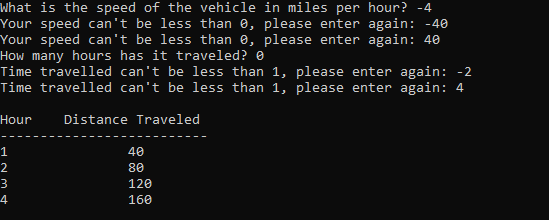
For the given output I need to apply a space between the "Your speed can't be less than 0, please enter again" and "How many hours has it traveled?"
If anyone can help me with that would be greatly appreciated.
Given Instructions:
The distance a vehicle travels can be calculated as follows:
distance = speed * time
For example, if a train travels 40 miles per hour for 3 hours, the distance traveled in 120 miles.
Write a program that asks the user for the speed of the vehicle (in miles per hour) and how many hours it has traveled. The program should then use a loop to display the distance the vehicle has traveled for each hour of that time period. Here is an example of the output:
Input Validation: Do not accept a negative number for speed.
Input Validation: Do not accept any value less than 1 for time traveled.
In this expected output, just to keep the simplicity of the program I entered only 2 times the wrong input. Your program should be able to handle an unlimited number of times wrong input (Hint: use while loop)
You must match the layout of the output.
For space use tab command (\t), do not use space bar to space them out.
It should look like this:
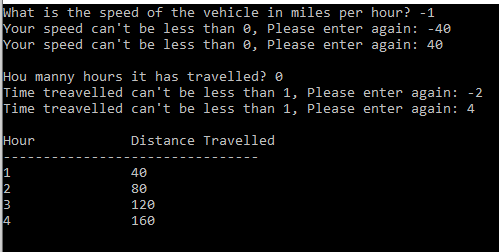
What is the speed of the vehicle in miles per hour? 4 /our speed can "t be less than , please enter again: 40 lour speed can "t be less than , please enter again: 40 How many hours has it traveled? Time travelled can't be less than 1 , please enter again: 2 rime travelled can't be less than 1 , please enter again: 4
Step by Step Solution
There are 3 Steps involved in it

Get step-by-step solutions from verified subject matter experts
 Study Help