







Question: The following PIC code displays a countdown with a 1-second interval, in the spirit of Prac 1. start: call LCD_init movlw d'100' movwf count
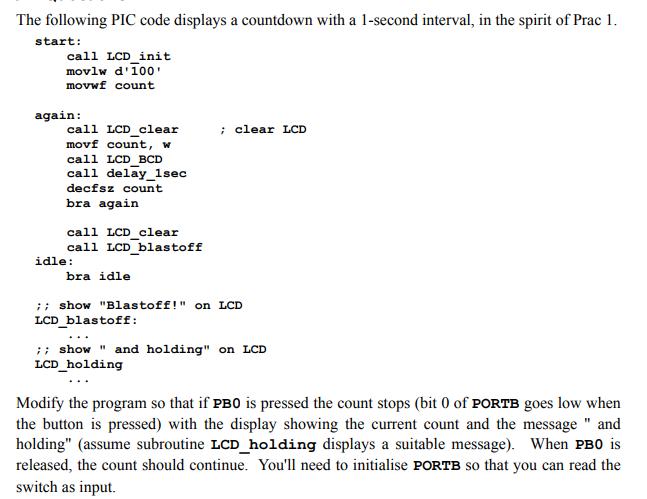
The following PIC code displays a countdown with a 1-second interval, in the spirit of Prac 1. start: call LCD_init movlw d'100' movwf count again: call LCD clear movf count, w call LCD BCD call delay_1sec decfsz count bra again call LCD_clear call LCD blastoff idle: bra idle ; clear LCD ;; show "Blastoff!" on LCD LCD_blastoff: ;; show" and holding" on LCD LCD_holding Modify the program so that if PBO is pressed the count stops (bit 0 of PORTB goes low when the button is pressed) with the display showing the current count and the message" and holding" (assume subroutine LCD_holding displays a suitable message). When PBO is released, the count should continue. You'll need to initialise PORTB so that you can read the switch as input.
Step by Step Solution
There are 3 Steps involved in it

Get step-by-step solutions from verified subject matter experts
 Study Help