







Question: The following program, write the code in C++, please do it well, make sure you show all steps and how you did it. Please make
The following program, write the code in C++, please do it well, make sure you show all steps and how you did it. Please make the code such that I can copy paste it. Also please show the output as well, as sometimes the code is given but there is not a correct output, so show a screenshot of your output and that it matches everything asked in the question.
Please follow all directions carefully, code of each of the files should be written out and should be written well, it should compile, I have asked this many times but I never got a correct answer. You have to use reservoir levels of 2018 and the gallons storage levels etcc (note i have downloaded the file and it is in my directory, it is called "Current_Reservoir_Levels.tsv", but the following is what you need to do to go to the file so you cans see for yourself:
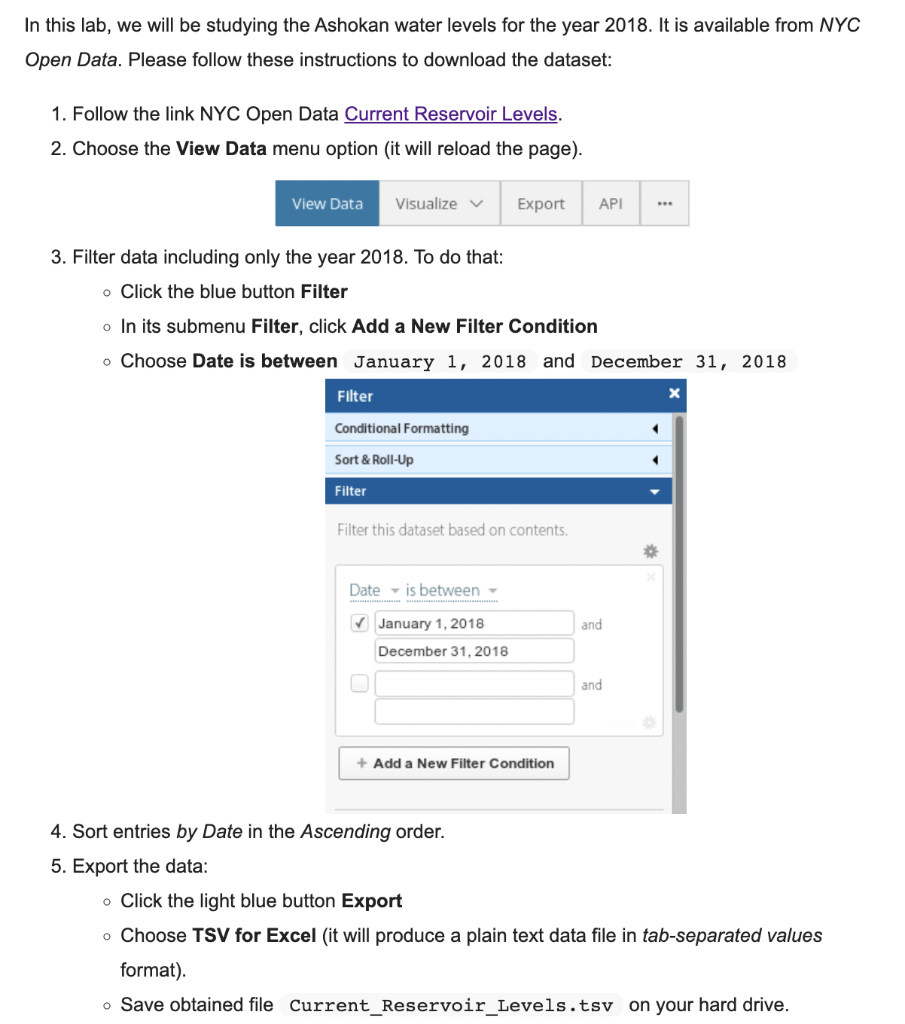
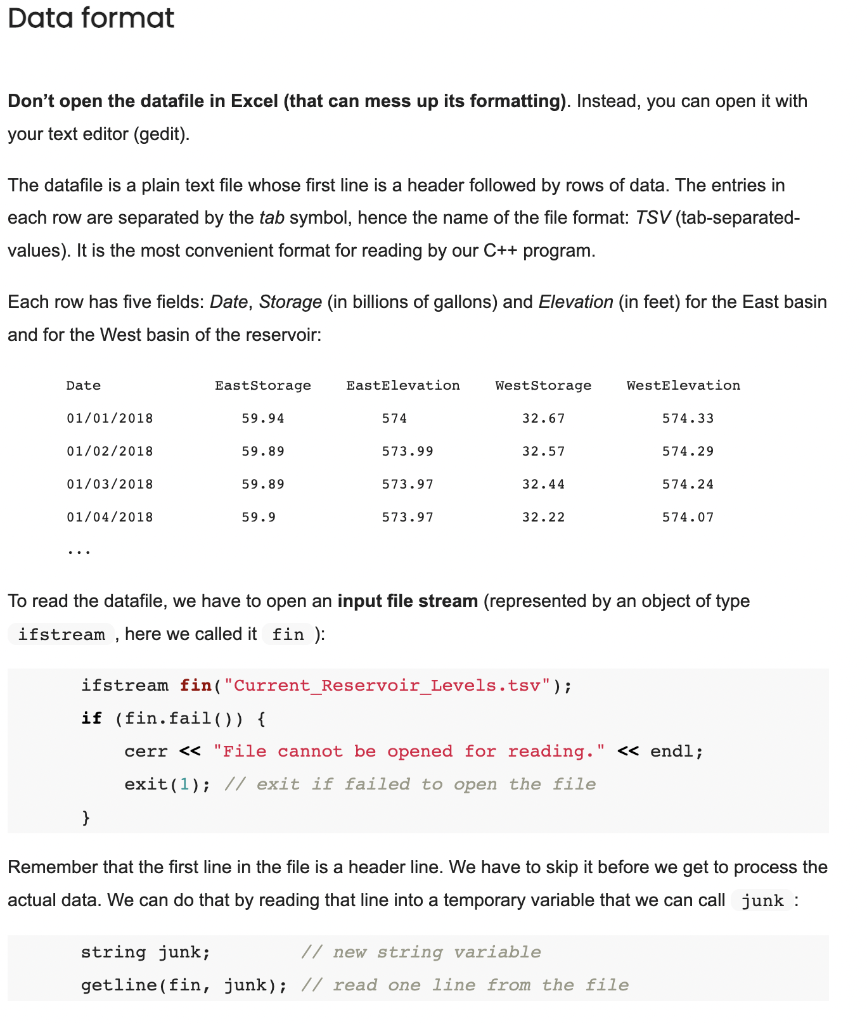
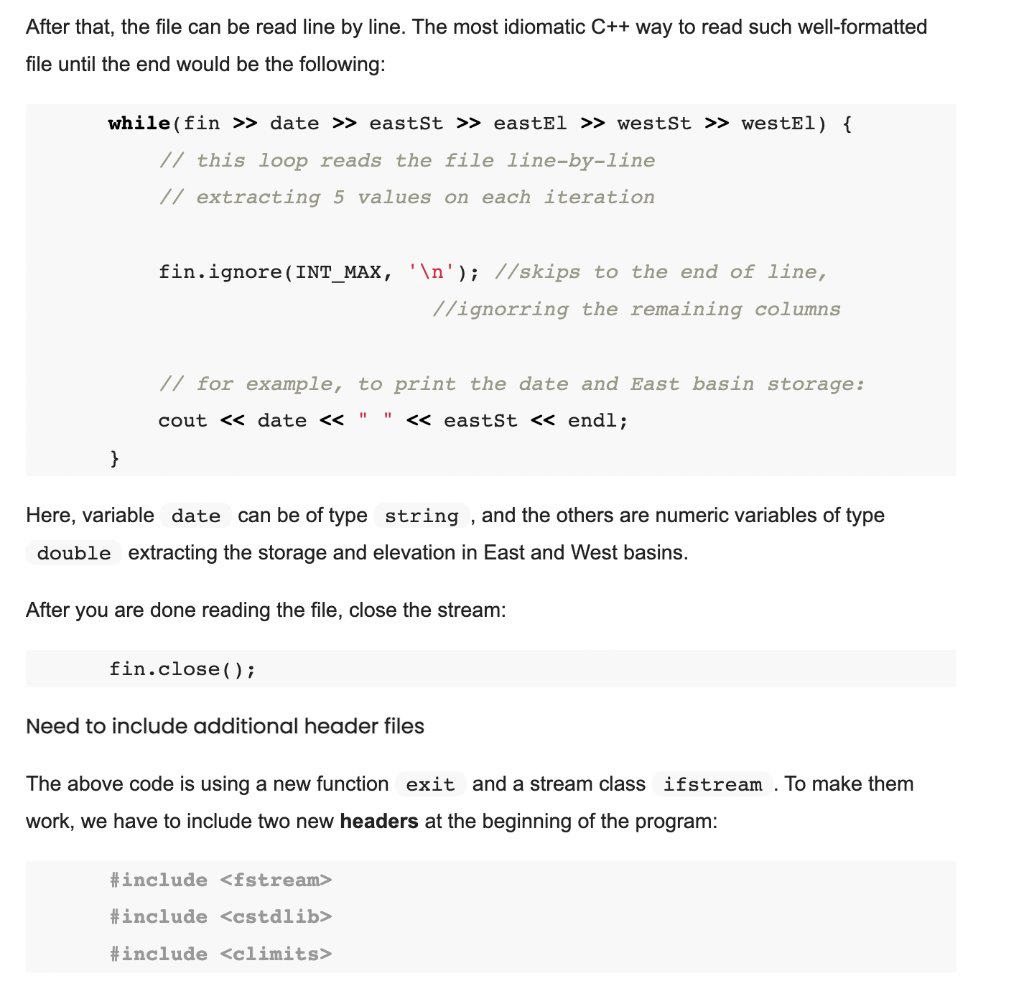
What you need to do is add on to my code and "Add a function std::string compare_basins(std::string date) that will return East if the East basin was higher on the specified date and West if the West was higher. It should return Equal if the values were the same." This is your task. In my code, that I am sending below i have completed task a and task b and you need to add on to those 4 files and do task c in which you add that function.
So when the program gets runned, it should have 3 outputs, my previous 2 outputs from task a and task b and your output for this function in task C.
IMPORTANT NOTE: YOUR CODE SHOULD BE SENT IN 4 FILES, THE RESERVOIR.CPP RESERVOIR.H MAIN.CPP AND MAKEFILE, THERE MAY OR MAY NOT BE CHANGES FROM THE FILE I SEND BUT SEND ALL 4 FILES THAT PRODUCES ALL 3 OUTPUTS AND COMPILES/RUNS WELL.
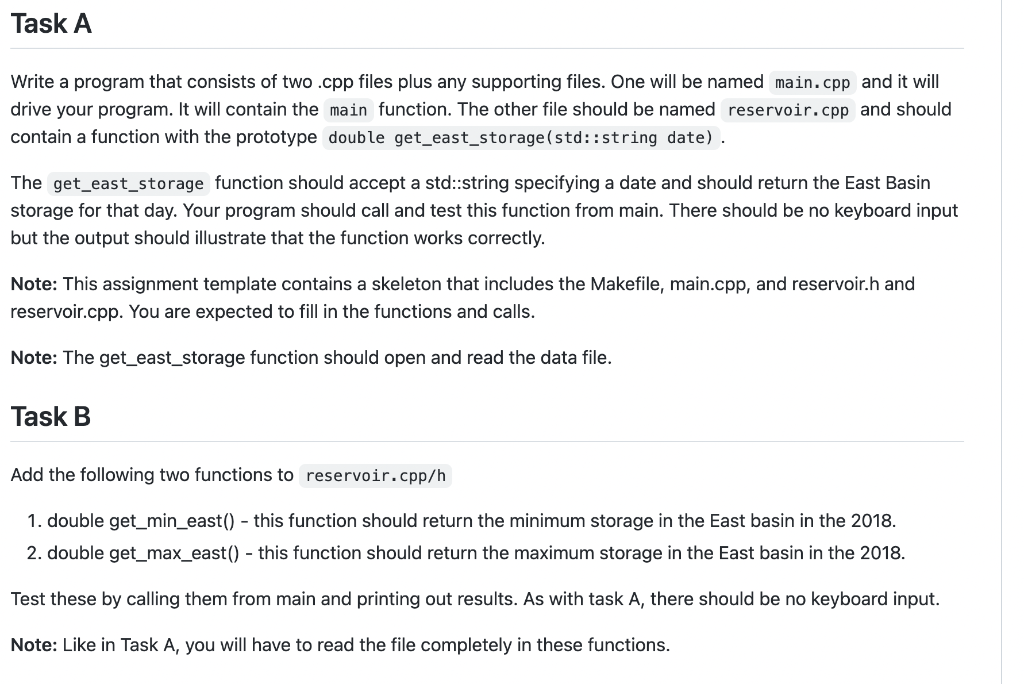
These are the two tasks I have done already, in which for Task A i hardcoded 10 dates in 2018, and the gallons storage got read in the file and printed, and task b showed the max and min storage for year of 2018, i am sending the code that comples both tasks and prints what i said, and you need to add on to the files and add the functions of compare_basins to compare the east and west values that the computer will read from the file of Current_Reservoir_Levels.tsv. Now I am sending the code i did for task a and b that you have to build on for c.
main.cpp:
#include
#include "reservoir.h"
int main() {
double east_storage;
std::string dates[] = {"01/01/2018", "02/01/2018", "03/01/2018", "04/01/2018", "05/01/2018",
"06/01/2018", "07/01/2018", "08/01/2018", "09/01/2018", "10/01/2018"};
int n = sizeof(dates) / sizeof(dates[0]);
for (int i = 0; i
east_storage = get_east_storage(dates[i]);
std::cout
}
double min_east_storage = get_min_east();
std::cout
double max_east_storage = get_max_east();
std::cout
return 0;
}
makefile:
all: main.cpp reservoir.cpp reservoir.h
g++ -std=c++11 -o main main.cpp reservoir.cpp
clean:
rm -f main
reservoir.cpp:
#include
#include
#include
#include
double get_east_storage(std::string date) {
// Open the data file
std::ifstream fin("Current_Reservoir_Levels.tsv");
if (fin.fail()) {
std::cerr
exit(1);
}
// Skip the header line
std::string junk;
getline(fin, junk);
// Search for the given date in the file
std::string file_date;
double east_storage;
bool found = false;
while (fin >> file_date >> east_storage) {
// Check if the current line contains the given date
if (file_date == date) {
found = true;
break;
}
// Ignore the rest of the line
std::string line;
getline(fin, line);
}
// Close the file
fin.close();
// Check if the date was found in the file
if (!found) {
std::cerr
exit(1);
}
return east_storage;
}
double get_min_east() {
std::ifstream fin("Current_Reservoir_Levels.tsv");
if (fin.fail()) {
std::cerr
exit(1);
}
// Skip the header line
std::string junk;
getline(fin, junk);
// Loop through the remaining lines to find the minimum value
double min_east_storage = std::numeric_limits
std::string file_date;
double east_storage;
while (fin >> file_date >> east_storage) {
std::string line;
getline(fin, line);
if (file_date.find("2018") != std::string::npos && east_storage
min_east_storage = east_storage;
}
}
// Close the file
fin.close();
return min_east_storage;
}
double get_max_east() {
std::ifstream fin("Current_Reservoir_Levels.tsv");
if (fin.fail()) {
std::cerr
exit(1);
}
// Skip the header line
std::string junk;
getline(fin, junk);
// Loop through the remaining lines to find the maximum value
double max_east_storage = 0;
std::string file_date;
double east_storage;
while (fin >> file_date >> east_storage) {
std::string line;
getline(fin, line);
if (file_date.find("2018") != std::string::npos && east_storage > max_east_storage) {
max_east_storage = east_storage;
}
}
// Close the file
fin.close();
return max_east_storage;
}
reservoir.h:
#ifndef RESERVOIR_H
#define RESERVOIR_H
double get_east_storage(std::string date);
double get_min_east();
double get_max_east();
#endif
This is the output I have so far that you would have to add on to for the output you make
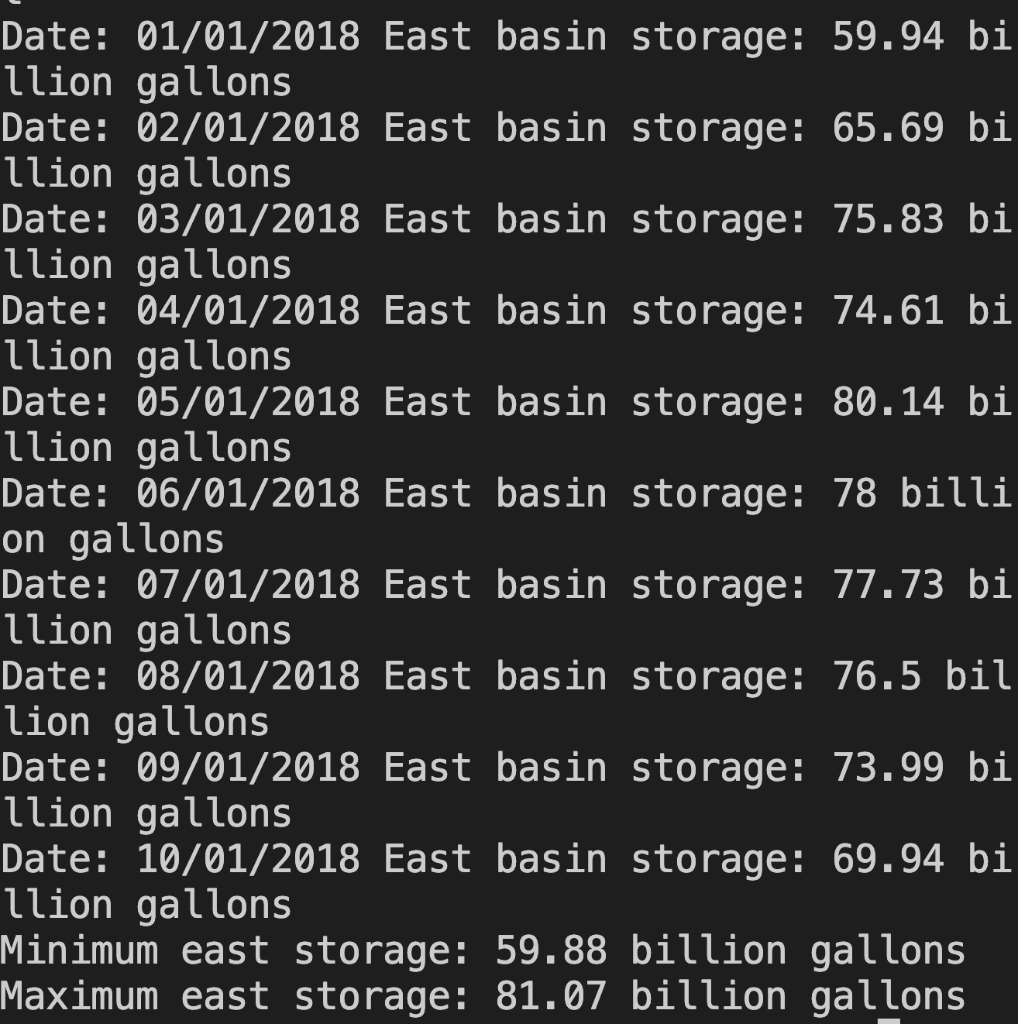
PLEASE PLEASE DO IT WELL, MANY TIMES THE CODE GETS RUN IT DOESNT SEND, MAKE SURE THE CODES YOU SENT IS OF THOSE 4 FILES, HAS A CORRECT OUTPUT, AND MAKE SURE YOU SEND A SCREENSHOT OF YOUR OUTPUT SO I KNOW IT RUNS AS MANY TIMES CODE DOESNT WORK
follow all directions welll please
In this lab, we will be studying the Ashokan water levels for the year 2018. It is available from NYC Open Data. Please follow these instructions to download the dataset: 1. Follow the link NYC Open Data Current Reservoir Levels. 2. Choose the View Data menu option (it will reload the page). 3. Filter data including only the year 2018. To do that: - Click the blue button Filter - In its submenu Filter, click Add a New Filter Condition - Choose Date is between January 1, 2018 and December 31, 2018 4. Sort entries by Date in the Ascending order. 5. Export the data: - Click the light blue button Export - Choose TSV for Excel (it will produce a plain text data file in tab-separated values format). - Save obtained file Current_Reservoir_Levels.tsv on your hard drive. Don't open the datafile in Excel (that can mess up its formatting). Instead, you can open it with your text editor (gedit). The datafile is a plain text file whose first line is a header followed by rows of data. The entries in each row are separated by the tab symbol, hence the name of the file format: TSV (tab-separatedvalues). It is the most convenient format for reading by our C++ program. Each row has five fields: Date, Storage (in billions of gallons) and Elevation (in feet) for the East basin and for the West basin of the reservoir: To read the datafile, we have to open an input file stream (represented by an object of type ifstream, here we called it fin ): ifstream f in( "Current_Reservoir_Levels.tsv"); if (fin.fail()) cerr "File cannot be opened for reading." endl; exit(1); / exit if failed to open the file \} Remember that the first line in the file is a header line. We have to skip it before we get to process the actual data. We can do that by reading that line into a temporary variable that we can call junk : string junk; // new string variable getline(fin, junk); // read one line from the file After that, the file can be read line by line. The most idiomatic C++ way to read such well-formatted file until the end would be the following: Here, variable can be of type string, and the others are numeric variables of type extracting the storage and elevation in East and West basins. After you are done reading the file, close the stream: fin.close(); Need to include additional header files The above code is using a new function and a stream class make them work, we have to include two new headers at the beginning of the program: Write a program that consists of two .cpp files plus any supporting files. One will be named and it will drive your program. It will contain the main function. The other file should be named reservoir.cpp and should contain a function with the prototype double get_east_storage(std:: string date). The function should accept a std::string specifying a date and should return the East Basin storage for that day. Your program should call and test this function from main. There should be no keyboard input but the output should illustrate that the function works correctly. Note: This assignment template contains a skeleton that includes the Makefile, main.cpp, and reservoir.h and reservoir.cpp. You are expected to fill in the functions and calls. Note: The get_east_storage function should open and read the data file. Task B Add the following two functions to 1. double get_min_east() - this function should return the minimum storage in the East basin in the 2018. 2. double get_max_east() - this function should return the maximum storage in the East basin in the 2018. Test these by calling them from main and printing out results. As with task A, there should be no keyboard input. Note: Like in Task A, you will have to read the file completely in these functions. Date: 01/01/2018 East basin storage: 59.94 bi llion gallons Date: 02/01/2018 East basin storage: 65.69 bi llion gallons Date: 03/01/2018 East basin storage: 75.83 bi llion gallons Date: 04/01/2018 East basin storage: 74.61 bi llion gallons Date: 05/01/2018 East basin storage: 80.14 bi llion gallons Date: 06/01/2018 East basin storage: 78 billi on gallons Date: 07/01/2018 East basin storage: 77.73 bi llion gallons Date: 08/01/2018 East basin storage: 76.5 bil lion gallons Date: 09/01/2018 East basin storage: 73.99 bi llion gallons Date: 10/01/2018 East basin storage: 69.94 bi llion gallons Minimum east storage: 59.88 billion gallons Maximum east storage: 81.07 billion gallons
Step by Step Solution
There are 3 Steps involved in it

Get step-by-step solutions from verified subject matter experts
 Study Help