







Question: The following program, write the code in C++, please do it well, make sure you show all steps and how you did it. Please make
The following program, write the code in C++, please do it well, make sure you show all steps and how you did it. Please make the code such that I can copy paste it. Also please show the output as well, as sometimes the code is given but there is not a correct output, so show a screenshot of your output and that it matches everything asked in the question.
For this assignment, you will create a program with multiple files and us make to control compilation. There will be a sample Makefile along with other starter files in this repo.
In addition to adding your .cpp files to the repo make sure to add the reservoir level tsv file you downloaded as well.
Start with this, and follow these directions before going into the code:
Write a program east-storage.cpp that asks the user to input a string representing the date (in MM/DD/YYYY format), and prints out the East basin storage on that day.
Now follow these following directions specifically and careful (make sure you read this carefully and follow all of it):
Note that there should be no user input and there should be around 10 dates hardcoded in which the computer reads the files and prints out the output regarding the gallons/water levels for each date. Please send all files well and make sure they can run together in the same directory, as i use Visual studio code, also let me know of the commands after g++ to run this.
Please send a screenshot of your output that comes after you compile/run it and again make sure all files are correct, and you dont forget any little thing and follow all directions, follow exactly as i said and leave a comment if you dont understand something.
Again, make sure there is no user input and that the computer could read everything well for gallons/water levels and make sure to add the reservoir level tsv file you downloaded as well.
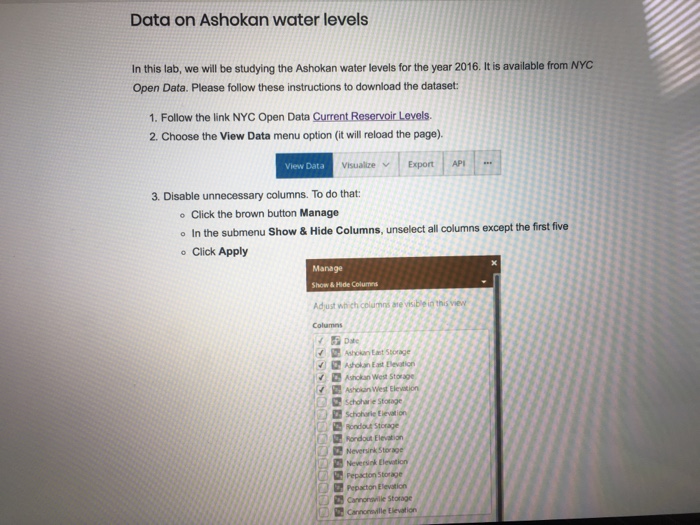
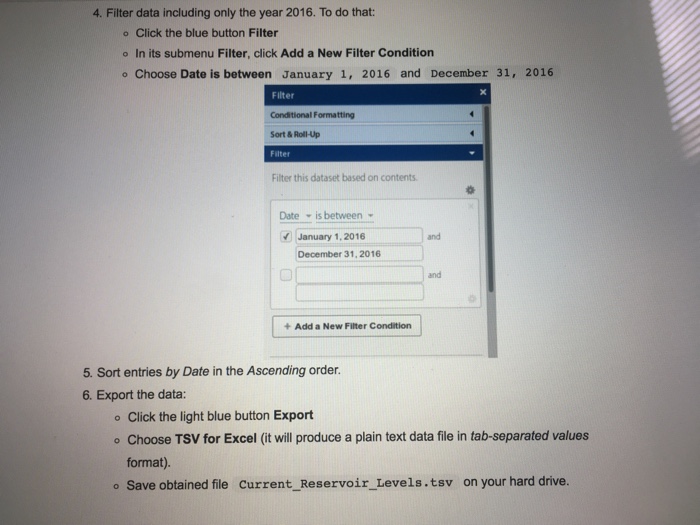
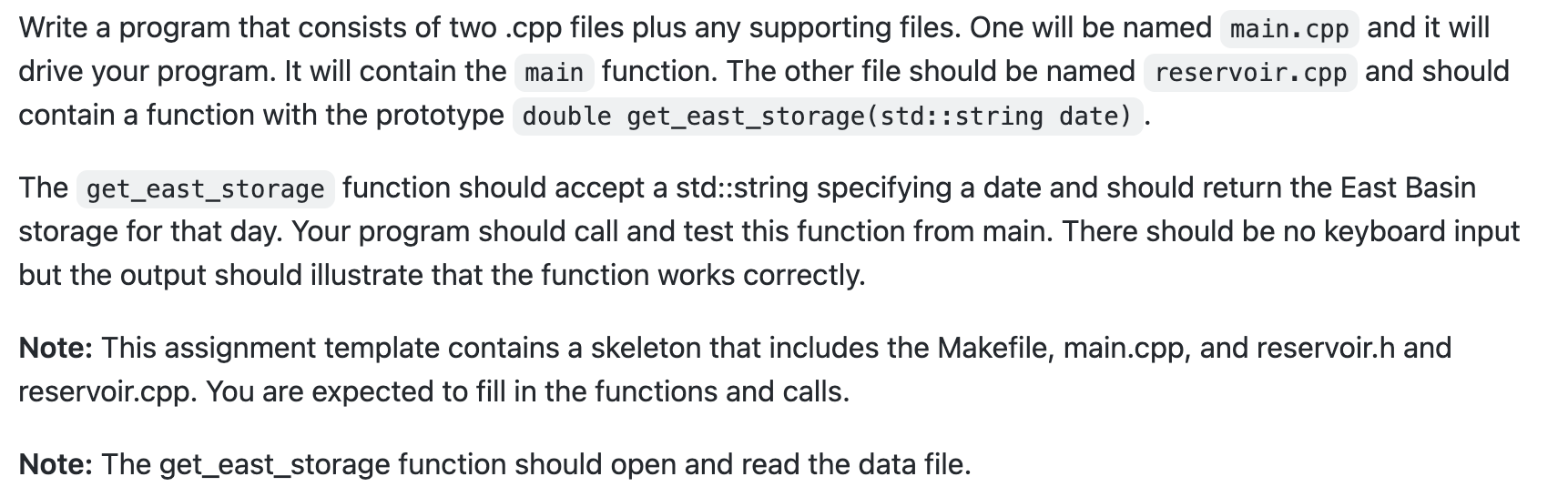
Data on Ashokan water levels In this lab, we will be studying the Ashokan water levels for the year 2016. It is available from NYC Open Data. Please follow these instructions to download the dataset: 1. Follow the link NYC Open Data Current Reservoir Levels. 2. Choose the View Data menu option (it will reload the page). 3. Disable unnecessary columns. To do that: - Click the brown button Manage - In the submenu Show \& Hide Columns, unselect all columns except the first five - Click Apply 4. Filter data including only the year 2016 . To do that: - Click the blue button Filter - In its submenu Filter, click Add a New Filter Condition - Choose Date is between January 1, 2016 and December 31, 2016 5. Sort entries by Date in the Ascending order. 6. Export the data: - Click the light blue button Export - Choose TSV for Excel (it will produce a plain text data file in tab-separated values format). - Save obtained file Current_Reservoir_Levels.tsv on your hard drive. Write a program that consists of two .cpp files plus any supporting files. One will be named main. cpp and it will drive your program. It will contain the main function. The other file should be named reservoir. cpp and should contain a function with the prototype double get_east_storage(std::string date). The get_east_storage function should accept a std::string specifying a date and should return the East Basin storage for that day. Your program should call and test this function from main. There should be no keyboard input but the output should illustrate that the function works correctly. Note: This assignment template contains a skeleton that includes the Makefile, main.cpp, and reservoir.h and reservoir.cpp. You are expected to fill in the functions and calls. Note: The get_east_storage function should open and read the data file
Step by Step Solution
There are 3 Steps involved in it

Get step-by-step solutions from verified subject matter experts
 Study Help